This thread has been locked.

If you have a related question, please click the "Ask a related question" button in the top right corner. The newly created question will be automatically linked to this question.

CC3235MODSF: Programming development image files with FS_DEVELOPMENT_BOARD_WRONG_MAC error

Part Number: CC3235MODSF
Other Parts Discussed in Thread: UNIFLASH, SYSCONFIG, CC3235SF

Hello,

I am attempting to program a development image onto the CC3235 on our custom board. So, first I obtain the MAC address:
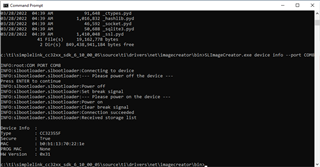
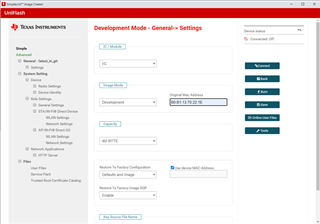
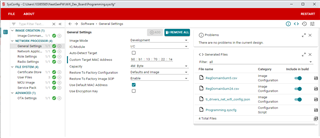
Then I create the image with these settings in SYSConfigs General settings:
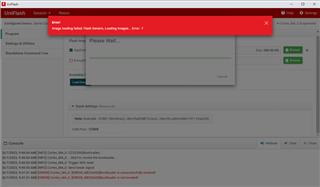
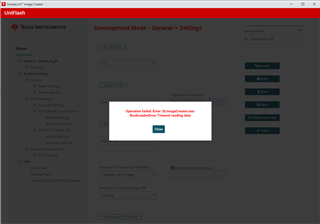
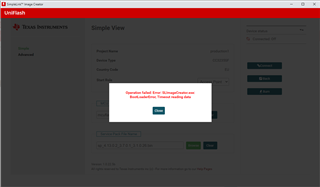
This succeeds. I then move the created image into my Uniflash folder and attempt to program it. It fails with this error:
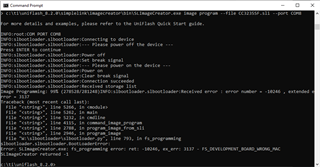
Unless I am missing something, I believe I am entering the MAC address that was retrieved by the dslite device info command. Any ideas?

John

  • Once correction: I wasn't using dslite to get the MAC address is was the SLImageCreator tool

  • Hi,

    The procedure looks OK.

    On my side, I did a similar procedure but from Code Composer (CCS) and not directly from sysconfig and it works fine. I don't get this MAC address error.

    Can you double check the xml file that should be created along with the image? with CCS it is ImageConfig.xml and should contain the MAC address.

    Shlomi

  • Hi Shlomi,

    Here is the MAC address from the sysconfig generated files: <DevMacAddress>b0:b1:13:07:22:1e</DevMacAddress>

    Which is the one I used. I'll try Code Composer and see if I get different results.

    John

  • this one is <DevMacAddress>b0:b1:13:07:22:1e</DevMacAddress> but it should be

    <DevMacAddress>b0:b1:13:70:22:1e</DevMacAddress>.

    Am I missing something?

  • Nope, you are exactly right. I completely missed that. I'm going to try it again.

  • Well, I rebuilt the SLI with the MAC address set correctly. Same error. <DevMacAddress>b0:b1:13:70:22:1e</DevMacAddress>

  • did you have a chance to try out with CCS? or even directly with Uniflash?

  • I did try CCS but I couldn't figure out how to get it to program my image without creating a CCS project which I currently do not have because we work in IAR. Is there a way to get CCS to program an image without having to create a project? When I try Uniflash, the Launchpad project fails to load because I'm not programming the launch pad. I tried the CC3235 bootloader selection and received this -7 error:

  • I also tried dslite through the gui mode. That failed as well. I ran this command:

        dslite.bat --mode cc32xx gui_cfg --port COM8

    And I received this output:

    Executing the following command:
    > c:\ti\uniflash_8.2.0\simplelink\imagecreator\bin\SLImageCreator.exe gui_cfg --port COM8

    For more details and examples, please refer to the UniFlash Quick Start guide.

    Projects Directory: C:\Users\10385585\.SLImageCreator\projects
    Temp Directory : C:\Users\10385585\.SLImageCreator\temp
    Script Directory : c:\ti\uniflash_8.2.0\simplelink\imagecreator\bin
    SLImageCreator v 1.0.22.5b
    killall: ('taskkill', '/FI', 'PID ne 104784', '/IM', 'SLImageCreator.exe', '/F')

    INFO: No tasks running with the specified criteria.
    Validating connection to server
    Server is up
    Server Ports: 64135 64137
    INFO:root:COM PORT COM8
    INFO:slbootloader.slbootloader:Connecting to device
    INFO:slbootloader.slbootloader:--- Please power off the device ---
    Press ENTER to continue
    INFO:slbootloader.slbootloader:Power off
    INFO:slbootloader.slbootloader:Set break signal
    INFO:slbootloader.slbootloader:--- Please power on the device ---
    INFO:slbootloader.slbootloader:Power on
    INFO:slbootloader.slbootloader:Clear break signal
    INFO:slbootloader.slbootloader:Connection succeeded
    INFO:slbootloader.slbootloader:Received storage list

    That is where it hung up forever.

  • with this mode I think you need to use power_off_com.py/ power_on_com.py.

    Anyway, can you please try with the actual GUI of the Uniflash? You can use the Uniflash GUI to prepare the SLI.

    This is the traditional way and the recommended way.

    Shlomi

  • Hi Shlomi,

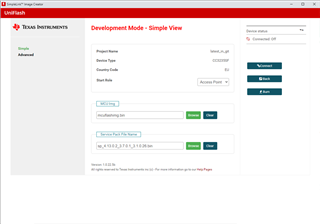
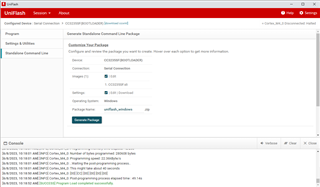
    I'm going to run through the steps I use when using Uniflash straight up. Perhaps you will be able to point out what I am doing wrong. First I create a new project and select both our application binary and the SP:

    Then I set the IP address I obtained using the image creator:

    Then I attempt to connect to the device:

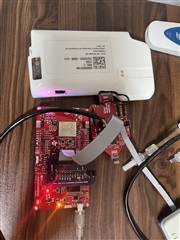
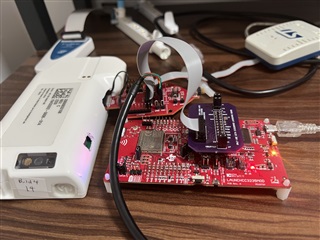
    Here are a couple of pictures of the LaunchPad connected over to our custom board:

  • Hi,

    hard to see the hardware connection but seems that you cannot even connect to the custom board from the debug emulation of the LP.

    For programming from Uniflash you need to use UART (TX, R), RST, GND and SoP lines. Are these lines connected?

    For more details see Production Line Guide.

    Shlomi

  • Hi,

    Yeah, I understand about the connections being hard to see. Plus, even if you could see them better, you'd probably need the schematics.

    The UART is connected. That is part of what our debug board the cables are connected to does. When I pull the launch pad off and just talk to the CC3235 using an FTDI COM port and the command line tools, the device is clearly there and responsive. It just that we fail that serial number check at the end. Is there any way to see the devices serial number on the device itself with any of the tools?

    John

  • what do you mean that it works when you pull the launch pad off? how does the setup look then?

    and by serial number I guess you mean the MAC address, right? If so, the 'device info' should give you the MAC address but you already used it as I can see,

  • and also by simply push the connect button on Uniflash...

  • When I pull the launch pad off and communicate over an FTDI USB <-> Serial cable and specify the COM port to the dslite.bat tool, it can connect send down the firmware image and do everything but pass the serial number check. This is how we have programmed hundreds of devices without issue. 

    Correct I am currently using the device info to get the MAC address I am using. Connect button on the Uniflash fails consistently. 

    If I use Uniflash and select the CC3235 (bootloader) device and my .sli created using sysconfig, That will program

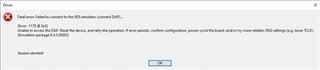
    But it doesn't seem to open the debug pins even though I created a development image. I get the DAP error from IAR:

  • So the way you worked till now is by programming a production image that didn't require any MAC address and it worked nicely with the FTDI cable (LP disconnected). It is just when you wanted to open in development mode that requires MAC address and JTAG connection (this is why you needed the LP) that it stopped working. Is that correct?

    This is strange as communicating with the device over UART (bootloader mode) is working since you can program. Not sure why reading the MAC address would fail. How do you reset the device? reset is required as part of programming.

    Lastly, I do not use the CC3235 Bootloader, not sure what it does. I use the CC32xx/CC31xx but I don't believe that this is the issue.

    Shlomi

  • Hi Shlomi,

    Not quite. I only use development images exclusively. The production images are of no use to me since I need the JTAG for debugging. This device is new to me and the person who had it before me didn't work on the CC3235 so they could use production images. I have had a number of other devices which allowed me to program the development image from the command line and specifying the FTDI COM port as the communications channel.

    We have a reset button on the side of that debug board. So when we reach the step where the device needs to be reset, I push that and the process moves on.

    I only used the bootloader to see if I could at least program from Uniflash over the FTDI cable, and that did work.

    John

    The highlighted line below is where I press our reset button:

    c:\ti\uniflash_8.2.0>dslite.bat --mode cc32xx image program --file CC3235SF.sli --port COM8
    Executing the following command:
    > c:\ti\uniflash_8.2.0\simplelink\imagecreator\bin\SLImageCreator.exe image program --file CC3235SF.sli --port COM8

    For more details and examples, please refer to the UniFlash Quick Start guide.

    INFO:root:COM PORT COM8
    INFO:slbootloader.slbootloader:Connecting to device
    INFO:slbootloader.slbootloader:--- Please power off the device ---
    Press ENTER to continue
    INFO:slbootloader.slbootloader:Power off
    INFO:slbootloader.slbootloader:Set break signal
    INFO:slbootloader.slbootloader:--- Please power on the device ---
    INFO:slbootloader.slbootloader:Power on
    INFO:slbootloader.slbootloader:Clear break signal
    INFO:slbootloader.slbootloader:Connection succeeded
    INFO:slbootloader.slbootloader:Received storage list
    Image Programming: 99% (278528/281248)INFO:slbootloader.slbootloader:Received error : error number = -10246 , extended error = 3137
    Traceback (most recent call last):
    File "<string>", line 5266, in <module>
    File "<string>", line 5262, in main
    File "<string>", line 5232, in cmdline
    File "<string>", line 4115, in command_image_program
    File "<string>", line 2788, in program_image_from_sli
    File "<string>", line 2946, in program_image
    File "W:\slbootloader\slbootloader.py", line 793, in fs_programming
    slbootloader.slbootloader.BootLoaderError:
    Error: SLImageCreator.exe: fs_programming error: ret: -10246, ex_err: 3137 - FS_DEVELOPMENT_BOARD_WRONG_MAC

  • so just to clarify, if you were to program the device using the USB cable but in production mode, this would have succeeded, right?

  • I just tried that. I built a production .sli and created a new production Uniflash project like so:

    I get the same error:

    It seems the GUI based tools don't like something, and the command line tools specifically reject the MAC address comparison.

  • I also tried with the command line dslite.bat. Same error about the MAC address. I'm beginning to think this particular CC33235 maybe damaged in some way.

  • it may be damaged, you should be able at least to connect to the board via GUI. You just need to make sure the followings:

    • SOP lines are set properly
    • nReset is toggled when requested
    • UART lines are connected properly (and not flipped)
    • UART RX that goes into the device go to BREAK (low)
  • Hi Shlomi,

    Since I was pretty convinced the device is damaged the home office sent me another device. I don't think either one of us needs to spend any more effort attempting to figure out what is wrong with it.

    Thanks for your help.

    John