This thread has been locked.

If you have a related question, please click the "Ask a related question" button in the top right corner. The newly created question will be automatically linked to this question.

CCS/CC3220SF: Gmake Error - CCS_V9_2

Part Number: CC3220SF


Tool/software: Code Composer Studio

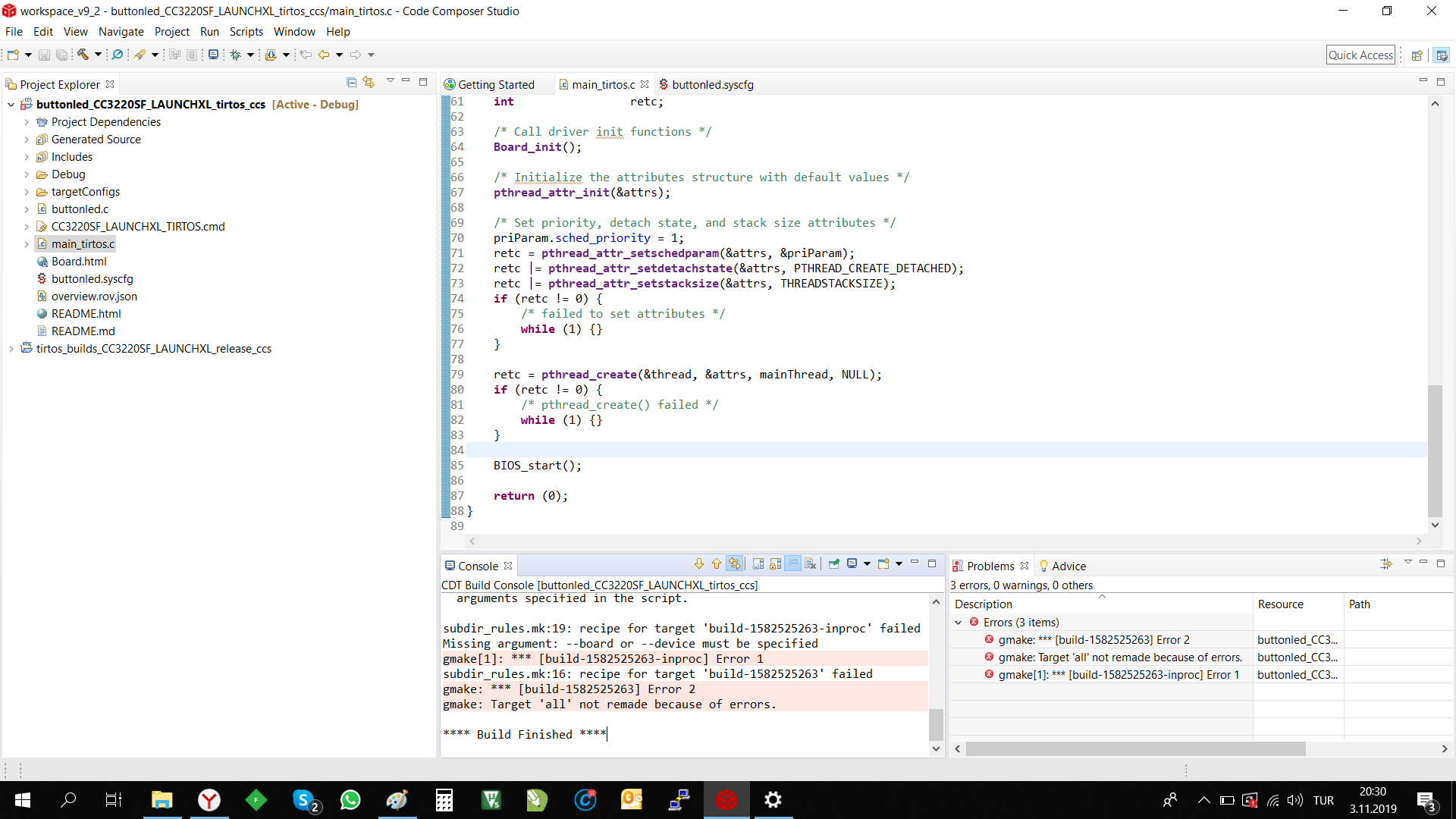
Can you help me to fix the Error which defined at attached picture? As I checked, Some persons defined this situation as "White Space Character" problem at installation folder name. But I installed program under "C:\ti" and there is not any "white space character" at any folder name. So, my problem is sourced from any other reason. Can you help me at this issue?

Thanks.
  • Hi,

    Please do the following to capture the global build log and send it to us.

    1) Right click on tirtos_builds_CC3220SF_LAUNCHXL_release_ccs project and select Rebuild Project.
    2) Right click on buttonled_CC3220SF_LAUNCHXL_tirtos_ccs and select Rebuild Project.
    3) Select the Global Build Console, copy and paste the full output in the CCS build console to a text file and attach it here.

  • Kemal,

    Since I haven’t heard back from you, I’m assuming you were able to move past this issue. If not, please feel free to post a reply with the requested build logs. Thanks!