


Part Number: CC2652R
Hello,
I have a problem with debugging in IAR 8.20.2. Recently, I use CC2642R1/CC2652R1 development kit to develop my project.
At the first time, I used simplelink_cc13x2_26x2_sdk_2_40_00_81 this version as the main SDK program.
Also, I use "CC26X2R1_LAUNCHXL\ble5stack\simple_peripheral" to program. It can work perfectly.
After a while, I tried to program the 2642/2652 IC chip that we ordered(Just a chip, not the evaluation board), I did some specific tunes to make it works. Likes below:
Options -> TI XDS -> Setup -> Emulator -> Specify custom board file
Board -> $TOOLKIT_DIR$\config\debugger\TexasInstruments\xds\CC2652_XDS110_CJTAG.dat
And I used XDS110 to emulate it, it works.
After checking it could work, I modify it to the normal, like below:
Options -> TI XDS -> Setup -> Emulator -> TI XDS110
JTAG 2-pin
However, when I switch to the original one (CC2642/2652 Development board) something happened.
In this case, there will pop a window screen that shows "get Alternative file chipinfo.c" while entering the debugging process.
Like the figure downs below:
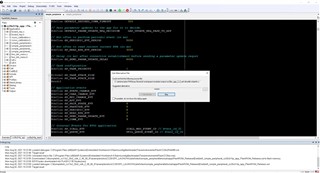
And I find the file "chipinfo.c" is under this route:
C:\ti\simplelink_cc13x2_26x2_sdk_2_40_00_81\source\ti\devices\cc13x2_cc26x2\driverlib
Then I choose it to let the system can get the path. Like the figure below:

In the end, the results show that the whole program will be stuck in "void ThisLibraryIsFor_CC13x2_CC26x2_HwRev20AndLater_HaltIfViolated(void)" this section. I put it down this section below:
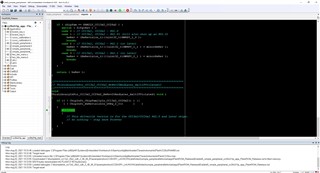
To solve this problem, I reinstall it several times, the problem is still there.
But I can work under version 2.30.00.34 correctly. Looks weird.
(I found that while I debugging in 2.30.00.34, it will cause some problems. So I swift to the new version.)
How can I solve the problem?
Best regards,
Wei, T-C
