This thread has been locked.

If you have a related question, please click the "Ask a related question" button in the top right corner. The newly created question will be automatically linked to this question.

About using CC2538EM as a standalone device

Other Parts Discussed in Thread: CC2538, CC2538EMK

I would like to know if CC2538EM can run standalone without SmartRF06 as SmartRF06 is just for programming the EMs?

I am planning to have multiple CC2530EMs form a network and do the experiments. 

Thanks.

  • Hi,

    Yes, after you program the device, it should run without SmartRF06 Board.

    Thanks,

    PM

  • Yes, it is no problem to run standalone without smartrf06eb. smartrf06eb is for programming FW to CC2538, debugging, or to test IO easily.

  • Thank you for your answer. I have two follow-up questions:

    • I noticed in the Chapter 7.1 of SmartRF06 Evaluation Board User’s Guide (SWRU321A – May 2013), there is a board called SmartRF06 Battery Board. Is it still available?

    • I assume I just need two AA batteries with the CC2538EM in order to make it work standalone. However, is there any circuit like regulator to make the CC2538EM work standalone?  

    Thank you.

  • 1. As I know, TI never sale SmartRF06 battery board as you see in the user guide.
    2. It should be OK to connect 2 AA batteries directly to VDD and GND of CC2538EM.
  • Following your answer, I am using 2xAA alkaline batteries (3 V) to directly power the CC2538EMK. Which ports should I exactly use on the CC2538EMK?

    Thanks.

  • You can refer to the schematic at www.ti.com/.../tidr187.pdf and connect battery to VDD and GND.
  • Thanks. You mean VDD_EB on Port 7 or 9 and Port 2 at EM connector 2? 

    I assume the USB power option on CC2538EMK is the same as the battery option, so I am using the USB power option only for now. My question is how to make PER Test program (http://www.ti.com/lit/zip/swrc272) work in this case. 

    I have removed the compile defined symbol 'BOARD_SMARTRF06EB' and load it to CC2538EMK. However, without SmartRF_EB06, I cannot make CC2538EMK powered by USB cable work. Here is what I have modified in the per_test.c:

    Step 1: commented out some codes and added one line so the CC2538EMK will work as a transmitter only after it's powered by USB 

    ----Line 240-----


    while(1)
    {
     

    appTransmitter(); //Use default parameters for CC2538EMK.


    /*
    //
    // Let user select mode
    //
    keysPressed = bspKeyPushed(BSP_KEY_ALL);
    if(keysPressed & BSP_KEY_UP) {
    appLedBlink();
    appTransmitter();
    }
    else if(keysPressed & BSP_KEY_DOWN) {
    appLedBlink();
    appReceiver();
    }
    */
    }

    Step 2: remove the defined symbol 'BOARD_SMARTRF06EB' and re-complied the codes and downloaded it to CC2538EMK with IAR.

    Please help me out with this. Thanks.

  • 1. Yes, I mean VDD_EB on Pin 7 or 9 at EM connector 2.
    2. To power CC2538EM from USB port, you have to put Power Select Jumper to 1-3. You can refer to CC2538EM quick start user guide at www.ti.com/.../swru348.pdf.
  • Thanks. Yes, I did switch the jumper on CC2538EM to the USB Power option.

    However, I have no software to test in that condition the CC2538EM can work (I haven't found any useful documentation on TI or on the net). My best bet is to modify the PER Test and make the USB-powered CC2538EM as a transmitter (transmitting right away after it's powered on). Since there is no documents telling me how to do that, could you forward my question to the CC25xx software group? A working PER Test program / instruction on USB-powered CC2538EM (without SmartRF_EB06) will be very helpful. 

    Thanks.

  • If you don't use SmartRF06EB in PER test, you don't know the test result which is originally shown on LCD of SmartRF06EB. Why do you intend to do PER test with only CC2538EM.
  • The Modified PER Test program is expected to work as shown in the following, where the USB-powered CC2538EM will function as a transmitter and the CC2538EM+SmartRF06EB will function as a receiver (so I can see the packets are correctly sent by the CC2538EM standalone module). 

    PER Test Setup:

    ++++++++++++++                          +++++++++++++++

    + SmartRF06EB  +                         + CC2538EM only +

    + CC2538EM        +      <----------> + (USB-powered) +

    +++++++++++++++                         +++++++++++++++

    (Receiver on Chn 11 )                     (Transmitter on Chn 11)      

    If this test is passed, ultimately I can test multiple distributed CC2538EMs powered by USBs/batteries forming a modest-scale mobile sensor network to communication each other (as I don't want to use SmartRF06EB in this network setup).

    Thanks.

  • I see that you have modified PER test source code to fit your request and I think it should work without problem.

  • Thank you! I resolved the problem!

    I happened to put the jumper to the 3-4 connector not 1-3 connector. 

  • If you run original PER test on two SmartRF06EB+CC2538EM, can you see over the air message in Packet Sniffer?
  • One last question: I am trying to test the battery power option on CC2538EM; how the jumper should be connected, 1-2, 1-3, or something else? Thanks.
  • If you don't use USB power to CC2538EM, the jumper should be placed on 1-2.
  • Still got no luck of making that work.

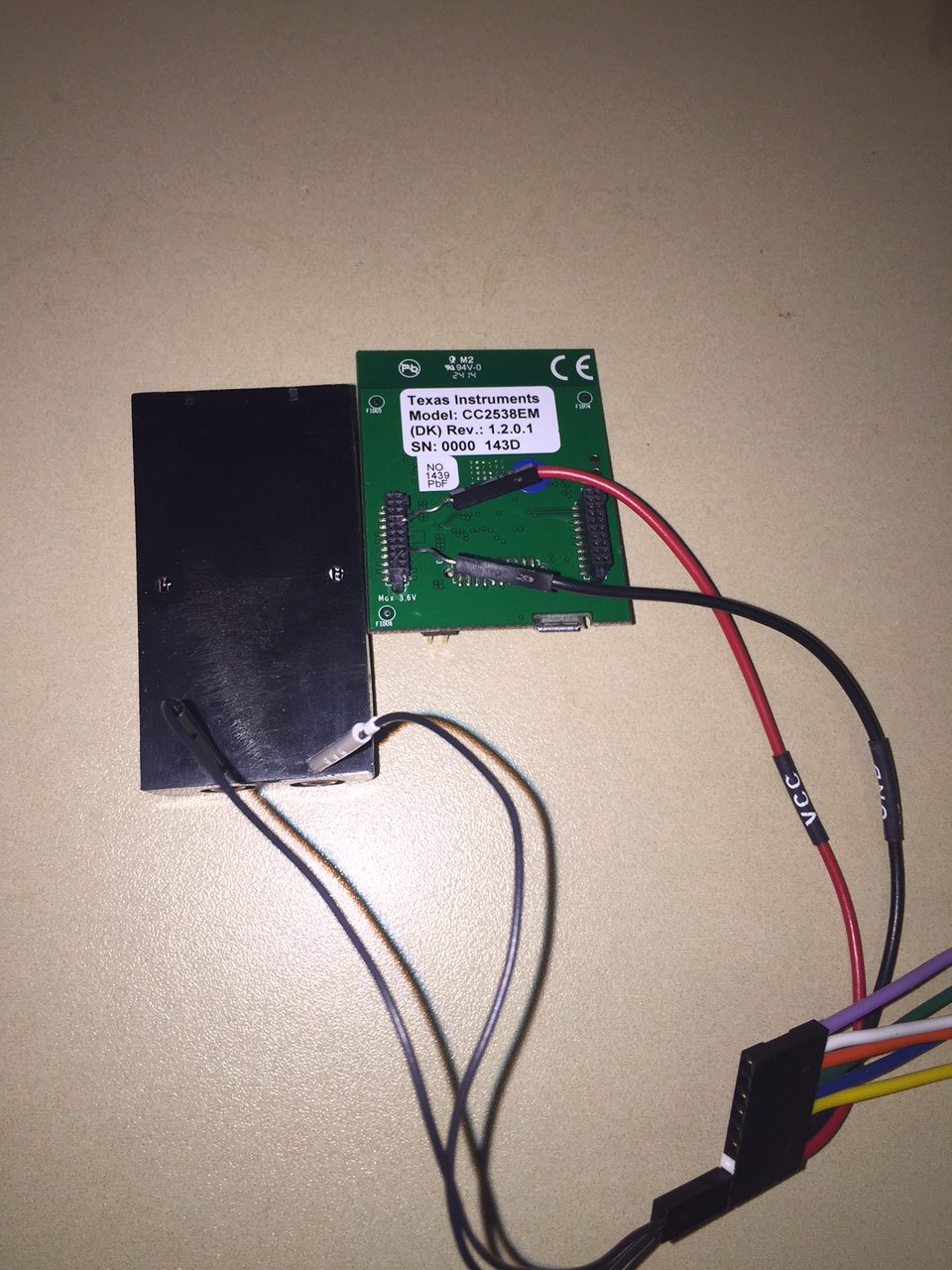
    I put the jumper 1-2, and the battery has the output 3.1 V. Could you help check my connection as shown in the picture? Thanks.

  • There's no indication and how do you know it doesn't work.
  • Following the PER Test program, I let CC2538EM be a transmitter and on my computer I use TI Packet Sniffer to sniff the packets. 

    If I power the CC2538EM through USB, I can successfully sniff the packets. Then I switched to the battery power option (as I showed in my last post), then I cannot sniff the packets. Therefore, I sense there might be something wrong with my battery connection setup. 

    Thanks.

  • YiKai Chen said:


    2. To power CC2538EM from USB port, you have to put Power Select Jumper to 1-3.

    Hi YiKai,

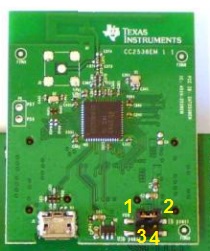
    Just to make sure, pins are numbered as in this image right?

    Then, to put jumper to 1-3 it has to be between the top left and bottom left pins in this image. Is this correct?

  • Yes, that is correct.
  • Hi Patrick,

    I'm doing the same experiment but it does not work.
    I found this default configuration (lines 178 : 188) :

    //
    // Set default configuration (used by SmartRF06 batteryboard)
    //
    perConfig.mode = PER_MODE_TX;
    perConfig.state = PER_IDLE;
    perConfig.channel = 26;
    perConfig.txPower = 0; // Index 0. Max output
    perConfig.burstSize = 1000000; // Max value
    perConfig.pktRate = 20; // 20 pkts per second
    perConfig.gainMode = PER_GAIN_MODE_NONE; // No PA/LNA

    Did you change this code?
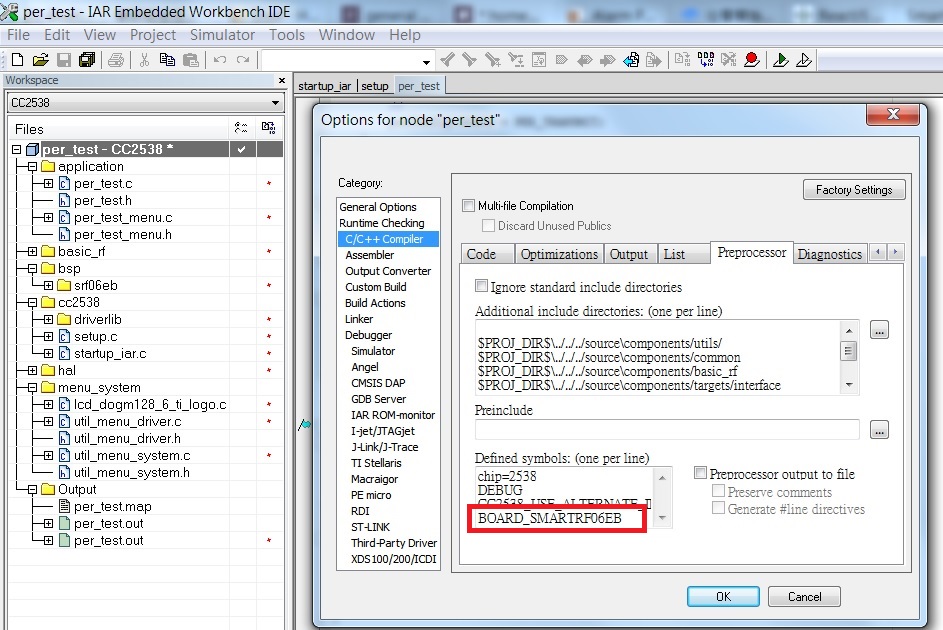
    Also, where is the symbol 'BOARD_SMARTRF06EB' defined? I didn't find it.

    I know you did this long ago :) I appreciate if you can help.
  • It's defined in "Defined symbols" of Preprocessor tab in Project->Options->C/C++ Compiler