


Part Number: CC2640R2F
Other Parts Discussed in Thread: LAUNCHXL-CC1352R1
Tool/software: Code Composer Studio
Hi all,
Background
I have designed and fabricated a custom board using CC2640R2FRHBR. I did a basic electrical inspection/test to verify the PCB is fine without any short circuits or such. I am using LAUNCHXL-CC1352R1 as the debugger.

I can Build--> Upload--> Debug the code without any problem. So I guess there are no issues with the PCB design or fabrication.
I imported empty sketch from SimpleLink CC2640R2 SDK - 4.20.00.04 to CCS 9.3. I changed the toggling LED to Board_GPIO_BLED where it was included in the enum MYBOARD_GPIOName in MYBOARD.h (renamed version of CC2640R2_LAUNCHXL.h), and IO Id mapped accordignly in ioc.h.
Problem
I noticed that the output is not generated as expected. After debugging I found out that,
main_tirtos.c
    int main(void) -->
        Board_init() -->

MYBOARD.c
    void MYBOARD_initGeneral(void) -->
        if (PIN_init(BoardGpioInitTable) != PIN_SUCCESS) -->

PINCC26XX.c -->
    PIN_Status PIN_init(const PIN_Config pinConfig[]) -->
        for (i = 0, pinConfigMask = 0; PIN_ID(pinConfig[i]) != PIN_TERMINATE; i++)-->

            // Check that pin exists and is available
            if (PIN_ID(pinConfig[i]) > pinUpperBound || PIN_ID(pinConfig[i]) < pinLowerBound || reservedPinMask & (1 << PIN_ID(pinConfig[i]))) {
                return PIN_NO_ACCESS;
            }
This PIN_NO_ACCESS causes a the app to stay on while(1)
if (PIN_init(BoardGpioInitTable) != PIN_SUCCESS) {
        /* Error with PIN_init */
        while (1);
    }
The screenshot below shows the value of variables,watch expressions at the time of failure.
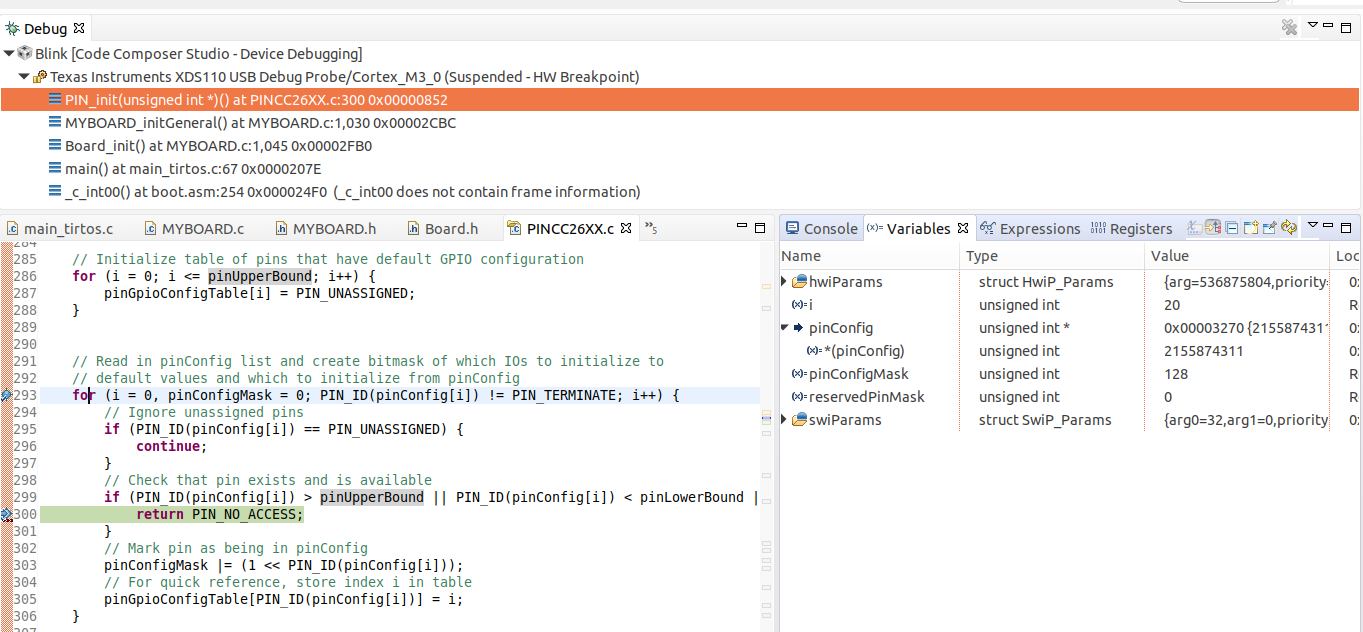

I even tried this BLE-Stack-Debugging Guide, but realized that it is does not relate to the TI Dirver example I am running. I need to atleast blink an LED before moving onto BLE.
What could be the reason for this? How can I resolve this?
Thanks in advance,


