This thread has been locked.

If you have a related question, please click the "Ask a related question" button in the top right corner. The newly created question will be automatically linked to this question.

PCM2903C: Change PCM2903C initial volume

Part Number: PCM2903C


Tool/software:

How to change PCM2903C initial volume in Windows 11/10?

It is always set at 100 when Windows10 PC is connected for the first time.

Immediately, a connection notification tone will be heard.

Especially when sound is playing, Max volume is loud and startling.

We want to change it to 50 or something, Is it achievable?

  • Hi,

    This would be a Windows driver setting to set the default volume, which may be complicated, can you turn down the volume once it is connected and see if it stays low when you disconnect and reconnect? Here is a resource about default volume setting: https://learn.microsoft.com/en-us/windows-hardware/drivers/audio/customizing-default-audio-volume-settings

    You could also try to mute the device on initialization, the HID0 pin controls the mute function. Is this an option?

    Best,
    Mir

  • Hi, Jeffres, This initial volume of 100 occurs the first time a Windows 10 connects to PCM2903C, or the first time connected after PCM2903C hardware is removed from the device Manager. Then turn down the volume and disconnect and reconnect PCM2903C, the windows stays low. Since we don't have a volume adjustable resistor and don't use HID interface, this initial value is important to us. Thanks

  • Hi,

    From reading some windows forums, it looks like this cannot be easily changed without a new driver. You can edit the default volume levels for new devices with the INF wrapper in the article I sent earlier (https://learn.microsoft.com/en-us/windows-hardware/drivers/audio/customizing-default-audio-volume-settings) but this would involve writing your own driver for the device. I believe the device doesn't have a specific driver because it acts as a class compliant audio device, so you would need to edit your computer's defaults. It may be easier to implement the hardware HID mute rather than changing your computer's audio drivers. You could also implement a switch to disconnect the DAC outputs until you are able to turn down the volume on the computer?

    Best,
    Mir

  • Hi,

    I just discovered this (third party) software called Sound Lock, it looks like it is a compressor for all sounds that go through your Windows computer before they are sent out of the DAC, so enabling this may help you as a backup for the Windows default volume being so high. I saw it and remembered this thread, I hope it helps! Here is the link: https://www.3appes.com/sound-lock/

    Best,
    Mir

  • Hello, Sir, we have some Pop Noise issue regarding PCM2903C,

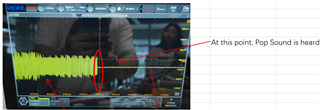
    PCM2903C is always output a Pop noise when sound playback ends or paused,  See picture for ADC port curve. The chip seems to enter the Muted mode, and Pop sound is generated when it enters the Muted mode for an instant.


    After playing a Windows system sound, a pop noise occurs after about 1 second.
    On the other hand, after playing a sound from a browser, a pop noise occurs after about 10 seconds.
    besides, during a Teams meeting, even if the other person is silent, no noise occurs.
    We would like to know the reason for these difference.And what conditions would produce a similar noise? Do you have any advise?
    How to change the hardware to make PCM2903C work continuously or cancel the automatic mute function to avoid the pop noise occurs?

    After understanding the conditions under which PCM2903C automatically mutes and a pop noise occurs, We can rest assured that the product will not make more noise.

    Thanks.

  • Hi,

    In section 9.5.3.4 of the datasheet, it describes the "suspend state" of the device, where 5ms after not receiving any audio over USB, the device will be in the suspend state. It doesn't look like you can disable this function unfortunately, but you can detect when it happens, if the SSPND pin is low then the device is in an idle suspend state. Maybe the pop you hear is the noise floor from the device going to an absolute silence as the audio is actually muted. You may want to implement a hardware low pass filter, or your own system to slowly ramp down as soon as the audio is done playing on your computer. Or, you could play a very low volume (at the noise floor or lower) signal over the USB audio to always keep it on, so it never enters the suspend state. Let me know if you need more help with this, I hope it answers your question.

    Best,
    Mir

  • Hi, Mir:

    I have try use /SSPND signal to control Mute circuit, but /SSPND only output the voltage from Low to High after PCM2903C identified,/SSPDN high level not change when pop noise is generated.In addition,our product design without volume potentiometer, so the PCM2903C output small Pop noise is very obvious.The total gain of the desktop speaker system is 35dB, and the input -7dBfs corresponds to 100W speaker power output.

     Can you again answer the reason of Pop noise occurs? What factors affect it? Many thanks.

    Best Regards,

    Deng

  • Hi Deng,

    Is the SSPND signal not changing when you experience this pop? Could you try to play a continuous signal and see if the pop ever occurs? If it is only outputting the pop after sound is done playing, I think it may be from this suspend state. Or, it could be from an audio file finishing playing, or maybe a setting with your amplifier. Are you using an amplifier after the codec in your signal chain? Is the scope shot you showed from the output of the DAC, or the output of the amplifier?

    Best,
    Mir

  • Hi, Mir:
    Please find the text dialogue I inserted.
    Is the SSPND signal not changing when you experience this pop?
    A: Yes,
    Could you try to play a continuous signal and see if the pop ever occurs?
    A: Pop does not occur during play, Pop occur after the end or pause, but the interval is different. Such as:
    End playing a windows system sound(Click the windows volume slider), or play a continuous blank signal with windows media player then pressing pause, a pop noise occurs after about 1 second.
    In addition, play in a browser (such as https://music.163.com/, or https://www.douyin.com/), press pause and wait a pop noise occurs after about 10 second.
    other phenomenon:during a Teams meeting, even if the other person muted the microphone, our speakers /PCM2903C is no abnormal Pop sound occurs.
    We would like to know the reason of pop time difference.
    If it is only outputting the pop after sound is done playing, I think it may be from this suspend state.
    Or, it could be from an audio file finishing playing, or maybe a setting with your amplifier.
    A: Thanks for your analysis,
    Are you using an amplifier after the codec in your signal chain?
    A: Yes, We suspect that the gain of the speaker system is too large,causing the Pop sound to be obvious. The total gain from the ADC port to the speaker is 35dB.
    Is the scope shot you showed from the output of the DAC, or the output of the amplifier?
    A: The picture shows the DAC ports Pin16 or 15 (Vout L or R).
    Best Regards,
    Deng

  • Hi Deng,

    Yes, to me it sounds like it may be an OS audio issue and not one with the codec. I notice on my Windows laptop that there is a noise floor that eventually stops after no audio is playing, after an indeterminate amount of time. Something else I noticed is that if I have my sound settings screen (system settings on Windows 11, System -> Sound) open, the noise floor doesn't stop. I would guess this is from some OS-level idle sound state and not your codec. But, when you have extreme gain on this noise floor with your amplifier, when it stops it might be causing this pop. You can try to keep the system settings page open instead of a Teams call to see if this removes the pop issue. Make sure you also have audio enhancements turned off in this screen, found in "More sound settings" from the System Sound settings page. 

    Best,
    Mir