This thread has been locked.

If you have a related question, please click the "Ask a related question" button in the top right corner. The newly created question will be automatically linked to this question.

ADS54J64EVM: How to implement mode 8 Dual ADC mode

Part Number: ADS54J64EVM
Other Parts Discussed in Thread: ADS54J64

Hi Team,

According to the doc, the ADS54J64EVM can operate in Mode9 and the HSDC Pro ADC Sampling rate can reach 983.04M in secondary mode. However, Mode9 is not an option in the ADS54J64 Mode tab in the ADS54J64EVM GUI.  The customer would like to know how to set up to achieve the acquisition rate of 983.04M?

According to the section 7.4.1.11 average Mode in the ADS54J64 Quad-Channel, this mode is used as an average of the AB two-way data as shown in figure below: 
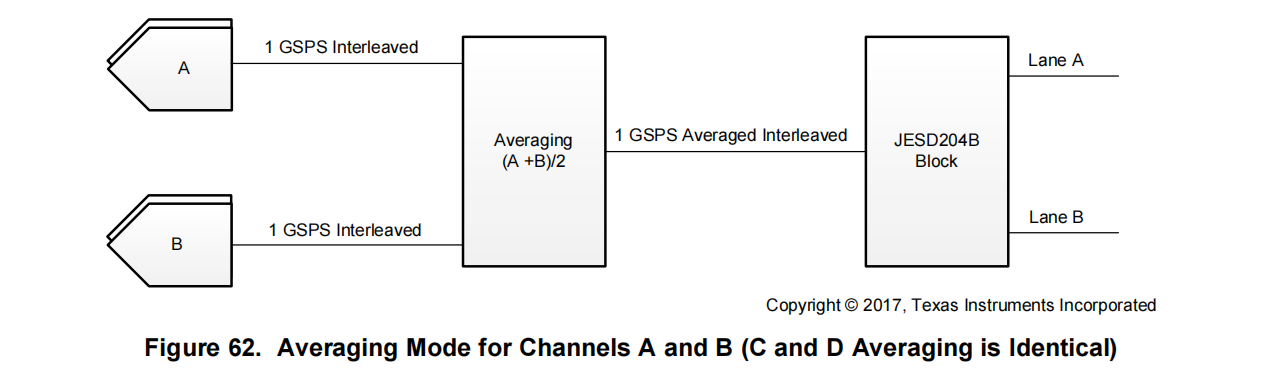
Are the data for LaneA and LaneB the same at this time, or are they both sampled at 1Gsps? Or the adoption data recorded through HSDC Pro is still 4 channels, but where AB is the same, CD is the same?
If so, half of the capture card storage space is wasted. Or will only two channels of data be automatically logged in this mode?

(Please be noted that Mode 8 Dual ADC mode is stated in the User's Guide as Mode 9) 

Could you help check this case? Thanks.

Best Regards,

Cherry

  • Hi Cherry,

    I am looking into this. I will report back by end of day Wednesday with any updates.

    Best regards,

    Drew

  • Hi Cherry,

    I can see where there may be confusion with "Mode 9" as the EVM User Guide lists Mode 9 and the datasheet shows it as Mode 8 but in Dual ADC mode.

    To configure the part in this way, the customer should:

    1. Follow the default start-up procedure in the EVM User Guide.

    2. Select the desired mode in the ADS54J64 mode tab in the GUI. Thus, select mode 8, based off the following comment under 7.4.1.11 Averaging Mode in the datasheet:

            "Configure the device in mode 8 before enabling dual ADC mode through SPI register writes."

    3. Choose the following .ini file in HSDCPro:

            ADS54J64_LMF_4211

    NOTE 1: Nothing need to be set for "Additional Device Parameters" for this mode. Sampling rate is as desired. No NCO. No decimation.

    The above is chosen based on the LMFS values in Table 3 on Page 33 of the datasheet.

    NOTE 2: Using this .ini file, only 2 channels are logged in HSDCPro.

    4. Perform the SPI writes shown below:

    Reg    Data

    0xA5  0x03  //Enable averaging on the AB and CD channel pair

    0xA6  0x20  //Enable the averaging option

    0xAB  0x03  //Set interleaving mode for channels A and B

    0xAC  0x03  //Set interleaving mode for channels C and D

    0x64   0x02  //Selects trim

    Best regards,

    Drew