This thread has been locked.

If you have a related question, please click the "Ask a related question" button in the top right corner. The newly created question will be automatically linked to this question.

DAC38RF82EVM: Excess noise output at some clock frequencies

Part Number: DAC38RF82EVM
Other Parts Discussed in Thread: DAC38RF82, LMK04828

I have been testing the DAC38RF82EVM board in a 'stand alone' DDS mode, with no modulation. The TSW14J56 is not used for this test.

I am using an external clock source in the CMODE1 function, Pin = +16 dBm nominal. The SE clock path is being used.

In general, the results look very good. However I have found that at some clock frequencies the output spectrum looks awful.

I have confirmed that it is not an instrumentation or measurement problem.

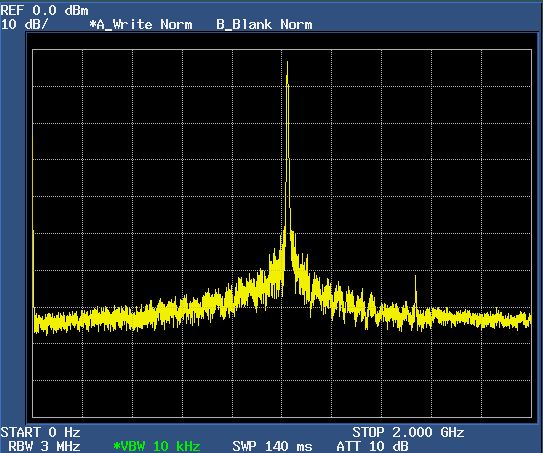
For example, the board runs quite well with Fclk = 5000 MHz, but exhibits serious noise problems at Fclk = ~5100 MHz. See below.

There are other "zones" where the output gets very strange: 5863 MHz, 3925 MHz, and 3515 MHz. There are likely others that I've missed.

I suspect some sort of timing problem, but do not see an obvious phase or timing trim function in the GUI.

Is there some type of DAC calibration that should be run as Fclk is changed?

Below is the spectrum from 0-2 GHz, with Fclk about 5100 MHz. The spectrum looks fine for Fclk=5000 MHz. Thank you.
  • Hi Doug,

    Upon the configuration of the DAC38RF82, the SYSREF pulse will set the clock divider to synchronize the internal digital logic for optimal internal logic timing. Therefore, after changing your clock to 5100MHz, you will need to re-run the GUI to restart the configuration process and also the synchronization to avoid these potential digital glitch/setup/hold problem.

    We have tested the DAC38RF82 EVM at 5100MHz and do not observe the issue. Please see attached.

    I suggest that you can check the following:

    1. check your clock source with a signal analyzer or phase noise analyzer to see if the clock source have such problems. We use SMA100A signal generator here as RF clock source

    2. at higher frequency of clock rate, the digital do run faster and can burn more power consumption. Please check the digital supply net DVDD to see if the voltage at the DUT pin (near the bypass caps of the DAC38RF82) is still within the spec of the EVM. We tested these EVMs at full rate, but perhaps something got damaged during transportation or shipment.

    3. We have tested a particular JESD/DUC mode per the attached powerpoint presentation. Please advise your JESD mode and DUC mode so we can double check again.

    -KangE2E_DAC38RF82_NCO_only_mode.pptx

  • Hi Kang,

    I have tried closing and reopening the GUI repeatedly and it had no useful effect, or even observable change.

    Also, I've tried cycling the power to the DAC test board, along with numerous resets, etc. All to no avail.

    I have been using the exact settings (except for 1xDAC mode) that you show on the PPT file.

    The eval board exhibits this problem with multiple CLK sources.

    Some of my signal generators have performance superior to the R&S SMA100A sig gen you refer to.

    It does not seem to be a power supply issue. Also, I am running only one DAC channel. 

    You should note that the problem is observed over a very narrow range of frequencies. For the 5.1 GHz example:

    My eval board looks OK at Fclk = 5104 MHz, gets very noisy at 5107 MHz, and looks good again at 5110 MHz. This is absurdly sensitive.

    Also, it is quite temperature sensitive. Heating or cooling the DAC heatsink a little can move the noise "center frequency" by 20 MHz or more.

    Notably, allowing some self-heating of the heat sink lowers the noise frequency suggesting a speed, temperature, and timing problem.

    You will not necessarily see the problem unless you can finely tune your CLK source while observing the output spectrum.

    I suggest that you set your SMA100A to 10 kHz or 100 kHz steps and tune it manually up and down with the knob. The problem is not hard to find.

    I am not using the JESD input, only the USB interface as I am only testing it the CW-DDS (or NCO) mode.

    Thank you.

    Doug

  • Hi Kang,

    I might have solved it by accident.

    The "SYSREF TRIGGER" sounded like it might be related, so I tried it during the setup process after the "CONFIGURE DAC" function.

    Now the RF DAC eval board seems much better behaved. It does not now exhibit the strange and excessive noise problem.

    I went back and searched the eval board user's manual and found it on page 10, as step 9 under section 2.1.5.

    Oddly, this step is missing from the detailed instructions regarding the DDS and NCO stand alone mode.

    Thank you for your assistance earlier today.

    Doug

  • Hi Doug,

    If the NCO is set to be initialized by the SYSREF, then continuous SYSREF trigger will reset the NCO counter continuously and hence modulate the SYSREF frequency onto the NCO.

    The NCO is a numerically controlled phase/frequency counter. It needs to be initialized by some sources. You may select one or all of the sources such as software sync, SYSREF, or JESD SYNC. If any of these selected source are triggered, the NCO will resets its phase basically to 0degrees.

    SYSREF triggering of the NCO is to ensure precise control of 0 degree phase reset. During the reset, you should set the SYSREF from the LMK04828 as single shot to avoid these type of SYSREF modulation. 

  • Hi Kang,

    Can you be more specific regarding exactly which settings that you are referring to? The DAC A Digital Control tab? 

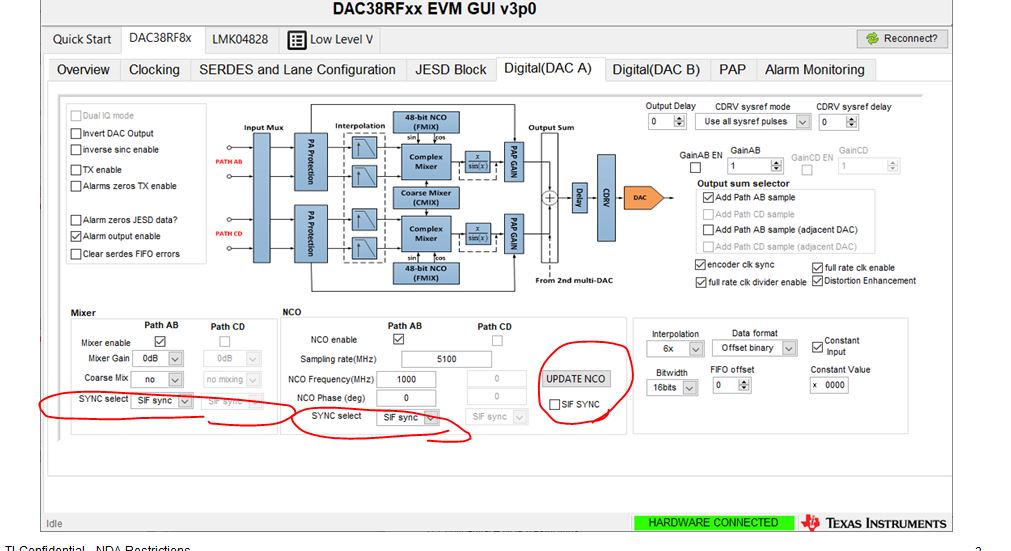
    Currently, the Mixer and NCO all SYNC selects are set "SIF sync". Is this correct? Thank you.

    Doug

  • Hi Doug,

    I am referring to the following settings for the synchronization of the mixer and the NCO.

    By default they are set to SIF SYNC. After configuring the NCO, you will need to make sure the Update NCO and SIF SYNC radio button is toggled to trigger the SYNC.

    If you have set the sync source to be SYSREF, then the SYSREF should be 1 shot.

  • Hi Kang,

    OK, and thank you.

    Doug