This thread has been locked.

If you have a related question, please click the "Ask a related question" button in the top right corner. The newly created question will be automatically linked to this question.

ADS1258: ADCPro Download failed...reset the hardware

Part Number: ADS1258
Other Parts Discussed in Thread: ADCPRO

Dear TI Forum,

a few weeks ago I bought me a ADS1258EVM-PDK and now I am trying to connect the device with my PC. For this I use the program adcpro. But when I load the EVM, the software tries to communicate and comes to the point that it wants to download something. However, the download fails and this error message appears:

The firmware load has failed due to a timeout condition. Please reset the hardware to continue loading the firmware.

There is a reset buttom on the board, I pressed it, but I dont think that this is the right way. Could you please give me a solution to my problem?

Regards,

Eric

  • Hi Eric,

    The most common cause of this problem is that the MMB0 driver failed to install. This driver is included in the ADCPro plugin installer and is suppose to run, but often this driver installer is either not running at all or is not completing successfully.

    I would recommending downloading the standalone MMB0 driver installer found at:
    ftp.ti.com/.../ (select the 32-bit or 64-bit installer based on your operating system).

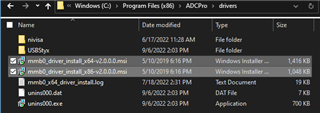
    9/6/22 UPDATE: The standalone driver installers can be found in C:\Program Files (x86)\ADCPro\drivers\ after installing the ADCPro plugin.


    Generally, after you re-run this driver installer the EVM will connect to ADCPro. Try that and let us know if you still have issues...

    Best regards,
    Chris

  • Hello Chris,

    now it is working. Thanks.

    Best regards,

    Eric