This thread has been locked.

If you have a related question, please click the "Ask a related question" button in the top right corner. The newly created question will be automatically linked to this question.

missing JavaToGtiAdapter.dvr

Other Parts Discussed in Thread: MSP430G2452, MSP-FET, MSP430G2553

I'm using Code Composer Studio Version 6.0.1.00040 on Ubuntu 14.04. I'm an attempting to debug on an MSP430G2452. I am using a LaunchPad. When I click the debug icon, I get a popup :
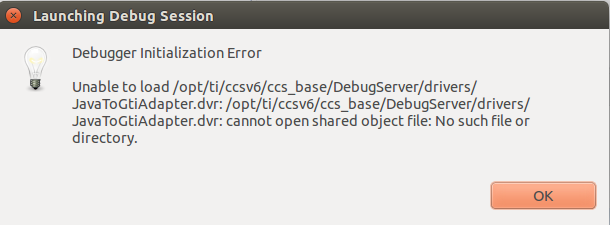
What is this JavaToGtiAdapeter.dvr? Where can I find one? 

I have debugged on this LaunchPad on another computer (the hardware works).  I have seen someone else in the E2E forums with this issue but they were piggybacking on another issue and it never got resolved...

  • Hi Peter,

    Peter Borenstein said:
    I'm using Code Composer Studio Version 6.0.1.00040 on Ubuntu 14.04. I'm an attempting to debug on an MSP430G2452. I am using a LaunchPad.


    Are you using the MSP430G2 Launchpad?
    www.ti.com/.../msp-exp430g2

    This LaunchPad is not supported on Linux.

    Peter Borenstein said:
    I have debugged on this LaunchPad on another computer (the hardware works).

    What is the host OS of this computer?


    ki

  • "Are you using the MSP430G2 Launchpad?"

    I am, BUT This problem also occurs when I try to debug with the MSP-FET using Spy-Bi-wire. I initially only reference the Launch Pad because I didn't want you to assume the error was in hardware. 

    "What is the host OS of this computer?"

    Windows. Both configurations worked fine on windows.

     I would expect anerror like "debugger not found" or "target device not recognized". This seems like a driver issue, but I'm guessing.

  • Peter Borenstein said:
    What is this JavaToGtiAdapeter.dvr? Where can I find one? 

    JavaToGtiAdapeter.dvr is the name of the driver file use in a Windows installation of CCS 6.0.1

    On a Linux installation the file used should be libJavaToGTIAdapter.so

    On a Linux CCS 6.0.1 installation searching the XML files found a reference to the non-existent JavaToGtiAdapter.dvr Windows driver:

    [Mr_Halfword@CentOS-Laptop ~]$ find /opt/ti/ti_ccs6_0/ -name '*.xml' -print0 | xargs -0 -n100 grep -i javatogtiadapter
    /opt/ti/ti_ccs6_0/ccsv6/ccs_base/common/targetdb/drivers/gti_uart_driver.xml:    <driver file="..\..\..\DebugServer\drivers\JavaToGtiAdapter.dvr">        
    /opt/ti/ti_ccs6_0/ccsv6/ccs_base/common/targetdb/drivers/gti_uart_driver.xml:    <driver file="..\..\..\DebugServer\drivers\JavaToGtiAdapter.dvr">        
    /opt/ti/ti_ccs6_0/ccsv6/ccs_base/common/targetdb/drivers/gti_uart_driver.xml:    <driver file="..\..\..\DebugServer\drivers\JavaToGtiAdapter.dvr">        
    /opt/ti/ti_ccs6_0/ccsv6/ccs_base/common/targetdb/drivers/gti_uart_driver.xml:    <driver file="..\..\..\DebugServer\drivers\JavaToGtiAdapter.dvr">        
    /opt/ti/ti_ccs6_0/ccsv6/ccs_base/common/targetdb/drivers/gti_uart_driver.xml:    <cchoice key="Jar File" value="../../../../../../../../JavaToGTIAdapterTester/JavaToGTIAdapterTester.jar"/>

    Therefore, is there an error in the Linux CCS installation which refers to the Windows JavaToGtiAdapter.dvr driver file instead of the Linux libJavaToGTIAdapter.so driver file?

    Also, can you post your target .ccxml for the project which has the debugging error?

    [I haven't seen this error when debugging MSP430 projects under Linux with a MSP-FET430UIF so wondering if some selection in the target configuration triggers the problem]

  • I have two ccxml files since I tried using both chips the lauchpad comes with

    MSP430G2553.ccxml:
    <configurations XML_version="1.2" id="configurations_0">
    <configuration XML_version="1.2" id="UARTConnection_0">
    <instance XML_version="1.2" desc="UARTConnection_0" href="connections/uart_connection.xml" id="UARTConnection_0" xml="uart_connection.xml" xmlpath="connections"/>
    <connection XML_version="1.2" id="UARTConnection_0">
    <instance XML_version="1.2" href="drivers/gti_uart_driver.xml" id="drivers" xml="gti_uart_driver.xml" xmlpath="drivers"/>
    <platform XML_version="1.2" id="platform_0">
    <instance XML_version="1.2" desc="MSP430G2553_0" href="devices/MSP430G2553.xml" id="MSP430G2553_0" xml="MSP430G2553.xml" xmlpath="devices"/></platform></connection></configuration></configurations>

    MSP430G2452.ccxml:
    <configurations XML_version="1.2" id="configurations_0">
    <configuration XML_version="1.2" id="UARTConnection_0">
    <instance XML_version="1.2" desc="UARTConnection_0" href="connections/uart_connection.xml" id="UARTConnection_0" xml="uart_connection.xml" xmlpath="connections"/>
    <connection XML_version="1.2" id="UARTConnection_0">
    <instance XML_version="1.2" href="drivers/gti_uart_driver.xml" id="drivers" xml="gti_uart_driver.xml" xmlpath="drivers"/>
    <platform XML_version="1.2" id="platform_0">
    <instance XML_version="1.2" desc="MSP430G2452_0" href="devices/MSP430G2452.xml" id="MSP430G2452_0" xml="MSP430G2452.xml" xmlpath="devices"/>
    </platform></connection></configuration></configurations>


    I'm not sure what I'm looking at. When working in Windows I never had to select the debugger. It "just works".

    Running the command in your quote gives:
    peter:~$ find /opt/ti/ccsv6/ -name '*.xml' -print0 | xargs -0 -n100 grep -i javatogtiadapter
    /opt/ti/ccsv6/ccs_base/common/targetdb/drivers/gti_uart_driver.xml: <driver file="..\..\..\DebugServer\drivers\JavaToGtiAdapter.dvr">
    /opt/ti/ccsv6/ccs_base/common/targetdb/drivers/gti_uart_driver.xml: <driver file="..\..\..\DebugServer\drivers\JavaToGtiAdapter.dvr">
    /opt/ti/ccsv6/ccs_base/common/targetdb/drivers/gti_uart_driver.xml: <driver file="..\..\..\DebugServer\drivers\JavaToGtiAdapter.dvr">
    /opt/ti/ccsv6/ccs_base/common/targetdb/drivers/gti_uart_driver.xml: <driver file="..\..\..\DebugServer\drivers\JavaToGtiAdapter.dvr">
    /opt/ti/ccsv6/ccs_base/common/targetdb/drivers/gti_uart_driver.xml: <cchoice key="Jar File" value="../../../../../../../../JavaToGTIAdapterTester/JavaToGTIAdapterTester.jar"/>


    I uninstalled and re-installed and still got the error. The installation file I downloaded is named ccs_setup_linux32.bin

  • Under Project->Show Build Settings->Connection I changed the option from UART to USB1.

    The Launchpad Does not work. The MSP-FET works in 4-wire JTAG mode and Spy-Bi-Wire

  • I had the same problem. When you create the target configuration, DO NOT configure the UART. Just stick with the JTAG emulator. There is a bug with CCs scripting for UART configs in the file ./ccsv6/ccs_base/common/targetdb/drivers/gti_uart_driver.xml . Someone forgot to update the xml script for linux.