This thread has been locked.

If you have a related question, please click the "Ask a related question" button in the top right corner. The newly created question will be automatically linked to this question.

Add an external library to Code Composer Studio

Other Parts Discussed in Thread: CCSTUDIO

Hello, I'm beginner in Code Composer Studio and I want to add a library of image processing SDL but I can't, help me please.

  • You can either add it to the project directly (add a file) or specify it in the project build options (Incl. Libraries (-l) ) under the Linker tab (select Libraries category) or add a reference to it in your linker command file.

    Thanks

    ki

  • Thank you ki
    The problem is that the SDL libraries exist only with the extension .al and .a
    I added the library but the error persists.

  • What error message are your seeing?

  • Here are the errors displayed:

    -----------------------------  test1.pjt - Debug  -----------------------------
    [dsk6713.cdb] "C:\CCStudio_v3.1\plugins\bios\gconfgen" dsk6713.cdb

    [test1.c] "C:\CCStudio_v3.1\c6000\cgtools\bin\cl6x" -g -q -fr"./Debug" -i"." -i"C:/CCStudio_v3.1/c6000/dsk6713/include" -d"_DEBUG" -d"CHIP_6713" -ml3 -mv6710 -@"Debug.lkf" "test1.c"

    [dsk6713cfg.s62] "C:\CCStudio_v3.1\c6000\cgtools\bin\cl6x" -g -q -fr"./Debug" -i"." -i"C:/CCStudio_v3.1/c6000/dsk6713/include" -d"_DEBUG" -d"CHIP_6713" -ml3 -mv6710 -@"../../../MyProjects/test11/Debug.lkf" "dsk6713cfg.s62"

    [dsk6713cfg_c.c] "C:\CCStudio_v3.1\c6000\cgtools\bin\cl6x" -g -q -fr"./Debug" -i"." -i"C:/CCStudio_v3.1/c6000/dsk6713/include" -d"_DEBUG" -d"CHIP_6713" -ml3 -mv6710 -@"../../../MyProjects/test11/Debug.lkf" "dsk6713cfg_c.c"

    [Linking...] "C:\CCStudio_v3.1\c6000\cgtools\bin\cl6x" -@"Debug.lkf"
    <Linking>

    undefined                        first referenced
     symbol                              in file
    ---------                        ----------------
    _SDL_RWFromFile                  C:\CCStudio_v3.1\MyProjects\test11\Debug\test1.obj
    _SDL_PollEvent                   C:\CCStudio_v3.1\MyProjects\test11\Debug\test1.obj
    _SDL_Quit                        C:\CCStudio_v3.1\MyProjects\test11\Debug\test1.obj
    _SDL_UpperBlit                   C:\CCStudio_v3.1\MyProjects\test11\Debug\test1.obj
    _SDL_SetVideoMode                C:\CCStudio_v3.1\MyProjects\test11\Debug\test1.obj
    _SDL_LoadBMP_RW                  C:\CCStudio_v3.1\MyProjects\test11\Debug\test1.obj
    _system                          C:\CCStudio_v3.1\MyProjects\test11\Debug\test1.obj
    _SDL_Flip                        C:\CCStudio_v3.1\MyProjects\test11\Debug\test1.obj
    _SDL_ShowCursor                  C:\CCStudio_v3.1\MyProjects\test11\Debug\test1.obj
    _SDL_Init                        C:\CCStudio_v3.1\MyProjects\test11\Debug\test1.obj
    >>   error: symbol referencing errors - './Debug/test1.out' not built

    >> Compilation failure

    Build Complete,
      2 Errors, 0 Warnings, 0 Remarks.

    Thanks

  • If I add the library "libSDL.la"  error becomes:

    [Linking...] "C:\CCStudio_v3.1\c6000\cgtools\bin\cl6x" -@"Debug.lkf"
    <Linking>
    >> C:\CCStudio_v3.1\c6000\dsk6713\lib\libSDL.la, line 1:   error:
                   illegal input character: hex 23
    >> libSDL.la:   error: system error, can't open file 'libSDL.la' for input: No
                           such file or directory

    >> Compilation failure

    Build Complete,
      3 Errors, 0 Warnings, 0 Remarks.

    Thanks.

  • CCS does not seem to automatically recognize *.al as a library if you just add the file to the project. But *.a is recognized. So you may need to explicitly reference it in the Build Properties under the linker "File Search Paths" (--library, -l). That should work

    ki


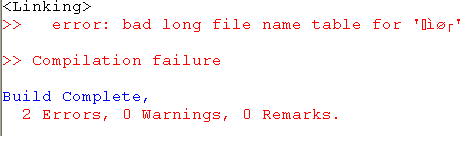
  •  

    I added the libraries correctly, but a strange error appeared:


    .
    I apologize for the inconvenience