This thread has been locked.

If you have a related question, please click the "Ask a related question" button in the top right corner. The newly created question will be automatically linked to this question.

CCSv6 Unable to install Add-on

Other Parts Discussed in Thread: CCSTUDIO

Hello,

I'm unable to install the TI-RTOS for Simplelink Add-on on CCS v6.1.0.00104. Every time I select 'Install Software' I get a message that states: "Failed to install the selected add-ons. Please see the Error Log for more details." The error log shows:

!ENTRY com.ti.ccstudio.app.center 4 0 2015-04-11 13:37:57.083
!MESSAGE An internal error was logged by 'com.ti.ccstudio.app.center'.
!STACK 0
org.json.JSONException: JSONObject["isWare"] not found.
	at org.json.JSONObject.get(JSONObject.java:461)
	at org.json.JSONObject.getBoolean(JSONObject.java:477)
	at com.ti.ccstudio.app.center.internal.FeaturesTracker.getFeaturesPendingToInstall(FeaturesTracker.java:114)
	at com.ti.ccstudio.app.center.internal.browser.AppCenterBrowserFunctions$10.execute(AppCenterBrowserFunctions.java:480)
	at com.ti.browser.internal.TIBrowser$3.execute(TIBrowser.java:270)
	at com.ti.chromium.browser.ChromiumBrowser$1.function(ChromiumBrowser.java:246)
	at com.ti.chromium.browser.cef.CefBrowserFunction.execute(CefBrowserFunction.java:43)
	at com.ti.chromium.browser.cef.N_CefBrowser.executeFunction(N_CefBrowser.java:103)
	at com.ti.chromium.browser.cef.N_Cef.N_DoMessageLoopWork(Native Method)
	at com.ti.chromium.browser.cef.Cef$1.runInUIThread(Cef.java:224)
	at org.eclipse.ui.progress.UIJob$1.run(UIJob.java:97)
	at org.eclipse.swt.widgets.RunnableLock.run(RunnableLock.java:35)
	at org.eclipse.swt.widgets.Synchronizer.runAsyncMessages(Synchronizer.java:136)
	at org.eclipse.swt.widgets.Display.runAsyncMessages(Display.java:4147)
	at org.eclipse.swt.widgets.Display.readAndDispatch(Display.java:3764)
	at org.eclipse.e4.ui.internal.workbench.swt.PartRenderingEngine$9.run(PartRenderingEngine.java:1151)
	at org.eclipse.core.databinding.observable.Realm.runWithDefault(Realm.java:332)
	at org.eclipse.e4.ui.internal.workbench.swt.PartRenderingEngine.run(PartRenderingEngine.java:1032)
	at org.eclipse.e4.ui.internal.workbench.E4Workbench.createAndRunUI(E4Workbench.java:148)
	at org.eclipse.ui.internal.Workbench$5.run(Workbench.java:636)
	at org.eclipse.core.databinding.observable.Realm.runWithDefault(Realm.java:332)
	at org.eclipse.ui.internal.Workbench.createAndRunWorkbench(Workbench.java:579)
	at org.eclipse.ui.PlatformUI.createAndRunWorkbench(PlatformUI.java:150)
	at org.eclipse.ui.internal.ide.application.IDEApplication.start(IDEApplication.java:135)
	at org.eclipse.equinox.internal.app.EclipseAppHandle.run(EclipseAppHandle.java:196)
	at org.eclipse.core.runtime.internal.adaptor.EclipseAppLauncher.runApplication(EclipseAppLauncher.java:134)
	at org.eclipse.core.runtime.internal.adaptor.EclipseAppLauncher.start(EclipseAppLauncher.java:104)
	at org.eclipse.core.runtime.adaptor.EclipseStarter.run(EclipseStarter.java:380)
	at org.eclipse.core.runtime.adaptor.EclipseStarter.run(EclipseStarter.java:235)
	at sun.reflect.NativeMethodAccessorImpl.invoke0(Native Method)
	at sun.reflect.NativeMethodAccessorImpl.invoke(Unknown Source)
	at sun.reflect.DelegatingMethodAccessorImpl.invoke(Unknown Source)
	at java.lang.reflect.Method.invoke(Unknown Source)
	at org.eclipse.equinox.launcher.Main.invokeFramework(Main.java:648)
	at org.eclipse.equinox.launcher.Main.basicRun(Main.java:603)
	at org.eclipse.equinox.launcher.Main.run(Main.java:1465)

I've verified firewall settings aren't the issue. Any suggestions?

Thanks,
Juan

  • Hi Juan,

    Proxy issues? Is your CCS able to connect to CCS servers when you try to update?

    Regards,
    Gautam
  • Juan,

    As Gautam mentioned this could be due to proxy settings, especially if you are having similar trouble installing any other update from App Center.
  • Gautum, AartiG,

    Thank you for the suggestion. I was able to update CCS from the Help menu and was able to update the ARM compiler add-on so I didn't think it was a proxy issue. I'll look into the network settings. Anything else that might be the issue though?

    Thanks,
    Juan

  • I'm having the same issue, but I get the following error in the log:

    !ENTRY com.ti.ccstudio.p2app 4 0 2015-04-23 09:29:23.380
    !MESSAGE The installable unit ,com.ti.rtsc.TIRTOSsimplelink.product.feature.group has not been found.

  • Same Issue:

    !ENTRY com.ti.ccstudio.p2app 4 0 2015-04-28 21:09:57.001
    !MESSAGE The installable unit ,com.ti.rtsc.TIRTOSsimplelink.product.feature.group has not been found.


    Running Win7_64

    CCS  Version: 6.1.0.00104

  • Juan, J. Sample, Sean,

    Could you all try the manual method of installing TI-RTOS as described in this post?

    Note that for TI-RTOS for Simplelink, the Location field should contain software-dl.ti.com/.../update

    Let us know if you are able to successfully install using this method.

  • That worked for me.

  • Hi Juan,

    I am trying to find out what might have cause the the exception in your post. Can you open up the appcenter and select one of the TI-RTOS, but don't click the install button at the top. Now, open this file in a text editor ccsv6\eclipse\configuration\com.ti.ccstudio.app.center\pending_apps.json. Can you copy and paste the content to this post?

    Also, for your CCS install, did you do an upgrade or a full install?

    Thanks,
    Patrick

  • AartiG,

    Tried that and I get a different error.

    I've downloaded the components separately and TI Resource Explorer seems to see them but they're still showing up as needing to be installed in the CCS App Center. I know for CCSv6 it's recommended to get the addons through the App Center so I'm wondering if the manual install missed something. Do you know how I could verify?

    Thanks,
    Juan

  • Hi Patrick,

    Here's the information on that file. I'm currently using the 90 day evaluation license.

    [
    {
    "id": "3B8C03B8",
    "ius": ["org.eclipse.cdt.autotools.feature.group,org.eclipse.cdt.build.crossgcc.feature.group,org.eclipse.linuxtools.cdt.libhover.devhelp.feature.feature.group,org.eclipse.linuxtools.cdt.libhover.feature.feature.group,org.eclipse.linuxtools.changelog.c.feature.group,org.eclipse.linuxtools.gcov.feature.group,org.eclipse.linuxtools.gdbtrace.feature.group,org.eclipse.linuxtools.gprof.feature.feature.group,org.eclipse.linuxtools.lttng2.feature.group,org.eclipse.linuxtools.lttng2.kernel.feature.group,org.eclipse.linuxtools.profiling.feature.group,org.eclipse.linuxtools.rpm.feature.group,org.eclipse.linuxtools.tmf.feature.group"],
    "repos": ["http://software-dl.ti.com/dsps/dsps_public_sw/sdo_ccstudio/guicomposer/temp_extras/"]
    },
    {
    "id": "FC0E5033",
    "ius": ["com.ti.ccstudio.gui.composer.ccs.feature.group,com.ti.gc.common.feature.group"],
    "repos": ["http://software-dl.ti.com/dsps/dsps_public_sw/sdo_ccstudio/guicomposer/gc-ccsrepo/,http://software-dl.ti.com/dsps/dsps_public_sw/sdo_ccstudio/guicomposer/gcrepo/"]
    },
    {
    "id": "791CE1E3",
    "ius": ["com.ti.rtsc.TIRTOSsimplelink.product.feature.group"],
    "isWare": false,
    "repos": ["http://software-dl.ti.com/dsps/dsps_public_sw/sdo_sb/targetcontent/tirtos/2_11_01_09/exports/p2/tirtos_simplelink_update/"]
    },
    {
    "id": "C9808185",
    "ius": ["com.ti.rtsc.TIRTOSmsp430.product.feature.group"],
    "repos": ["http://software-dl.ti.com/targetcontent/esd/tirtos_msp43x/update/,http://software-dl.ti.com/targetcontent/esd/xdctools/update/ccs6.1.x/"],
    "isWare": false
    },
    {
    "id": "9C45CDDD",
    "ius": ["com.ti.rtsc.TIRTOSsimplelink.product.feature.group"],
    "isWare": false,
    "repos": ["http://software-dl.ti.com/targetcontent/esd/tirtos_simplelink/update/"]
    },
    {
    "id": "CAC1D7A0",
    "ius": ["com.ti.gcc.msp430.win32.feature.group"],
    "isWare": false,
    "repos": ["http://software-dl.ti.com/ccs/esd/msp430/"]
    }
    ]

    Thanks,
    Juan
  • Juan,

    Make sure the Location field contains software-dl.ti.com/.../update
    (make sure to copy the link address and not just the text of the link as the text seems to be partially cut-off).

  • AartiG,
    Didn't notice there was a differing hyperlink. That worked for me as well. I now show TI RTOS Simplelink as Up to date in the APP Center. How can I find the links for other addons?

    I was also interested in MSP430 RTOS addons.

    Thanks!
    Juan
  • Tried the manual install and got an error about java heap space.

    Restarted CCS and tried again and it worked!

    Thanks.  This was a new install of CCS

  • Juan,

    I see 2 issues in the pending_apps.json file that you posted here.

    1) There is a missing isWare property for two of the selected app. This shouldn't happen, most likely a bug somewhere that needs to be fixed. Did you over install CCS into the same location? Where is the pending_app.json file located on your local file system?

    2) It looks like there is a change in the name of the repos for the TIRTOSsimplink feature, which causes the generated ID mis-match.

    To workaround the isWare exception and the feature not found dialog when pressing the install button in the app center, you can just delete the contents in this file before starting CCS.

    I'll file CQ to track these two issues.

    Thanks,
    Patrick
  • Patrick,

    Thanks! Deleted the contents of that file and now when I select the Install button something happens. Unfortunately another error eventually comes up.

    Here are the contents of the pending_apps.json file in case they're helpful.

    [{
    "id": "C9808185",
    "ius": ["com.ti.rtsc.TIRTOSmsp430.product.feature.group"],
    "isWare": false,
    "repos": ["http://software-dl.ti.com/targetcontent/esd/tirtos_msp43x/update/,http://software-dl.ti.com/targetcontent/esd/xdctools/update/ccs6.1.x/"]
    }]

    I have plenty of available RAM and disk space. Anything I can do to resolve?

    Answer to your questions, I don't remember having re-installed CCSv6. The full path for the json file is: C:\ti\ccsv6\eclipse\configuration\com.ti.ccstudio.app.center

    Please let me know if you need any additional information.

    Thanks,

    Juan

  • Patrick,

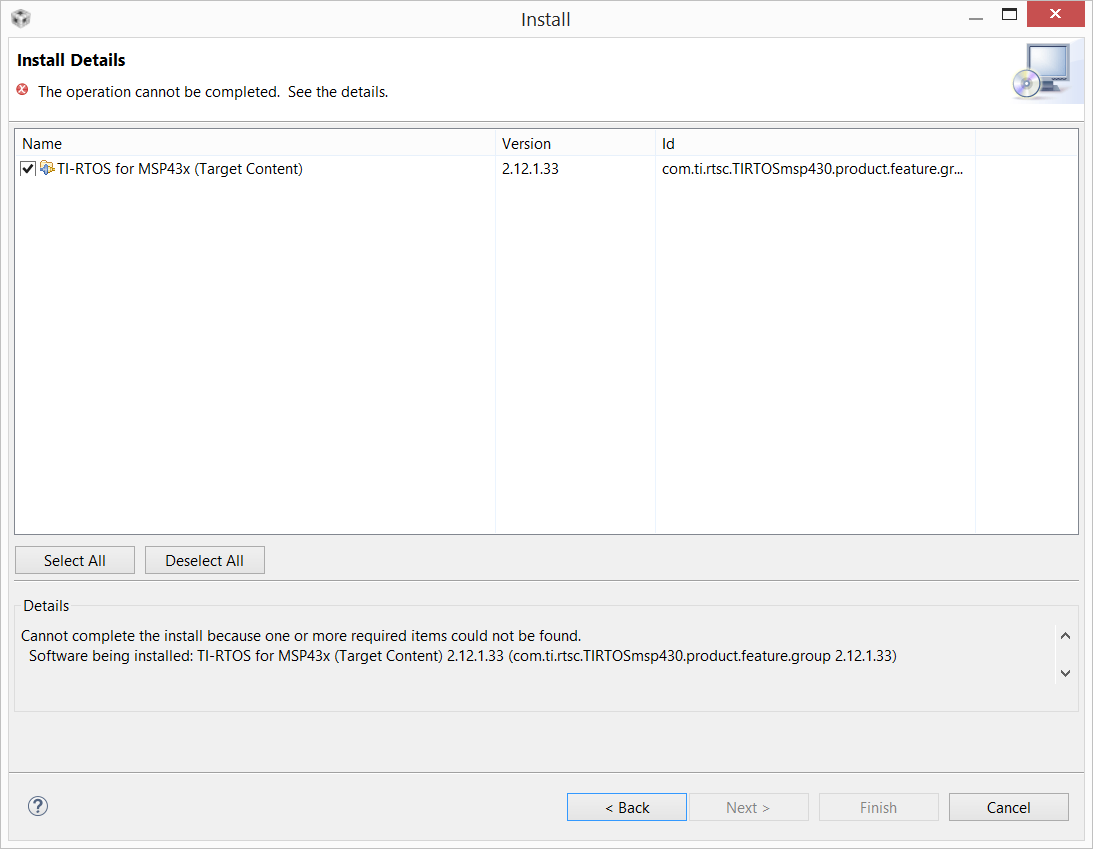
    I also tried the manual method described by AartiG earlier using the link:software-dl.ti.com/.../ and I get this error:

    I closed out CCS and tried again after relaunching. This time it found the software and looked to be installing but then I got the same "Out of memory" error as when I went through the App Center only with a different signature File number. I tried another addon (MSPWare) and that installed fine through the App Center.

    Please let me know if I can provide any additional information.

    Thanks,
    Juan

  • Juan,

    For the "Out of Memory" error please see http://processors.wiki.ti.com/index.php/Troubleshooting_CCSv6#Update_features on how to resolve.

  • AartiG, that resolved the issue. Thank you for the support!

    Juan
  • Juan,

    I have filed two CQ to track the isWare issue and the Feature not found sisue, SDSCM00051871 & SDSCM00051872.

    Thanks for your help.

    Regards,
    Patrick
  • Same problem on App Center, same version of CCS, running on Windows 8.1
    I can't even open error log (option absent in 'Window->Show View' and the help text link for error log doesn't work too)

    I went to 'Help->Install New Software' and pasted the address you wrote above ( downloads.ti.com/.../update ) into the 'Work with' text box and the TI-RTOS repo appeared below. I could easily install it from there.

    Finished install, CCS restarted itself, I went back to the App Center and the TI-RTOS for SimpleLink App was still selected from before, and clicking the 'Install Now' button would give the same error, but the text of the button on the App selection checkbox had changed from 'Select' to 'Update', so it seems the App Center knows I have the RTOS.

    Finally, got all the way to the end of the Project Zero setup, at the very last step when I press F8 to run, Tera Term shows nothing and the red LED is blinking on my board. Seems the RTOS is installed though, otherwise I don't think I'd have got this far.

    Extra deets: When I pause the execution, there's one error saying there's no source of UtilDelay(). I found that method in driverlib->util.c, and I don't think that's the problem. Really sucks to have to figure something out after coming so far! Please let me know if you too were plagued by the blink of the LED and what you id to stop it. Hope this insights on the RTOS install helped someone. Bye :*
  • Nevermind my blinking LED was because I was using Access point with WEP when the demo clearly said only WPA (2) and Open. I got a new Access Point and all is well. Sorry I shouldn't have posted all this extra garbage in this thread anyways!
  • I had the same problem (no apps could be installed from the App Center, with the same error message in the log of "Failed to install the selected add-ons")

    I noticed that the file Patrick mentioned: c:\ti\ccsv6\eclipse\configuration\com.ti.ccstudio.app.center\pending_apps.json
    had additional packages in it that I had NOT selected.

    The solution was:
    1. Delete the file: c:\ti\ccsv6\eclipse\configuration\com.ti.ccstudio.app.center\pending_apps.json
    2. Re-select the packages to install from the App Center
    3. Select "Install Software"

    The packages then installed correctly.
  • I've just had the same issue. I was prevented from installing any add-ons in App Center by the error message: "Failed to install the selected add-ons. Please see the Error Log for more details". The eclipse error log only showed "!MESSAGE The installable unit com.ti.cgt.tms470..*.win32.feature.group.* has not been found."

    After finding this thread I checked in pending_apps.json and found this block, which I removed and was then able to install add-ons again:

        {
            "id": "B6B71E88",
            "ius": ["com.ti.cgt.tms470..*.win32.feature.group.*"],
            "repos": ["http://software-dl.ti.com/dsps/dsps_public_sw/sdo_ccstudio/codegen/Updates/p2win32/"],
            "isWare": false
        },