This thread has been locked.

If you have a related question, please click the "Ask a related question" button in the top right corner. The newly created question will be automatically linked to this question.

How to import/use example project in ccs6?

Other Parts Discussed in Thread: CONTROLSUITE

Hi,

I am trying to use example projects for F28355 in CCS6. I have attached the picture for your reference. I tried to use any of the 45 example projects listed. They are listed as folder and there is no option such as import project or use project. I am new to this. Any help is appreciated.

Thank you,

Ujjwal
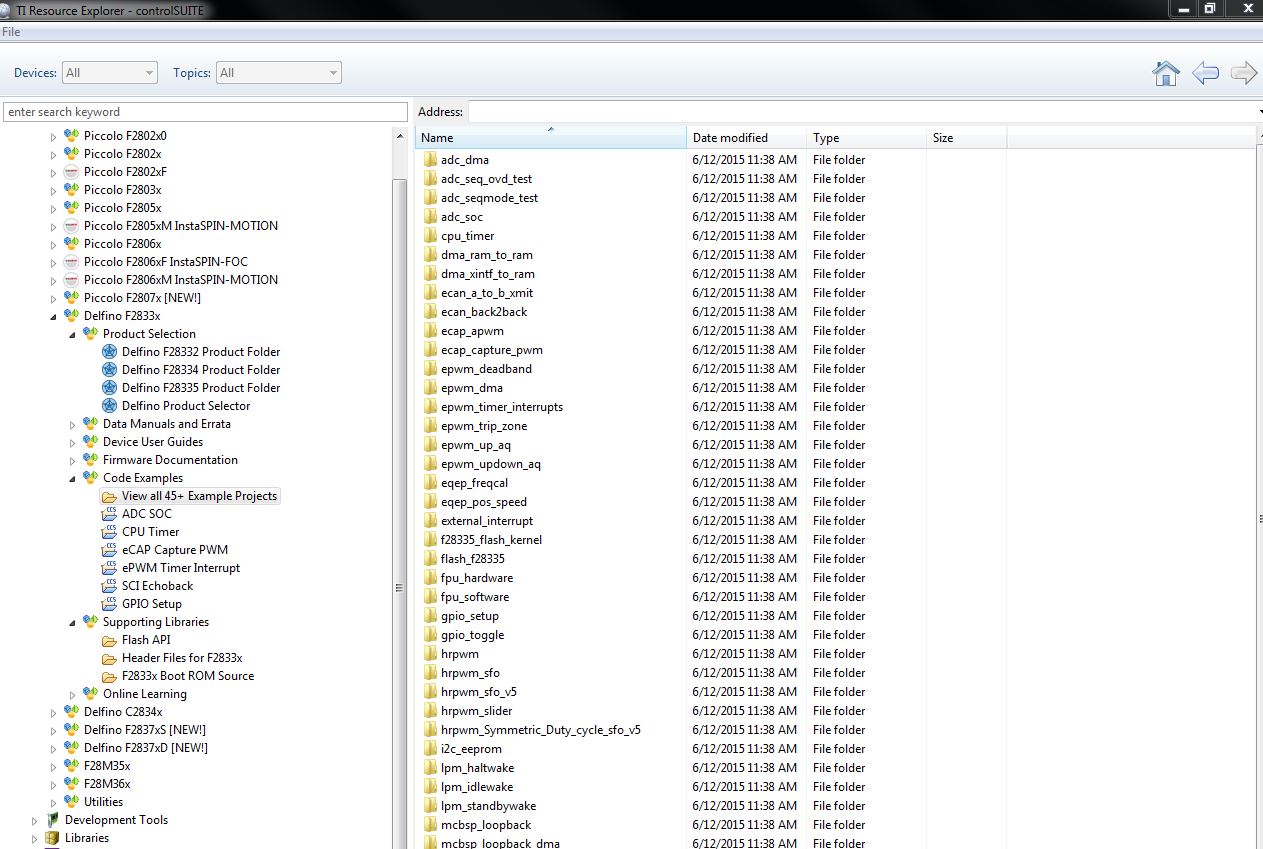
  • You can click on one of the CCS projects (with the icon that says CCS) such as ADC SOC, CPU Timer etc, and the right pane should have links where you can click to import and build the project. Not all the available 45+ examples are listed there, so if you wish to import the ones not listed there, you can do it manually by going to the CCS menu option Project->Import CCS Projects and browsing to the ControlSuite where the examples are.

  • Hi Ukkwal,
    Those other projects in the list must be imported into CCS manually using 'Project -> Import CCS Projects'. You will need to provide the path to the project. Just right-click on the project and select 'Open in new window' to open a new windows explorer dialog to the project location. You can then use that path in the address bar when you are importing the CCS project.

    Thanks
    ki