This thread has been locked.

If you have a related question, please click the "Ask a related question" button in the top right corner. The newly created question will be automatically linked to this question.

CCS 4 tutorial

Other Parts Discussed in Thread: MSP430F2101

I am trying to figure out this environment.  All the information I can collect is simply circular references.

I am looking for a good tutorial that will start from scratch.  I am coming from Borlands turbo's, MC Visual C, Visual Studio 4 - 2008, MPLab, etc...  All environments that have consistent behavior.

This behaves nothing like any of them.  I can't get things to make sense.

I followed the tutorial and created the hello world, and now it insists on opening that same hello world, as though everything I want to do will be based only on it for all eternity.

How do I create a new project?  That menu option has now disappeared.  How do I create a project that is not based on the tutorial that I created?  

What does it mean that it can't find the USB FET?

Does the thing have an emulator/debugger? 

Where can I find a good explanation of this environment and a tutorial that actually matches the IDE?


  • Well, I am getting nowhere with this environment.  Actually, I am going backwards.

    I am trying to move a project from one PC to another.  And it is a major disaster.  Apparently it insists that the project be in the users directory of the PREVIOUS machine.  So that was a major flop.

    Next, I figured I could simply move the source files.  No, that doesn't work either.  There actually is NO SUPPORT for adding a source file to a project.  It appears the environment believes that every single source file must be written from scratch.  Or at least every file would have to be copy/pasted into a source file that this environment thinks it created.

    Is there anyway I can get a copy of CCS V3?  From what I can see, apparently that version was more intuitive, before TI abdicated their responsibility of providing a decent development environment.

  • Hi Christopher,

    have a look at this CCS site (http://processors.wiki.ti.com/index.php/CCSv4) there were tutorials for different targets.

    I do not know which target you're writing code for, but, here's a MSP430 workshop documentation which will give you information on how to use CCS too (http://software-dl.ti.com/trainingTTO/trainingTTO_public_sw/MSP430_5xx_One_Day_Workshop/MSP430F5xx_One_Day_Workshop_v1-0.pdf).

    Adding existing files to a project is quite easy! Right-click in the Project pane and select ADD FILES TO PROJECT. This will copy your exiting files into your project folder and leave the destination sources untouched.

    Rgds
    aBUGSworstnightmare

  • I have followed some of these already.  With no progress.

    Nope, there is no "ADD FILES TO PROJECT" on any of the right clicks I try.  Is there some specific (not described) element you must click on to add a file? Importing a whole project was a waste of time.  It refused to understand where any of the existing files were.

    There are so many subfolders, none of which have any intuitive meaning, most of which are metadata, I can't figure where stuff goes, even if I could figure anything else out.  I though Cobol style programs were dead.

  • Hi Christopher,

    I took the time for making some screenshots (and a simple 'how to' in text).

    1.) Open CCS (which version are you using?)
    2.) to make a new project from scratch click on FILE-->NEW-->and select CCS PROJECT

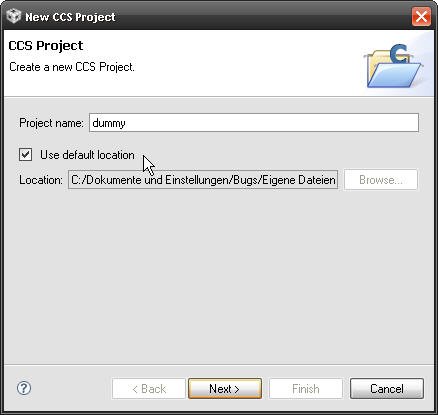
    3.) Give your project a name and choose the location were to create it. Default location is in 'user files'--> folder workspace. CCS will create a new folder there with the name of your project

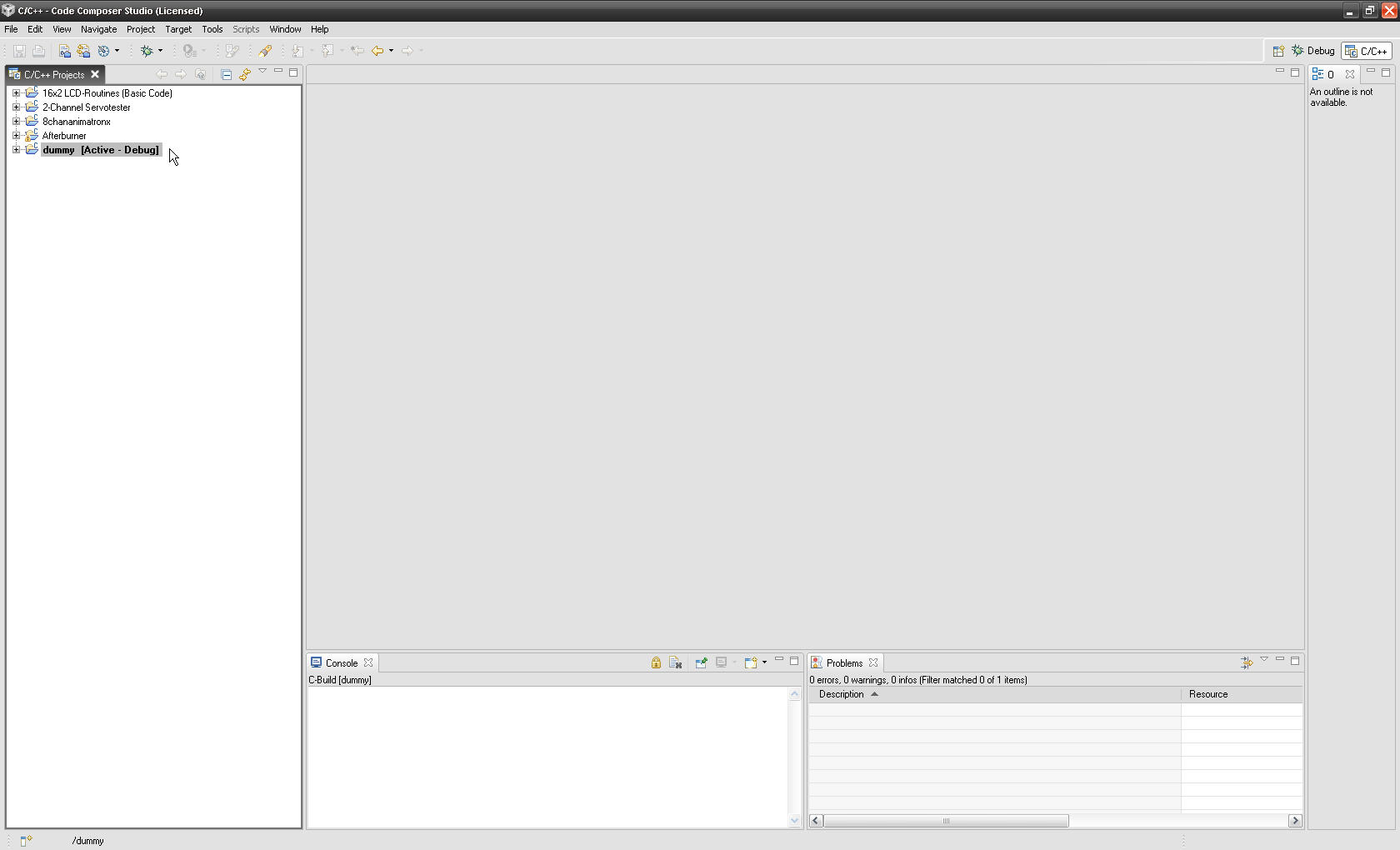
    4.) You will have to select the target (I used MSP430F2101 for the example). Now a new project shows up and CCS sets this new project as active

    5.) Since you may have some sources/headers already you now place the cursor in the window were the project trees are and click right. A context menu shows up which looks like this


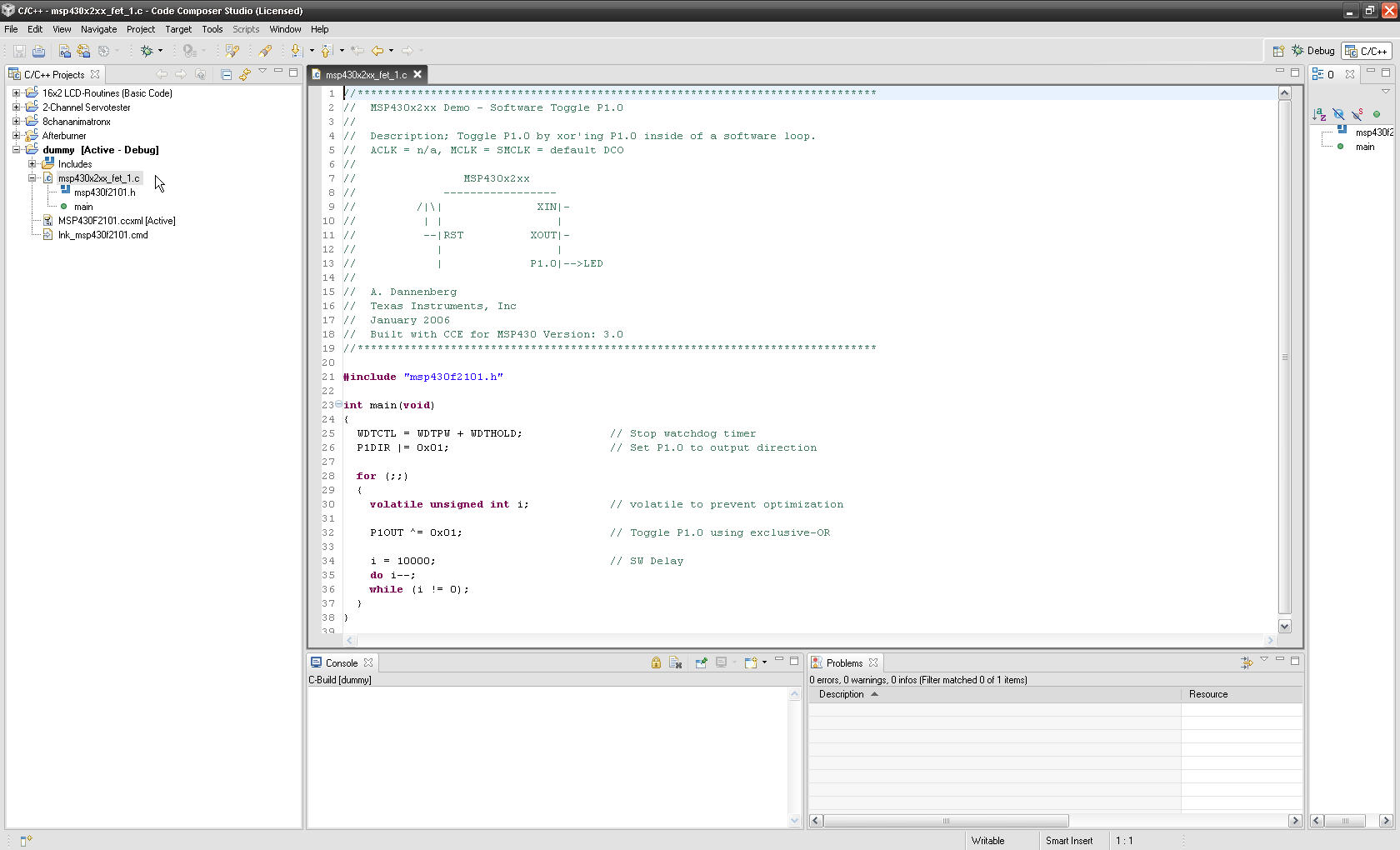
    6.) Click on 'ADD FILES TO PROJECT' - a browser window opens and you can brose to the location or your files and add them to the project. CCS will copy the selected files into your project folder. You want to have the HIGH-END, FULL FEATURED BLINKING LED example source code to be added. Do to sow, browse to PROGRAMS-TEXAS INSTRUMENTS-ccsv4-msp430-examples-msp430x2xx-C-source-and select the file you will find there. CCS now copies it to your project folder (check it out).
    Double click on the file and now your workspace should look like below.

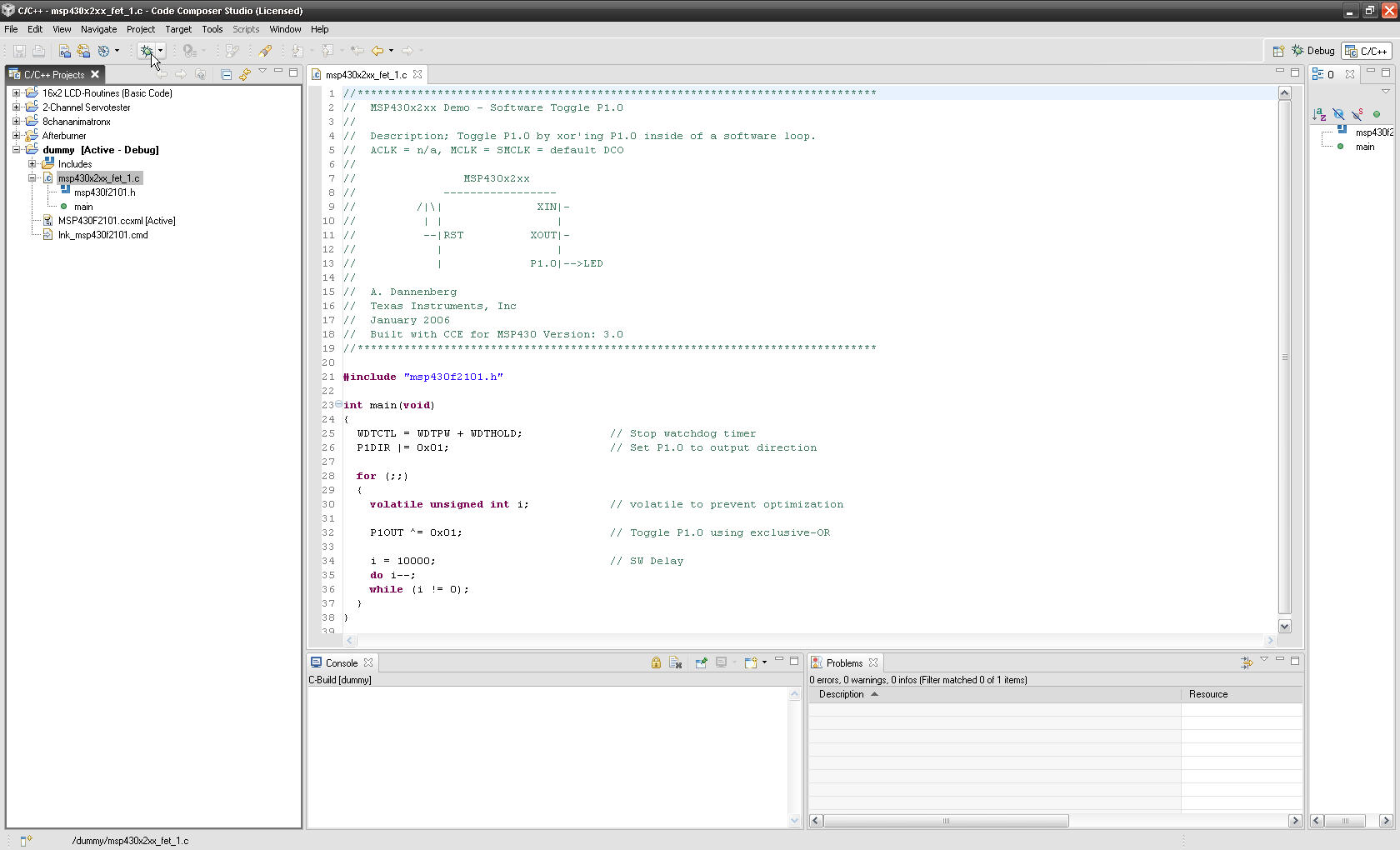
    7.) Now you're ready to start debugging. Connect your target, click on the 'launch debug' button and here we go.

    I hope this helps, rgds
    aBUGSworstnightmare

  • I appreciate your making screen shots.  But I can't see them.  Either in the forum (404 - Not found), or in MS's web outlook which I have been constrained to use.

    Here is what I did:

    1.  I created the project  Now I am on the welcome screen. ?    A black screen with icons for getting started, examples...  (I browsed through them already)

    2.  So I click on "View C++ projects"

    3. I copied the files to the directory of the project I created  ('Sample').  There are two files I wish to use at this point.

    4. I right click and select Add Files to Project.  I select the one I am trying to add, called main_ed.c.

    5. I get the informative box that says: "Could not add: main_ed.c"

    Ok, so I close CCS4 and reopen it.

    Now when I reopen it, it opens the same project, Witthout asking me if I want to open a different project.

    For a change, it DOES have more than two options, including File | New CCS project.   Which I will swear was not there the last several times I was doing this.

    My other issue is (assuming I can get this other project moved off of the other computer) how do I debug?  Do I HAVE to have some device plugged into the USB?

    And where can I find the MSP420 programmer reference so I can see the predefined macros, library functions available, assembler codes, etc...  I can't find anything that describes how to program a device.

    Thanks.

    CS Weber


  • Hi Christopher,

    Christopher Weber said:

    3. I copied the files to the directory of the project I created  ('Sample').  There are two files I wish to use at this point.

    4. I right click and select Add Files to Project.  I select the one I am trying to add, called main_ed.c.

    5. I get the informative box that says: "Could not add: main_ed.c"

    If you copied the files into your CCS project folder (as mentioned in step #3), then those files are already added to your project. Hence when you try to "re-add" the files to the project (step #4), you get the error you mentioned in #5 since you can't add a file already part of your project.

    This wiki topic on Eclipse projects has some more details which may be useful:

    http://processors.wiki.ti.com/index.php/Eclipse_Concepts#Projects

    Christopher Weber said:
    Now when I reopen it, it opens the same project, Witthout asking me if I want to open a different project.

    If you restart CCS, it will open any projects left open when you shut it down. Most people tend to leave all projects open in the workspace. More information on opening and closing projects are mentioned in that same above wiki topic.

    Christopher Weber said:
    My other issue is (assuming I can get this other project moved off of the other computer) how do I debug?  Do I HAVE to have some device plugged into the USB?

    You can simply copy the contents of your project folder to the other computer and use the 'Project->Import Existing CCS/CCE Eclipse Project' option in the CCS version on that machine to import it into that workspace. This works well with simple projects where all the files are in the project folder. If you are working with linked files (as described in that wiki topic), then it is a bit more tricker. But looks like you are doing the former.

    To debug your MSP430 app, you will need an MSP430 device to run on. Basically MSP430 hardware. There is no MSP430 simulator. That is why you were getting those errors about not finding the USB FET (the connection from your PC to the MSP430 hardware is via USB). There are various kits available:

    http://www.ti.com/corp/docs/landing/mcu/index.htm?DCMP=MSP430&HQS=Tools+OT+ez430

    Thanks

    ki

  • Thanks, we are making small progress...

    I have read the link.  A few times.

    Here is what I was attempting. The other guy set up his project in a folder called "workspace2". He was experiencing even more frustration than I am, and put everything in the world in that folder.

     I coped the entire folder onto a thumbdrive, and placed it on my machine, in a folder devoted to this task.  That folder is next to (not in) the folder where I build the sample project you explained.

    I then did an 'Import' as you said.  I picked the folder that was his.

    I get an error "An Internal Error Occurred during:  C/C++ Indexer".  I press OK

    Now, my project window has two root folders in it.  My original 'sample' following your previous instructions.  Plus this project (named ez430_....  because it was adapted from a demo project because the guy who created it was having more issues with projects than I am).

     I expand the Applications  folders looking for source modules, and try to open one.  I get an error "Error retrieving content description for resource " .  I can navigate the through my file system and see the original files in the other folder location (the one I copied).  So I know they are there.  So it didn't copy it to the new workspace, 

    I expand the "Components" folder and select a source file, it tells me "Resource /ez430_....  does not exist."

    I expand the "Includes" folder, which refer to bunch of folders back in that "workspace2" folder, and those headers can be opened.

    Now, I right click on the imported project, (ez430_...)  I can't delete the project that I imported, because I am getting the same 'Indexer' error as I did when I imported it.

    And I can't even close the program. I have a 'Progress Information' box, that says 'deleting resources', with a greyed out cancel button.  I can't close it by the task manager.  I can't open a new copy of CCS, because it says the workspace is in  use.

    It just seems everything I try to do in this thing fails.


  • Christopher, I am with you.

    It looks like this environment was written by a bunch of Engineering. It has everything in it, including the kitchen sink. The problem is unless you are an expert in CComposer, it seems to have a steep learning curve.

    I ended going back to 3.3 just to run my demo board - it came with a copy of 3.3. That worked, now I am trying to migrate back to v4 with the working 3.3 code. Simple, run the example code that flashes the LEDs. It works on 3.3 but does not seem to have the I/O mapping setup correctly in 4.

    Frustrated on something that should have taken me 30 minutes to an hour to get up and running - max. Now on day 2.

    Misery loves company...

    It seems TI has sacrifices ease of use for a boat load of features. it will be great when I am ready to tweak and caress my executable, but until then - simplicity would be great.

    David

  • Thanks.  Glad I am not alone.  I have fought trying to learn Eclipse for almost a decade.  When I say fight, I don't mean resist.  I mean actually try to figure it out.  It always ends with me throwing my hands up and saying 'you win, I'm going elsewhere'.  The fact that they jumped into it just means they wanted to take the easy cheap way out.

    BTW, is was written by a bunch of engineers.  At IBM. As an environment for Java. It takes a PHD to understand how to configure it to do anything else.  Packages like this were written more for the ego of the team that created it than for the users who need to be productive with it.

    I have considered just learning the compiler directives, and writing my own MAKE files to build this stuff.  But for now, we are also looking into IAR.

    And I have received some useful advice from a poster called 'aBUGSworstnightmare', and 'Ki-Soo Lee'. About 50% effective.

    Good luck!

  • hmmm.... I have some guesses on the other errors, but:

    Christopher Weber said:
    I get an error "An Internal Error Occurred during:  C/C++ Indexer".  I press OK

    This one I haven't seen. Would it be possible to obtain that project you copied from your colleague? The one you tried to import? If you wish to send it to me privately, click on my name to bring up my profile and then use the option "Start conversation" in the upper right hand corner.

    Thanks

    ki

  • David Clark said:

    It looks like this environment was written by a bunch of Engineering. It has everything in it, including the kitchen sink. The problem is unless you are an expert in CComposer, it seems to have a steep learning curve.

    I ended going back to 3.3 just to run my demo board - it came with a copy of 3.3. That worked, now I am trying to migrate back to v4 with the working 3.3 code. Simple, run the example code that flashes the LEDs. It works on 3.3 but does not seem to have the I/O mapping setup correctly in 4.

    As a long time CCS user (1.x-3.x), I'll be honest and say that I struggled with the new v4 environment... it was pretty overwhelming. There is indeed a learning curve. If you are familiar with Eclipse (and like it), it's not so bad. If you are not, or don't like it, it can be steep. Once I got the hang of it however, I really saw the benefits of it. But it took time.

  • Hi Christopher,

    Screenshots are im my post on the forum; you can click them for a larger view (I've tested with Internet Explorer 8, latest version of Firefox and Safari (since I'm working on a MAC; everything is as it should be); if you can't see them there's maybe a problem with your browser settings.

    In addition to my latest post I would recommend you two more documents:

    1.) Code Composer V4.0 Users Guide for MSP430 - http://focus.ti.com/lit/ug/slau157m/slau157m.pdf
    2.) MSP430 Hardware Tools Users Guide - http://focus.ti.com/lit/ug/slau278d/slau278d.pdf

    Well, I was working with IAR for years (targeting NEC (8 to 32bit) and ATMEL), I hated working with Greenhills (ARM and NEC 32 to 64bit) and then came they day when I had to use Eclipse based tools (first attempt was with Atmel AVR32 MCUs). Your right! On first view the tool is overwhelming, but - if you spend a few hours on it - you will see that is it pretty easy and intuitive to use. Every new (from your point of view) IDE has it pros and cons (.. where is this fu..ing compiler switch?...), but believe me, you will love eclipse after not that much hours!

     And - if you really don't like it - you have the option of using IAR's IDE (in case of MSP430 and ARM products).

    Rgds
    aBUGSworstnightmare

  • No...  It's getting worse.   See my post  "Still trying to make sense of CCS with no useful doc..."

    But to further complain...

    I am trying to debug something.  Trying to figure out how to make this device communicate over SPI.  I set some bits in a register:


    UCB0CTL0 = 0;
    UCB0CTL0 = UCCKPH | UCMSB | UCMST | UCSYNC ;

    As I step through it, the value of UCB0CTL0 never changes in the watch window. I have no idea if the code is working.  I have no feedback if the setup is proper. I have no indication the control registers are being set. And I can't read any of the SPI data, so I have to assume not.

    I still have the battle of trying to decipher the weak docs regarding the chip itself (no useful examples, unclear bit definitions, etc...)  And this environment has been nothing but a massive obstacle .


  • Christopher,

    Unfortunately, I'm with you on the level of frustration and the weak docs. I guess if you migrated from CCS it would be clearer, but I migrated from MicroChip and Visual Studio.

    Did you ever figure out how to add your own "includes"? I would like to include an entire library, but NOT create a new copy of the files in my existing project. I would prefer just to "include" a reference in my project so that I can maintain the external library independently of the project. I have tried, as you have, to right click on the existing "includes" folder, but CCS will only allow me to create a new item, not import an existing item/folder/library. If I click on Project menu, I can either "link" or "add" FILES, not an entire folder. Could it be that you must create seperate "projects" for the desired folder, then add it as a dependency when creating the project in which you want to "include" the library?

    Grrrrrrr.....

  • Sorry Mike,

    I completely gave up on it.  Download IAR.  It is extremely similar to VS and MpLab.  It also was written by people who know how to write stuff for the industry, and behaves exactly like you expect...   F7 is build, F3 is find next, Ctrl H is replace...  Just like everything you are used to.  Exactly the opposite of what CCS4 / Eclipse it like.  Because I came from MpLab and Visual Studio 6... all the way back to Turbo C.  (I hate the VS 2000+ series).

    When a co worker looked at the CCS mess, and saw me install IAR, create a project from scratch, import some other code, build the thing, download it to the FET, and test it, all within 10 minutes...  he agreed.  Delete the CCS nonsense.

    And another guy stood there with his mouth hanging open when he saw IAR program the chip in a few seconds.  He said CCS takes tens times longer.

    For ten years, I have people tell me that Eclipse is the best thing in the world.  But they are usually Java bigots, and don't have a clue that IDE's actually existed before Sun invented Java.  In every case, after a few weeks, I've thrown up my hands a said 'you win. I'm giving up and going elsewhere'.  Mostly because I have actual work to do.  And not time to play with some environment that is supposed to be cool once you get your 6 month PHD in how to use it. Seriously, my last company there was this guy that stayed below the radar and spend months goofing off with java and eclipse stuff.  Then spent 18 months doing a project that the rest of us could have done is 6.  But all we heard from him was how great this environment was. ...  end of rant.

    Anyway, sadly, IAR's demo version is size limited.  However, I code really lean, and for the small things I've been doing it all fits in with space to spare.

    On the plus side, the IAR people have been incredibly responsive.  Which is even more valuable considering I'm using the free demo version (which I told them in my email).  So if you can make the purchase, I'd recommend IAR both for the good environment, and for their service.

    Good luck!

  • Mike,

    Add files copies files into your project folder "link" files creates a reference, i.e. they are part of your project but it leaves them where they are.  A project assumes that it is going to have 1 output (.out or .lib).  Thus if you want to build your library and link it as part of the project then you should create a project for the library and then one for the application that is linking it and set up the library project as a referenced project, when you build your application it will build the library project if needed as well.  That also makes it easier if you want to reuse the library across multiple projects.  Now if the library is already built and not getting rebuilt you can just go into your project options for the linker and add it and then it will just get linked when the linker runs.

    Regards,

    John


  • Thanks John. This is very helpful.

    So I assume there is no way to add my library files to the automatically generated "includes" folder, which appears to be only the target hardware compiler tools...?

    Mike


  • Thanks for the input Christopher. But I am using the C55xx which does not appear to be covered by IAR products.

  • Correct IAR supports our MSP430 and Stellaris families but not any of the DSP families.


    As far as having the libraries show up in the includes folder, the "Includes" folder that is shown lists the include paths that are specified in the build options.  When creating a new project CCS adds one for the compiler header files.  You can however create your own folders in the project structure.

    If you want your .lib to show up directly in your project you can create a "Library" folder.  Just right click on your project and select New -> Folder and name the folder "Libraries".  Then go in that folder and right click and select "Link files to project" and pick your .lib.  That library will now be part of the build.  Note that you don't have to create a new folder I just suggested that for organization.


    John

  • Perfect! Thanks John. Very helpful.

  • John,

    " Then go in that folder and right click and select "Link files to project" and pick your .lib."

    This does not actually work. The only way to "add" or "link" files is to highlight the top level project folder, the select add or link. The files that you added or linked then show up in the top level of the project folder. You must then manually move them to the desired "new" folder.

    thx

    MikeH

  • Mike,


    Strange.  You are right the context menus are not there and if I use the menus on the main project menu it also puts them in the root project folder.  I will have to ask someone about that on Tues (Mon is a holiday for me)


    Regards,

    John


  • I filed SDSCM00036677 to track this.

  • Hello, 

    I too am frustrated with the CCS4  environment.

    Could not create a new project from scratch so far.

    How do I compile a C file? I do not want to link it or make a  .out file?

    Similar to other posts, could not put .h files in a subfolder without compilation errors. Even after linking the files in the subfolder I get the same compilation errors.Only way seems to be to put them in the main project directory.

    So many errors and no users guide to refer to. I would like to get a comprehensive guide to CCS4. I have read all the available documentation (Eclipse environment which does not seem to have any advantage at all over CCS3, inadequate Users guide on CCS4 for MSP430). I need something similar to the year 2000 version of the CCS guide. I cannot keep coming back to the forum for every detail. These could be easily covered in a single document. TI should really really fix this. We cannot be wasting time on trying to learn a new non-intuitive software environment without documentation when all we want to do is program a DSP. There is no point in adding features touting savings on development times if even the basic s/w environment does not function properly.

    Amit.


  • Amit,

    To compile a file right click on it and the project view and select "Build Selected File(s)".  There is also a menu item on the Project menu.

    If you place a .h file in a subfolder you will also have to add that path to the include search paths in your build options unless your #include statement has the relative path in it.

    Have you taken a look at the Getting Started Guide on the wiki http://processors.wiki.ti.com/index.php/CCSv4_Getting_Started_Guide


    Regards,

    John


  • John,


        Thanks for your reply.

        Build selected file does work fine.

        I understand that if I specify the full path in the #include statement there will be no problem. But isn't this what the "link files to Project " should be doing.

    I did look at the wiki guides for Eclipse and CCS4.   Is there any chance of getting more comprehensive documentation from TI? I really do not want to ask every little "how to " on the blog. And because this is a new environment there are a lot of new "how to"s.

      Best Regards,

     Amit.


  • "Add files to project" and "link files to project" just control how a file is added to the project.  Add files makes a copy in the project directory, link files just makes an entry in one of the project files.  In the link case the file is not physically in your project directory.

    The behavior for C files versus H files can be a bit confusing.  When you add or link a C file it will automatically be built it is the project system that passes the files to the compiler.  H files on the other hand are not passed to the compiler they are referenced by other source files so the compiler needs to know where to find them.  Adding or linking a H file to your project does not update the include search paths that is something you need to do explicitly via the build options.


    Also there are different ways of using #include

    if you use #include "john.h" then the compiler is going to look in the same directory as the .c file that included the .h and then it will search the include paths specified in the build options

    If you use #include <john.h> it will just look in the include paths specified by the build options

    If you use #include ".\Headers\john.h" it will look in a subfolder off of the the directory where the C file is first.


  • This answer is a pretty good answer. It is ill advised to add files to the  "Includes" folder. This will make it alot more difficult for users to identify source files when they look at your code.  You are however an intelligent engineer and its totally up to you how you organize your code. Additionally I think the introduction of Control suite adds a compelling reason to want to add libraries. You can do it as follows:

    Select the Project you want to add files to:
    Select Project->Properties->C/C++ Build and under "Tool Settings" tab Select "Include options" in the bottom window add the directory path

    I will write a better tutorial after I have figured out all the other time-suck features of CCSv4