This thread has been locked.

If you have a related question, please click the "Ask a related question" button in the top right corner. The newly created question will be automatically linked to this question.

CCSv6 / MSP430-FET430UIF Debugger no longer stops at start of program

Other Parts Discussed in Thread: MSP430F5419A, UNIFLASH

Hardware Tool MSP-FET430UIF
Software Tool CCS Version: 6.1.1.00022

Ubuntu 14.04.3

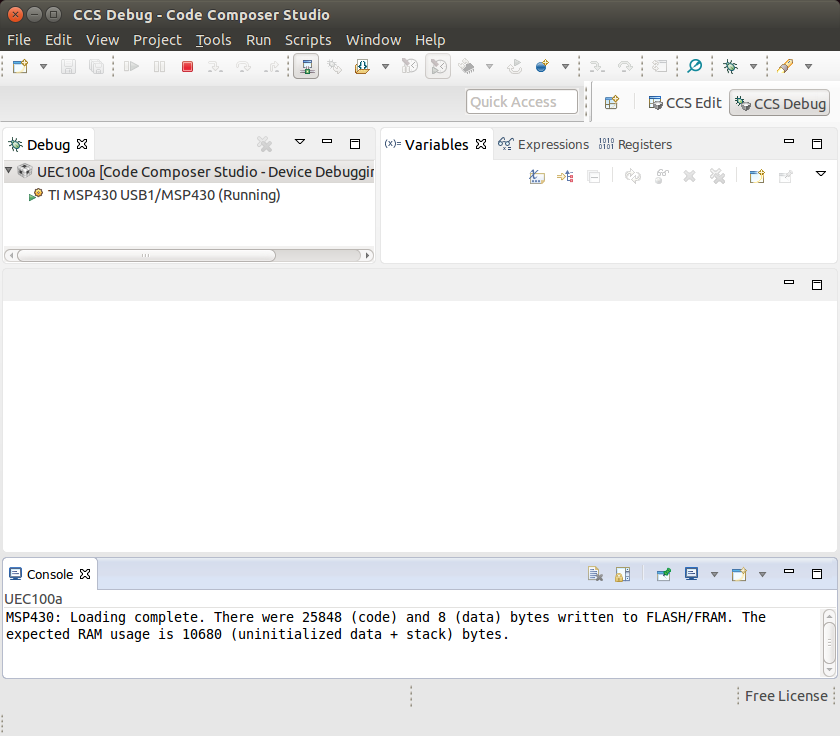
When I click the debugger button, instead of seeing the source code with the options for Run / Step, etc. I get the following screen:


There is no pause button or run button.

The debugger runs for me on another computer using the same MSP-FET430UIF the same target and the same source code.

I tried to completely remove Code Composer Studio and re-install but I am getting the same results.

I tried on several computers with the same results.

  • Hello Joshua,

    What changes did you make to your project before being unable to correctly enter a debug session? Can you run TI demo code on the target without any abnormalities? Are there any similarities between the versions of CCS or types of OS on the computers that do work vs. the ones that don't?  Make sure that the WDT does not fire during the C startup code, or else you will never enter the debugger correctly.

    Moving this thread to the Code Composer Studio Forum for their expertise on the matter.

    Regards,
    Ryan

  • Hello Ryan,

    Thanks for your help.

    I have 3 computers that I am using for development. A desktop, a ThinkPad and a Sony notebook. All running 64-bit Ubuntu 14.04.3.

    All 3 used to work until recently.

    When I upgraded my desktop and the Sony to Code Composer Studio Version: 6.1.1.00022 I noticed that the ThinkPad would not upgrade but kept saying "No updates were found". To keep the 3 computers at the same level I uninstalled CCS from the ThinkPad and did a new installation. This time it came up with Version: 6.1.1.00022 like the other two but I was no longer able to debug.

    I tried to check out a fresh version of my source code from git but I am getting the same problem.

    I tried to copy over the source folder from the desktop (where debugging is functional) to the ThinkPad  (in case something gets lost going through git) but I am still getting the same problem.

    I experimented with clean installing CCS on a VirtualBox on the desktop and the ThinkPad to see if there is a USB hardware problem with the ThinkPad  but I am getting the same debug problem on both.

    I did not try the demo code but I did try to exclude most of my source files and comment out the code that needs them, leaving a very minimal main() function. When I did that the problem went away. Including the code back in makes the problem come back on the ThinkPad but not on the other computers.

    I am disabling the Watchdog at the beginning of main()

    //============================================================
    int main(void) {
    //============================================================

    WDTCTL = WDTPW + WDTHOLD; // Stop watchdog timer
    __no_operation();
    __no_operation();

    At this point I do not dare doing any upgrades or changes to CCS on the 2 working computers since I am working on a critical project that does not allow downtime.

    Thanks!

    Josh

  • Hey Josh,

    So the problem only happened after you upgraded to 6.1.1? Would the issue disappear if you went back down to 6.0.1? You can have two different installations of CCS on your computer at the same time. Also, could you figure out exactly which code segment/source file causes the problem? This would be of great help to the CCS team for debugging purposes.

    Regards,
    Ryan
  • Hi Ryan,

    Thanks again for working with me on this!

    I did not mention it before but I have already tried 6.0.1 with no luck. Debugger still does not work.

    I will try to isolate the code segment that causes the problem but that will not be easy since there is a lot of interaction between the different parts of the code.
    Could it be related to code size? I am using MSP430f5419a.
    $ /opt/ti/ccsv6/tools/compiler/gcc_msp430_4.9.14r1_364/bin/msp430-elf-size UEC100a.out
    text data bss dec hex filename
    26062 3316 7658 37036 90ac UEC100a.out
  • Josh,

    The MSP430F5419A has 128 KB of flash so I don't think this is a problem. You can try changing your project to a large memory/data model and see if this fixes the issue, but I would have expected a warning or error to appear if this were the case.  Are the compilers any different on your separate systems?

    Regards,
    Ryan

  • Hi Ryan,

    I compared the makefiles between the working and the non-working installations.

    The only difference is that the non-working version has:
    /opt/ti/ccsv6/tools/compiler/gcc_msp430_4.9.14r1_364

    and the working version has:
    /opt/ti/ccsv6/tools/compiler/gcc_msp430_4.9.14r1_167

    (3 places)

    I copied the folder /opt/ti/ccsv6/tools/compiler/gcc_msp430_4.9.14r1_167 from the working
    computer to the non-working computer. I modified the non-working makefile to invoke r1_167. I ran:

    make clean
    make all

    I then used Uniflash to program the board. Everything works.

    When I change back to r_364, run make and program with Uniflash nothing works.

    So it is a compiler version issue.
  • Hi Ryan,

    I got the installation on the ThinkPad to work.

    I copied /opt/ti/ccsv6/tools/compiler/gcc_msp430_4.9.14r1_167
    from the working installation to the non-working installation.
    cd /opt/ti/ccsv6/tools/compiler/
    mv gcc_msp430_4.9.14r1_364 gcc_msp430_4.9.14r1_364_original
    ln -s gcc_msp430_4.9.14r1_167 gcc_msp430_4.9.14r1_364
    Thanks,

    Josh
  • Joshua Sakov said:
    The only difference is that the non-working version has:
    /opt/ti/ccsv6/tools/compiler/gcc_msp430_4.9.14r1_364

    and the working version has:
    /opt/ti/ccsv6/tools/compiler/gcc_msp430_4.9.14r1_167

    I have created the following example which recreates your problem symptoms:

    /*
     * A LED toggle program for a MSP430F5438 which uses a 16,000 byte initialised array
     * which requires the Watchdog to be disabled during start-up in order to reach main.
     */
    
    #include <msp430.h>				
    
    /* Port10 bits connected to LEDs on the Olimex MSP430-5438-STK */
    unsigned int output_bits[8000] = {BIT7 | BIT6};
    
    int main(void) {
    	WDTCTL = WDTPW | WDTHOLD;		// Stop watchdog timer
    	P10DIR |= output_bits[0];
    
    	for(;;) {
    		volatile unsigned int i;	// volatile to prevent optimization
    
    		P10OUT ^= output_bits[0];
    
    		i = 10000;					// SW Delay
    		do i--;
    		while(i != 0);
    	}
    	
    	return 0;
    }
    

    When compiled with gcc_msp430_4.9.14r1_167 the program operates correctly.

    When compiled with gcc_msp430_4.9.14r1_364 the program fails to reach main, with the CCS 6.1.1 debugger showing only the red Terminate button as available:

    The changelogs.txt file in the gcc_msp430_4.9.14r1_364 lists the following change which I believe has caused the problem:

    ChangeLogs from build 341 to 364
    libgloss/ChangeLog.RedHat:
    > 2015-08-20  Nick Clifton  <nickc@redhat.com>
    > 
    > 	* msp430/crt0.S: Remove watchdog disabling code.
    > 
    

    I am not sure why the watchdog disabling code was removed from the start-up, and will attempt to find out if there is a way of re-enabling disabling of the watchdog during startup for those projects which require it.

    [The TI MSP430 linker has the "Hold watchdog timer during cinit auto-initialization (--cinit_hold_wdt)" to control this]

  • Chester Gillon said:
    I am not sure why the watchdog disabling code was removed from the start-up, and will attempt to find out if there is a way of re-enabling disabling of the watchdog during startup for those projects which require it.

    Adding the following to the previous test program then allowed the program to initialize when compiled with either the gcc_msp430_4.9.14r1_167 or gcc_msp430_4.9.14r1_364 compiler:

    // disables the watchdog between the __start() and the __crt_0init()
    __attribute__ ((naked,section(".crt_0010init")))
    void __gcc_disable_watchdog() {
        WDTCTL = (WDTPW + WDTHOLD);
    }
    

    When compiled with gcc_msp430_4.9.14r1_364 the watchdog is disabled once before the run time library start up executes.

    When compiled with gcc_msp430_4.9.14r1_167 the __gcc_disable_watchdog function doesn't do any harm, it just means the watchdog is disabled twice in succession before the run time library start up executes.

    Got the idea from CCSv6 MSP430 GCC Watchdog disable pre main, but had to adjust the numeric part of the .crt_0010init section name used since the linker script sorts the names of the .crt_* sections to control the order in which they are executed.

  • Hi Chester,

    Thanks!!!!

    I will test on my system when I am back at the office next week.

    Regards,

    Josh
  • Yes, your suggestion fixed my problem.

    Thanks!!!

    Josh