This thread has been locked.

If you have a related question, please click the "Ask a related question" button in the top right corner. The newly created question will be automatically linked to this question.

mklib doesn't work on OS X

Other Parts Discussed in Thread: CCSTUDIO

Hi,

I am new to CCStudio. 

My project cannot be compiled completely on my laptop, I was very confused.

Here is a part of compiled result:

Following are my programming environment:

  • OS : Mac OSX EI Captain 10.11.5
  • CCS version : 6.1.3.00033
  • Compiler : ARM Compiler Tools 5.2.7

Here is my guessing : the mklib doesn't work correctly, it doesn't generate the required runtime library for my project, and then causing the linker error.

I have tried different version of compilers, but the problem still there.

I don't understand how to fix this problem, seems like OS problem because the same project can be compiled correctly on Windows 7 with CCS v6.

Anyone has any idea about it? I'll be very appreciate for it!

Thanks for your time!

  • I can reproduce this error on MacOS. It appears that the mklib program that builds the runtime library in ARM CGT 5.2.7 is generating the segmentation fault. The ARM CGT 15.12.1.LTS does not generate the same error, however that version does not support ARM9 ABI hence is not a viable solution for you.

    I will file a bug report for this MacOS issue, but in the meantime, can you copy over the rts library created on the Windows machine to your Mac machine? That should allow you to build the project on MacOS.

  • Is there any difference between rts libraries generated by different version of compilers? If not, I already tried rtsv4_A_be_tiarm9.lib generated at ti-cgt-arm_5.2.5 and moved to my MacOS ti-cgt-arm_5.2.7/lib folder. But it doesn't work, and seems like library made in Windows not fit for MacOS.

    I tried it again today, seems linking successful. But other problems came out.

    It also shows on Windows when I compiled it. I tried solution of TI Wiki, problems are still not been solved.

    Any instruction for this?

    Thanks again!

  • RHC said:
    Is there any difference between rts libraries generated by different version of compilers?

    In general, it should be fine as long as the version of linker is newer than the version used to build the library. Since you are using v5.2.7 linker for the build, it should be ok to link with a runtime lib built with v5.2.5.

    The link errors "program will not fit into available memory" is because the size of some of the output sections is greater than the memory available to allocate them into. The wiki link you referenced already has recommendations for resolving that error. You  may need to reduce your code size or re-allocate certain sections to other parts of memory to allow it to fit (by modifying your linker command file).

    For the unresolved symbol errors, please see this wiki: http://processors.wiki.ti.com/index.php/Compiler/diagnostic_messages/10234

  • FYI, the bug tracking # for the segmentation fault generated by the mklib utility when building the runtime library is: CODEGEN-26.

  • Hi AratiG,

    Thanks for your patiently answer, I already fixed those problem by applying your reply.

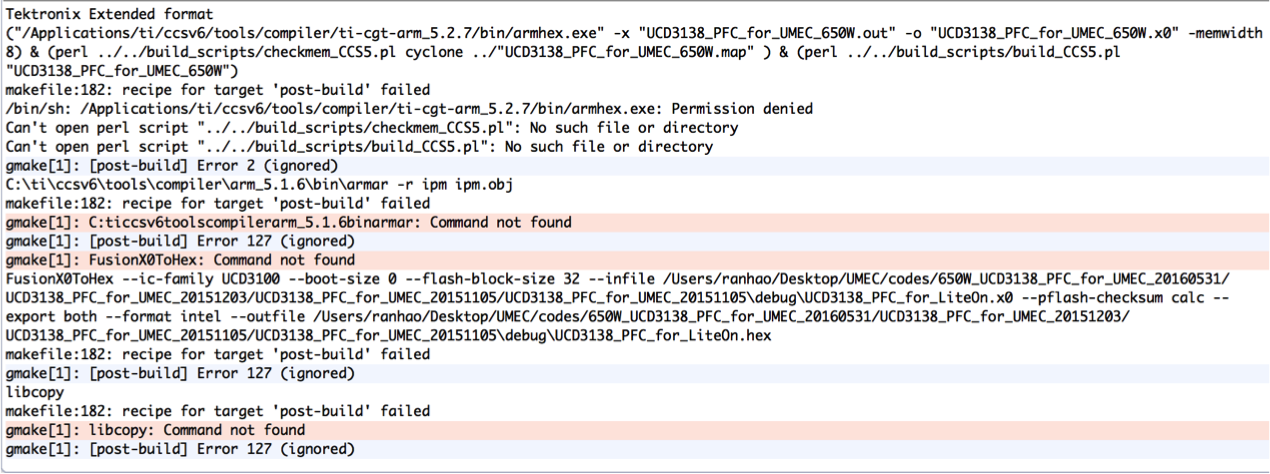
    But there has another problem is:

    Does FushionX0ToHex has Mac version? I thought this is last problem, if I get through this then I can compile it correctly.

    The only thing I need is to generate the right .x0 file to download firmware to my board.

    Thanks for helping me soooooo much, REALLY appreciate it !

  • The post-build step is invoking armhex.exe which is the Windows executable. The MacOS executable is just armhex. 

    The next error indicates that it is not able to find the perl scripts at the specified directory.
    One of the errors following that is because the command is calling the armar tool from a Windows directory.
    All of these commands have to be updated for Mac and to reflect the correct paths.

    RHC said:
    oes FushionX0ToHex has Mac version?

    I am not familiar with this tool. This question would be better answered in the Digital Power forum, so I would suggest starting a new post there. Also please note that even though the project build may be successful on MacOS I do not have any knowledge whether the drivers are supported on MacOS,and to what extent the download and debug process for UCD devices is supported on MacOS. This may be an appropriate question for the Digital Power forum as well.