This thread has been locked.

If you have a related question, please click the "Ask a related question" button in the top right corner. The newly created question will be automatically linked to this question.

std.h could not open source file "ti/targets/select.h"


Hi,

    I am using one of the TI RTSC project example.  I built/ran and I got the .out file. Everything is fine. Now I want to create a library for this TI project and make sure this library built before TI project.  I created a CCS project parallel with TI project directory.  The only thing I did is create .c file and include <xdc/std.h>, then I got this error.  I traced into the std.h I saw.

                   There are many ways to get rid of this error, but I am looking for the cause and best way to solve this error.  I am using

XDCTool 3.31.2.38 and Compiler TIv7.4.12.  MCSDK 3.1.4.7 and EVMK2H

            v/r

            Yoyo

  • Yoyo Lee said:
    There are many ways to get rid of this error, but I am looking for the cause and best way to solve this error. 

    Generally this error means that the compiler was unable to open the mentioned file because it was not provided the path to find the file. 

    This file is usually within the \bios_xx\packages folder. Check the exact path for your MCSDK installation and try adding that to the Compiler's Include Options (under --include_path). 

    Usually in RTSC projects, the paths to packages are provided to the XDCTools under the Package Repositories option (rather than directly to the compiler). This is then passed to the compiler via an auto-generated compiler.opt file. As a reference, you can see the contents of this auto-generated file in your example project that is already built.

    I am not sure how you are creating this new project, but if it is a RTSC project then it should build ok as long as the package paths are specified under the --xdcpath option (under XDCtools->Package Repositories).

  • Hi AartiG,

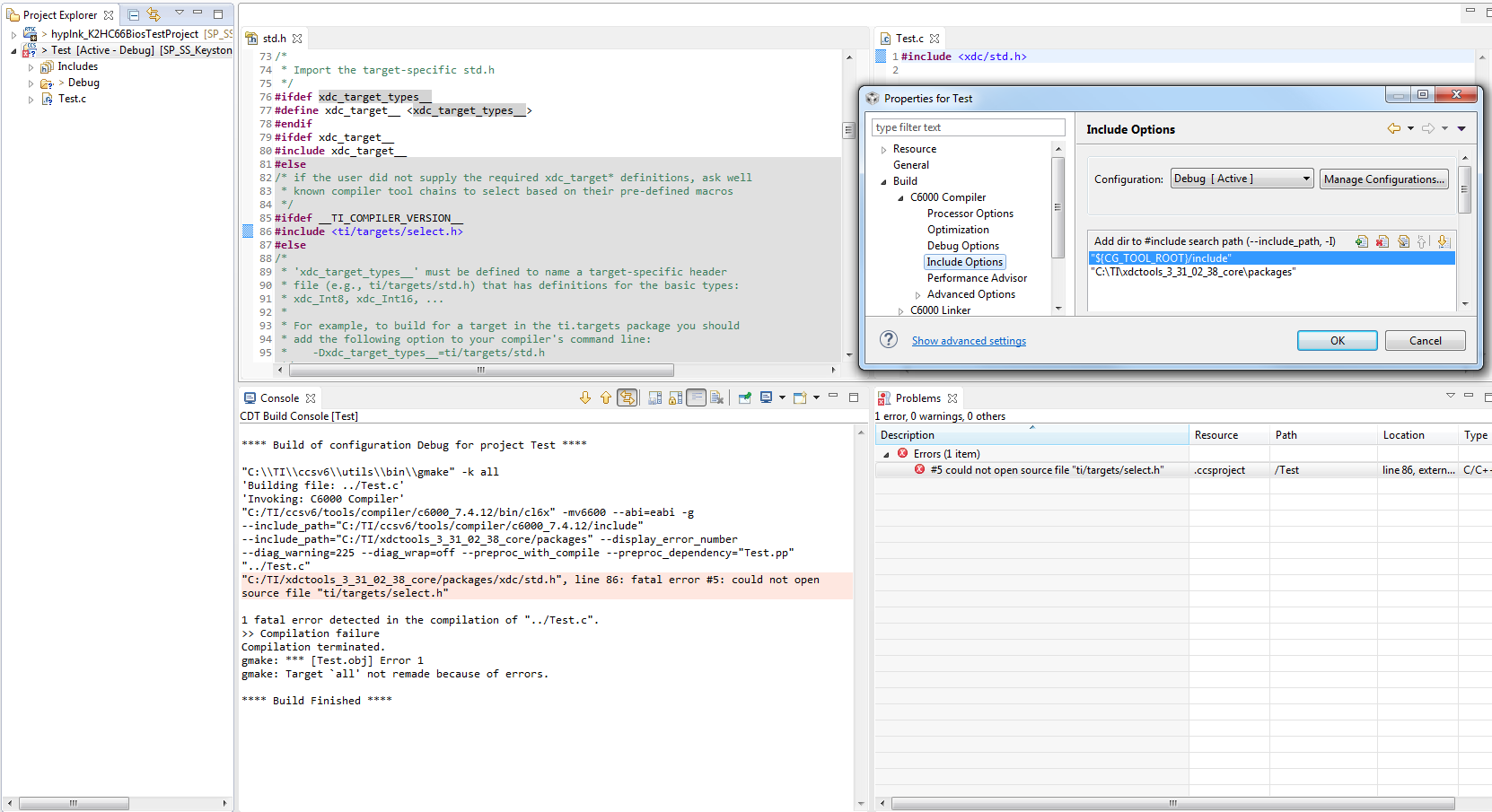
                  Thank you for the response.  I think I did not explain the situation correctly.   I took scree shot to make sure we are on the same page.  Inside my "Test.c" I only include "xdc/std.h".  Since I build my test CCS project first, then hyplnk_K2H66BiosTestProject 2nd.  When it reach "std.h" it somehow knows xdc target has been defined, that's why it went to ifdef not else.    My goal is use this "Test" CCS project as library for hyplnk_K2H66BiosTestProject, so I must build first, but "Test" does not know what tool I will use(I think).  I feel almost like chicken and egg issue.  I think all of the path issue inside  hyplnk_K2H66BiosTestProject should has been taken cared for me, but I have not reach there yet.

         v/r

         Yoyo

  • Yoyo Lee said:
    My goal is use this "Test" CCS project as library for hyplnk_K2H66BiosTestProject, so I must build first,

    If the goal of the "Test" project is to create a library (.lib) and not an executable (.out), then it's Output Type should be set to Static Library, not Executable. You can set the Output type at the time of project creation. It looks like yours is set to Executable so just wanted to mention it in case that is something you overlooked.

    For the remaining compiler error, as I mentioned earlier, the file ti/targets/select.h is in the \bios_xx\packages folder. Check the exact path to where the bios tools are within your MCSDK installation and add that path to the Compiler's Include Options (under --include_path). Right now the only path you have added to the Compiler's Include Options is \xdctools_xx_core\packages.