This thread has been locked.

If you have a related question, please click the "Ask a related question" button in the top right corner. The newly created question will be automatically linked to this question.

MSP430 Emulators & Dev Sprt install error: Requires debugserver 6.2.1

Other Parts Discussed in Thread: CCSTUDIO

CCS Version: 6.1.3.00034

I am trying to update "MSP430 Emulators and Device Support Files". I am getting an error that I need debugserver 6.2.1. However, I cannot find that under Updates or Add New Software.

Where\How do I update the debugserver?

Here is the error message:

Cannot complete the install because one or more required items could not be found.
  Software being installed: MSP430 Emulators and Device Support Files 6.3.6.2 (com.ti.ccstudio.msp430.emu.win32.feature.group 6.3.6.2)
  Missing requirement: MSP430 Emulators and Device Support Files 6.3.6.2 (com.ti.ccstudio.msp430.emu.win32.feature.group 6.3.6.2) requires 'com.ti.ccstudio.debugserver.win32.feature.group 6.2.1' but it could not be found

Regards,

Jim

  • Hi Jim,

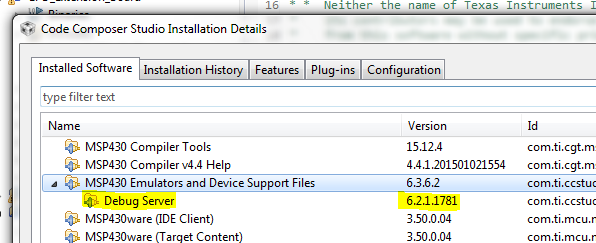
    Can you confirm which version of the "MSP430 Emulators and Device Support Files" you currently have installed by going to:

    • Help -> About Code Composer Studio
    • Click "Installation Details"
    • Locate the "MSP430 Emulators and Device Support Files" -> Expand by clicking right-facing arrow

    Below is a screen capture from my CCS Version 6.2.0.00050 installation, which leads me to believe you may need to update your CCS version to CCSv6.2 by installing from here:

    You can try updating this component by having the "MSP430 Emulators and Device Support Files" highlighted as shown above and selecting 'Update...' from the bottom of the Installation Details window, but I have not tried this process in the past so cannot comment on the results.

    Best Regards,

    Mark-

  • Version 6.2.0.1631

    ====================================

  • Hi Jim,

    Your specific message appears slightly different, but following "5." from the Troubleshooting - Update Features wiki page may resolve the conflict. The "Code Composer Studio v6 Updates" is the specific software site to select when attempting the installation.

    Did you receive an error when attempting to update from the installation details page matching the first one you received?

    Best Regards,

    Mark-

  • I uninstalled CCS Version: 6.1.3.00034 which removed it from "Programs & Features" in Win7.
    I downloaded CCS 6.2. However, when I went to install it, asked me to remove 6.1 first. The uninstaller removed it from Progams & Features but the directory was still in tact with many sub-directories and about 14k files in them. I nuked the directory and installed 6.2.

    That fixed it.

    Jim
  • Jim,

    Thank you for reporting back your results. The MSP430 Emulators and Device Support Files version 6.3.6.2 requires CCS 6.2 for it to install. And CCS 6.2 is not available as an "update" to 6.1. So, as you realized, you would need to either uninstall 6.1 and install 6.2 (if installing to same directory), or can have both versions installed side-by-side (in different directories) and then apply the MSP430 Emulators update to CCS 6.2.