This thread has been locked.

If you have a related question, please click the "Ask a related question" button in the top right corner. The newly created question will be automatically linked to this question.

CCS v3.3 is not connecting to my C6713 DSP Processor, what to do?

Other Parts Discussed in Thread: CCSTUDIO

Heya'll,

I'm trying to connect CCS V3.3 with my C6713 DSP Processor on Windows 7, but everytime I try to connect it, the following error comes up.

----------------------------------------------------------------

I/O Port = 540

Board Name: C6713 DSK
Cpu Name: CPU_1

Abort:        Close Code Composer Studio.
Retry:        Try to initialize the emulator again.
Ignore:        Ignore the initialization error and start
        potentially without target debugging access.
Diagnostic:    Run diagnostic utility.

----------------------------------------------------------------

when I ignore it, it just won't connect to the DSP Processor.

when I click on Diagnostic following dialog box appears:

----------------------------------------------------------------

Diagnostic Utility: "" failed to load

----------------------------------------------------------------

what should I do now?

  • Arsal,

    If you are using the C6713 DSK board the message indicates the CCS configuration is ok, but this error is common when the device drivers are not properly initialized. This can have several causes, therefore I suggest to check if the device driver is properly configured.

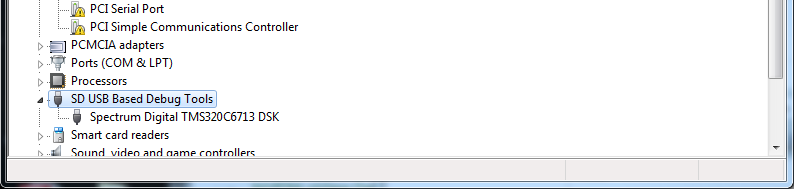
    Go to Control Panel, select Device Manager and check if there is an entry called SD USB Based Debug Tools (check the attached picture). If this entry has a yellow warning sign, then the device drivers did not install properly. Right-click on its entry and select Update Driver Software... select Browse my computer and point to the installation directory (typically C:\CCStudio_v3.3\specdig\xds510usb_win64).

    After that I would expect the board should be properly connected.

    Just FYI, keep in mind that CCSv3.3 was neither designed to work with Windows 7 nor in a 64-bit Operating System, therefore unfortunately these issues are more likely to happen than in a "plain" 32-bit XP.

    Hope this helps,

    Rafael