Other Parts Discussed in Thread: TMS320F28377D
Tool/software: Code Composer Studio
Dear sir,
My development system consists of windows 10 pro 64 bit, CCS7.2 and TMS320F28377D customizing board and now installed SYS/BIOS version is 6.50.1.12 and XDCtools version is 3.50.2.20.
Any CCS project except RTSC project is working well while a CCS7 is in editing, compiling and debugging.
But I don't have a problem in compiling and debugging a RTSC project but editing a RTSC project ecpecially editing graphycally.
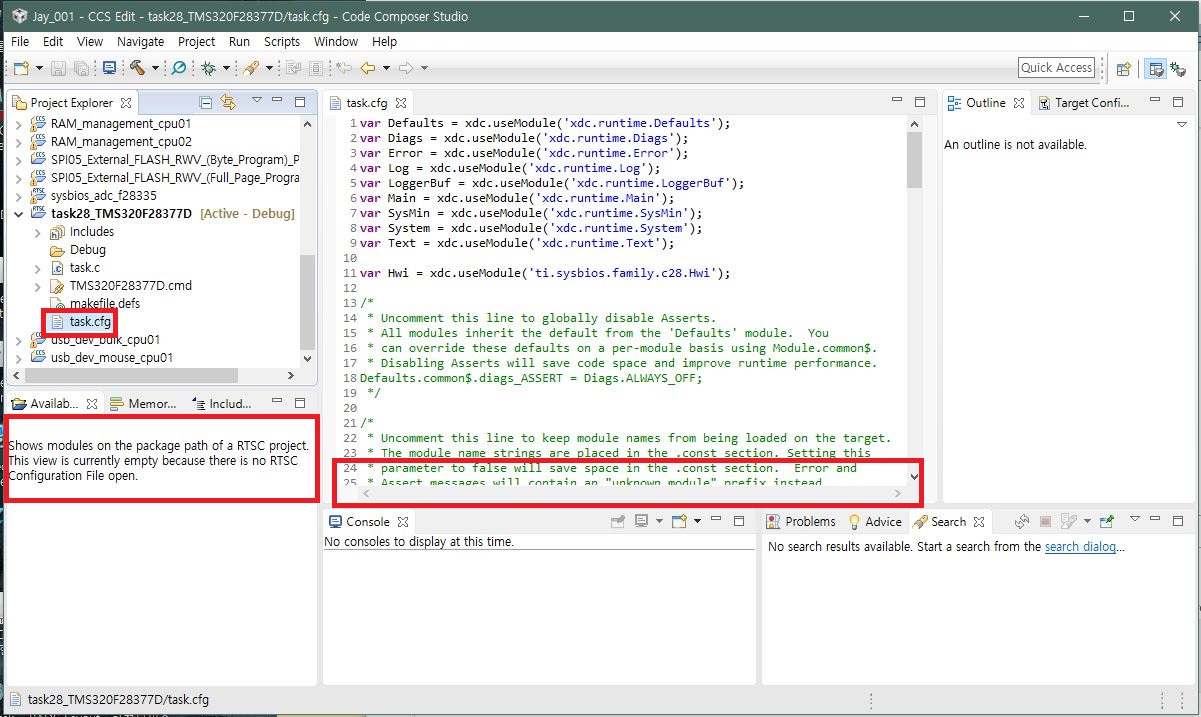
My CCS7 is not activate Available Products while select *.cfg. This window shows "Shows modules on the package path of a RTSC project....." , and the icon of *.cfg file in [Project Explorer] is not RTSC config file type but common text file, and a editor window is only for text edit without bottom select tap for selecting [SYS/BIOS], [Properties], and [cfg Script].
And [Available Products] item in [Show Vew] select window is inactive like below image.
How can I active XGCONF graphical editor?
Thank you for your kind reply in advance.