This thread has been locked.

If you have a related question, please click the "Ask a related question" button in the top right corner. The newly created question will be automatically linked to this question.

CCS/LAUNCHXL-CC1310: DSLite load image.out asserts "halt on boot" flag causing application to not run until manual reset or powercycle

Part Number: LAUNCHXL-CC1310
Other Parts Discussed in Thread: SIMPLICITI, CC1310

Tool/software: Code Composer Studio

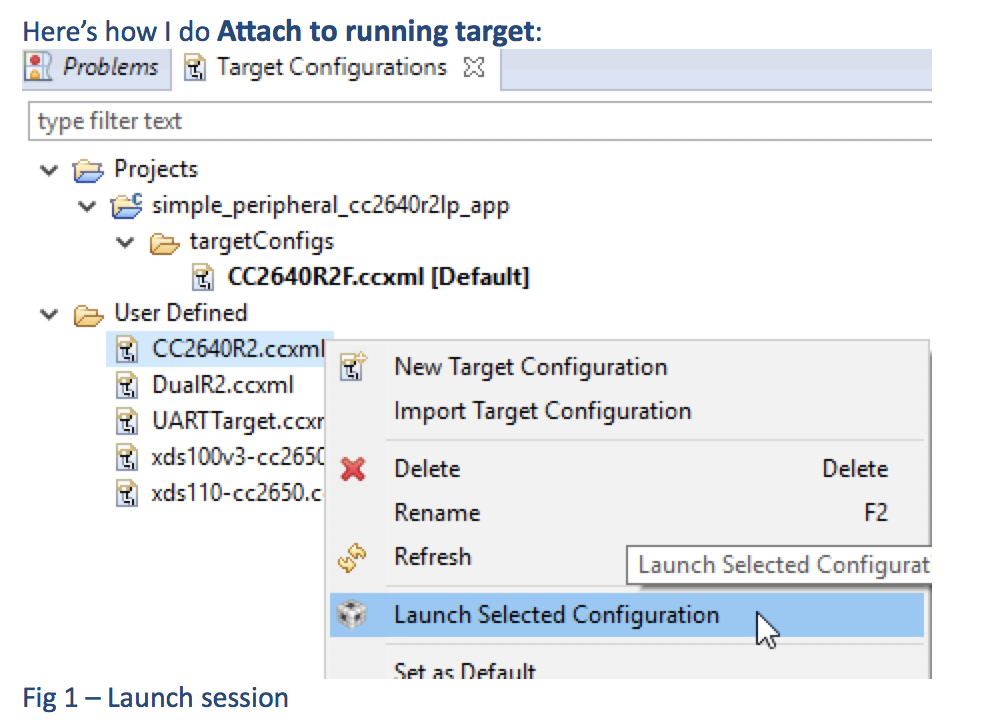
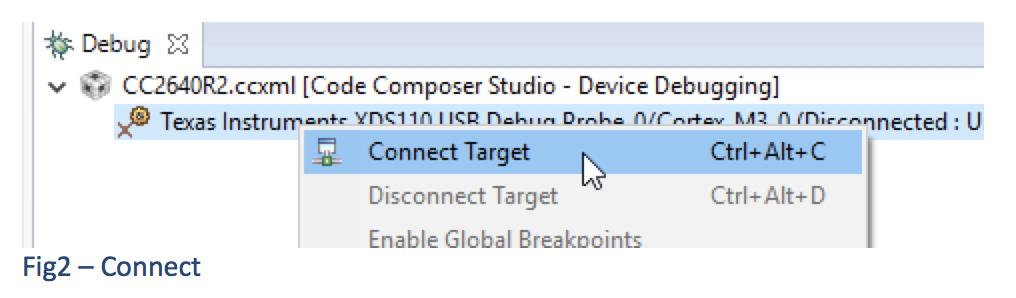
Please see

Today I confirmed that the title behaviour is indeed occurring, after DSLite load image.out, the application does not run, and attaching the debugger shows it deadlocked at address 0x10003A12. Hitting reset or powercycling the target causes the application code to run normally.

  • Michael,

    If I look at the GEL initialization file used by CC1310 it looks like it explicitly does a board reset on startup if the debugger has not yet connected to the board.  You could try commenting out that line

    The file is cc26x0.gel in ccsv7/ccs_base/emulation/gel

    StartUp(int major, int minor, int patch)

    {

       /* Initialize memory map */

       memorymap_init();

       /* Debugger specific handling */

       if(GEL_MatchesConnection(".*TIXDS.*") == 1)

       {

           GEL_LoadGel("$(GEL_file_dir)/cc26xx_connect_util.gel");

           GEL_LoadGel("$(GEL_file_dir)/cc26x0_xds.gel");

           DefineResets(0);

           // Issue Board Reset to ensure device is in a known state

           // Note: If you want to attach to a running target without resetting the

           //       device, you must comment out the following 4 lines:

           if(!GEL_IsConnected())

           {

               GEL_AdvancedReset("Board Reset");

           }

       }

       else if(GEL_MatchesConnection(".*JLink.*") == 1)

       {

           GEL_LoadGel("$(GEL_file_dir)/cc26xx_jlink.gel");

       }

       else

       {

           GEL_TextOut("Error: Unknown debugger.\n");

           return;

       }

    }

    similarly in cc26x0.gel I see that a board reset is issued prior to loading the program.  That is probably ok.

    Regards,

    John

  • I commented that line a long time ago (in February) so I could connect the debugger to running/crashed code without nuking all available debug information while doing so.
  • Michael,

    I am looping in some other people with expertise on the device to help.

    John
  • Michael,

    I want you to know that we have not forgotten this and are still trying to get you some help.

    Regards,
    John
  • I was able to get the following information from someone:

    • I suppose it’s possible they have enabled watchdog, and their chip has reset in the meantime, or the reset line + tck is toggled for some other reason.
    • I would look at a logic analyzer trace of TCK,TMS,Reset
    • In any case, the only reason you would get stuck at this address is if there is a pin reset quickly followed by or simultaneous with TCK toggles, or if there is just an internal system reset / fake pin reset / watchdog reset while the debug system and HiB is activated.

    They also provide some info on how they do their connection to a running 26xx which should be the same for cc13xx.  BTW are you still using CCSv7.1 or did you change to 7.2?  Apparently in 7.2 the gel files for 26x0 and 13x0 are merged so you would need to apply that gel file tweak to the cc26x0.gel file.

  • We are not using the watchdog because it seems to be terribly broken.

    We're using the XDS110 debugger on the LAUNCHXL board, is there some reason it would emit the signal patterns you describe?

    I am using CCS7.1.0.00016, I didn't realise there is a new update since CCS's "Check for updates" says "No updates were found in available software sites".

    PS: how do you have symbols for the 0x1000 region in that screenshot? I've been asking for that exact thing for literally months with no result
  • Well at least I can help with the symbol part as someone showed me that.

    Go to the installation folder for the SDK. Then under /source/ti/devices/<name of device
    <sdk>/source/ti/devices/cc13x0/rom/driverlib.elf
    In that folder there is also a c file and a readme. The readme gives as tip on getting the source association to work.
  • What package/download is driverlib.elf in? I don't have that file in my CCS+tirtos+CC13xx/CC26xx driverlib installation.

    The closest named file I have is tirtos_cc13xx_cc26xx_2_21_00_06/products/cc13xxware_2_04_03_17272/driverlib/bin/ccs/driverlib.lib which appears to be the NOROM (in-flash) versions of driverlib functions
  • It comes with the SimpleLink cc13x0 SDK

  • Hi Michael,

    Regarding:

    Michael Moon said:
    Today I confirmed that the title behaviour is indeed occurring, after DSLite load image.out, the application does not run, and attaching the debugger shows it deadlocked at address 0x10003A12

    You reported that upgrading to CCSv7.2.0 helped resolve a similar issue:

    https://e2e.ti.com/support/development_tools/code_composer_studio/f/81/p/609640/2253134#2253134

    Just want to follow up with you in this thread to see if this issue is resolved also.

    Thanks

    ki

  • This issue is still present.

    If I call SysCtrlSystemReset or trigger watchdog timeout, my project seems to deadlock instead of resetting