This thread has been locked.

If you have a related question, please click the "Ask a related question" button in the top right corner. The newly created question will be automatically linked to this question.

CCS/MSP430FR5994: Device-id "MSP430FR5994" is not recognized!

Part Number: MSP430FR5994
Other Parts Discussed in Thread: MSP430WARE,

Tool/software: Code Composer Studio

Hello,

I wanted to review a DSPLib project and tried to open Software/MSP430Ware/Libraries/DSPLib/Example Projects/Transform/transform_ex1_fft_fixed_q15 but an error message was poped up as below
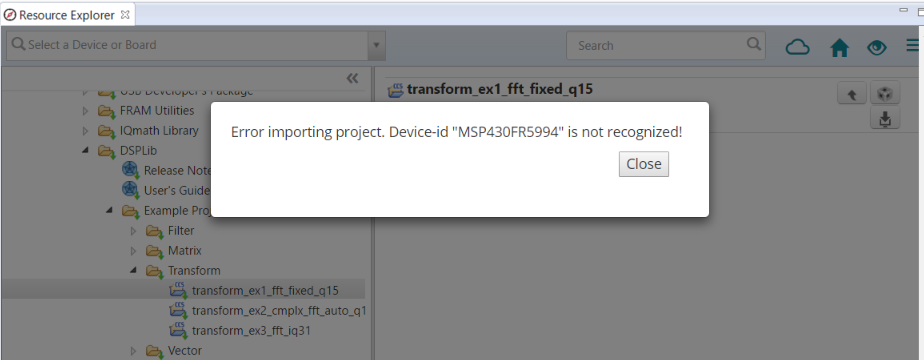
Please let me know what the problem is.

Thank you in advance.

  • A common cause for that error is that the correct device support is not installed. Did you select the MSP430 family of devices when installing CCS?

    One way to confirm this is to see if you can create a new project for that target device. Go to menu Project -> New CCS Project and see if you can select MSP430FR5994 in the Target list. If the device is not in the list, then that confirms that device support for MSP430 family is not installed.

    You can add support for it by re-running the main CCS installer, point it to your existing installation directory and select the MSP430 device family.

  • Hi,

    I wanted to know if there is any way to add new devices which were not installed during the 1st ccs installation.

    So... I need to reinstall the ccs for adding new devices.

    Thank you for your clear instruction.

  • Charlie Choi said:

    I wanted to know if there is any way to add new devices which were not installed during the 1st ccs installation.

    So... I need to reinstall the ccs for adding new devices.

    Yes, you need to re-run the CCS installer, but only select and add the new processor families that were not installed the first time.

    Please see this link: http://software-dl.ti.com/ccs/esd/documents/ccsv7_updates.html#changing-the-code-composer-studio-installation