This thread has been locked.

If you have a related question, please click the "Ask a related question" button in the top right corner. The newly created question will be automatically linked to this question.

CCS: CCS xdc tools - testing compiler command line parameters


Tool/software: Code Composer Studio

generally, most CCS project have a CFG file that is processed by configuro to configure TIRTOS and driver lib.

In my case, the file is called "release.cfg", CCS - when building the example application invokes "configuro" with numerous parameters.

In the "release.cfg" file - I need to test to see if a specific compiler command line option is enable - if it is enabled, I need to modify other things in the 'release.cfg' file.  In pseudo code, I need to the following:

if  compiler command line option:  '-DFOOBAR=1' is present on the command line

then

   /* move the reset vector to another address */

   m3Hwi.resetVectorAddress = 0x50;
   /* Vector table lives at start of RAM */
    m3Hwi.vectorTableAddress = 0x20000000;

else

   /* leave the reset vector at address 0, make no modifications */

endif

Question How do I get access to the compiler command line options at that point?

Note: Specifically - this is the command line options that are GIVEN to the configuro application with the "--compilerOptions" parameter.

If you could show me something simple like:

print( "the compiler options are: " ???????? )

that would be great.

  • Hi Duane,

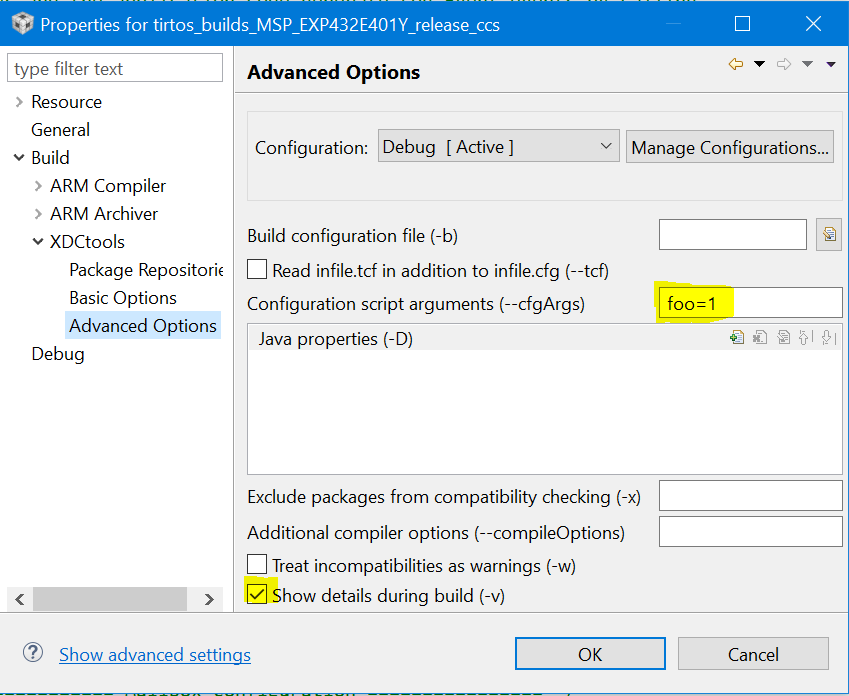
    You can pass into configuro via --cfgArgs. For example, I add "foo=1" here in project properties (along with verbose output):

    Then in the build output you'll see --cfgArgs "foo=1".

    In the .cfg I added this and I got "howdy1" in the build output.

    if (foo) {
    print("Howdy" + foo);
    }

    You can get the compile options specified by the xdc target, but those are the ones I think you want. You are looking for the ones that you define in the project properties...correct? Unfortunately other then replicating the ones you are interested in via the cfgArgs, we don't have a way to get to these in the .cfg file.

    Todd

  • No - i want the compiler flags specifically

    There are numerous compile "-Dsomevalue=1" in the compiler options, I need to inspect them and take action based upon those values.  It's not practical to do it the other way.

    While yes, I could do "two things" - the "-foo=1" and the "-DSOME_DEFINE=1" method 

    I would prefer the "one-and-only-one" rule - I have existing C & files that triggers off the "-DSOME_DEFINE=1" - and thus, i want the CFG file to inspect the compiler options and - if it finds the string: "-DSOME_DEFINE=1" do something special.

  • Duane,


    I agree that one place is much more desirable, but the compile options you are looking for are not available unless you add them into the ti.targets definition (which is a road I don't recommend).

    Another option (again less desired) is to define things in the .cfg and use it in the code. For example, you can have the following in the .cfg

    Program.global.bar = 1;

    and then in the source you can have

    #include <xdc/cfg/global.h>
    #ifdef bar
    #warning bar is defined
    #endif

    Todd
  • The compile options I am looking for are passed to the configuro script on the command line when configuro is invoked.

    Other things in Configuro have access to this, I just need access in the 'release.cfg' file

    From within the 'release.cfg' file - how can I get access to all of the existing cmd line parameters passed to the configuro invocation?
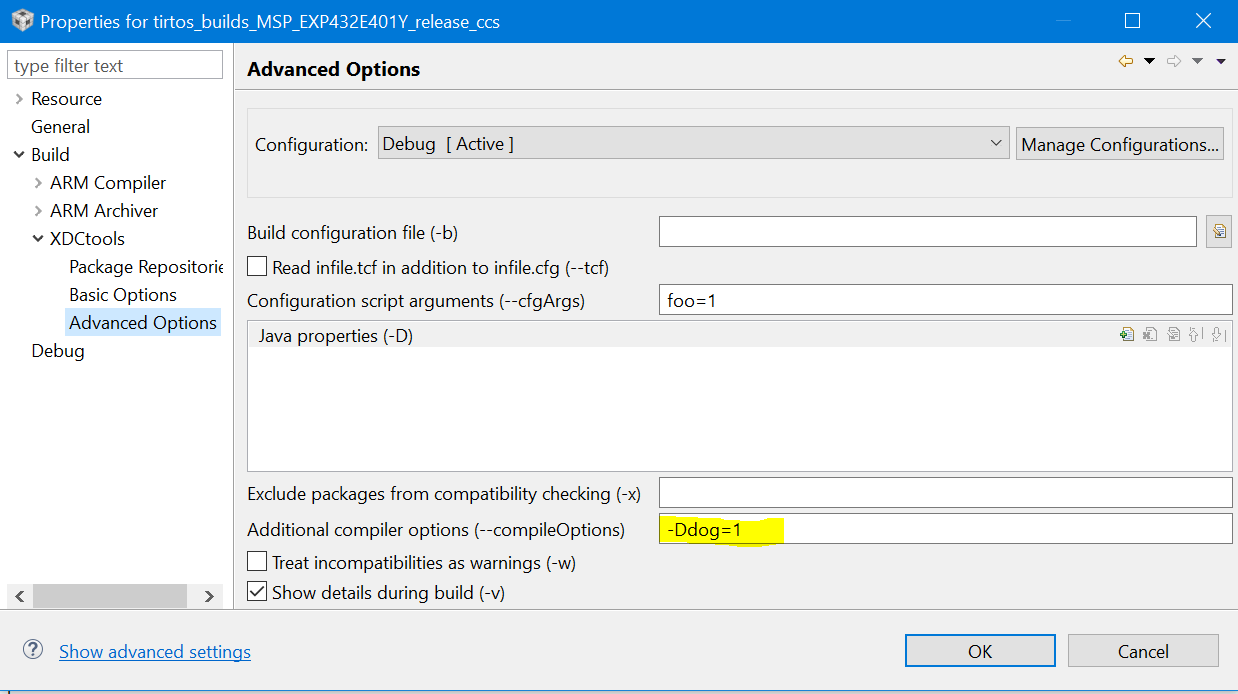
  • You can parse the output of Program.build.target.ccOpts.prefix in the .cfg to get the --compilerOptions settings. For example I have 

    Then in the .cfg, I do 

    print("profileOpts.compileOpts" + Program.build.target.ccOpts.prefix);

    I get this. in the build output:

    ...

    profileOpts.compileOpts-Ddog=1 -qq -pdsw225

    ...

    Please note, these compiler options are only being use in configuro to build the kernel. As is, none of the application source files (e.g. main.c) would not have "dog" defined.

    Todd

  • You gave me the clue I needed - this gives me what I want:

    print("===================================")
    print("Options are: " + Program.build.target.ccOpts.prefix) ;
    print("===================================");

    From this, I can inspect the string, and find the "-D" options I am looking for.