This thread has been locked.

If you have a related question, please click the "Ask a related question" button in the top right corner. The newly created question will be automatically linked to this question.

CCS/TMDSEMU110-U: Error in connecting device, while debugging using XDS110 debugger

Part Number: TMDSEMU110-U
Other Parts Discussed in Thread: CC3200, UNIFLASH

Tool/software: Code Composer Studio

Hi all,

I am using XDS110 debugger for debugging my CC3200 based custom board.

I changed my Target configuration according to XDS110 debugger settings.

I also run "TEST CONNECTION" which shows my JTAG connections are ok.

Now, when i am trying to debug it is showing me this error:-

"error in connecting target. Please check you connections.. "

When i am using CC3200 Launchpad Emulator section to debug my custom board it was working fine, i believe there is no hardware problem with my new board.

So, please suggest me some points so that i can resolve this problem.

Reagrds

Shubham

  • Shubham -
    the CC3200 is accessed by FTDI connection (as seen in the reference schematic) located here ==>

    More information that may be useful - in case you not using the CC3200 LaunchPad Emulator can be found here, too ==> 


    the XDS110 is used for CC3220.

  • Hi Josh,

    Yaa you are right. But after seeing its data sheet CC3200 is also supported by XDS110 and by using it i am able to debug but not flash my firmware.

  • Dear Shubham -

    there is no mention of the emulator in the datasheet.

    In the last minutes i did find an xml file that will help you. 

    <?xml version="1.0" encoding="UTF-8"?>
    <device description="CC3200 (SWD 2-Wire Debug)" id="CC3200_SWD" partnum="CC3200" HW_revision="1" desc="CC3200-SWD" xmlns:xsi="http://www.w3.org/2001/XMLSchema-instance">
        <jtag>
            <property id="SWD.MODE" ID="SWD.MODE" Type="choicelist" Value="swd+swo" />
        </jtag>
        <!-- Filter to list device under in project wizard -->
        <property Type="stringfield" Value="SimpleLink Wireless MCU" id="FilterString" />
        <router HW_revision="1.0" XML_version="1.2" description="CS_DAP Router" id="CS_DAP_0" isa="CS_DAP">
            <subpath id="subpath_0">
                <instance XML_version="1.2" desc="Cortex_M4_0" href="cpus/cortex_m4.xml" id="Cortex_M4_0" xml="cortex_m4.xml" xmlpath="cpus"/>
                <cpu HW_revision="1.0" XML_version="1.2" desc="Cortex_M4_0" description="Cortex_M4 CPU" deviceSim="false" id="Cortex_M4_0" isa="CORTEX_M4_CC">
                    <property Type="filepathfield" Value="../../../emulation/gel/cc3200.gel" id="GEL File"/>
                    <property Type="numericfield" Value="0x02000000" id="Access Port Designator"/>
                    <!-- Project Wizard Settings -->
                    <property Type="stringfield" Value="cc3200v1p32.cmd" id="LinkerCmd"/>
                    <property Type="stringfield" Value="-D=cc3200 --silicon_version=7M4 --code_state=16 --abi=eabi --float_support=vfplib"  id="CompilerBuildOptions"/>
                    <property Type="stringfield" Value="--stack_size=0x512 --heap_size=0x0" id="LinkerBuildOptions"/>
                    <property Type="stringfield" Value="cc3200_startup_ccs.c" id="FilesToCopy"/>
                    <property Type="stringfield" Value="true" id="IsElfDefault"/>
                    <property Type="stringfield" Value="little" id="Endianness"/>
                    <property Type="stringfield" Value="4.9.0" id="MinCodegenVersion"/>
                    <!-- GCC options -->
                    <property Type="stringfield" Value="cc3200.lds" id="GNULinkerCmd"/>
                    <property Type="stringfield" Value="-mthumb -march=armv7e-m -mcpu=cortex-m4 -mfloat-abi=soft -ffunction-sections -fdata-sections -DPART_CC3200" id="GNUCompilerBuildOptions"/>
                    <property Type="stringfield" Value="--gc-sections" id="GNULinkerBuildOptions"/>
                    <property Type="stringfield" Value="cc3200_startup_ccs_gcc.c" id="GNUFilesToCopy"/>
                    <!-- END Project Wizard Settings -->
                </cpu>
            </subpath>
        </router>
    </device>
    

     Try saving the attached XML file to your CCS installation in the …\ccs_base\common\targetdb\devices directory.  Then start CCS, create a new configuration and choose the XDS110 debug probe - In the device list you should see an entry for CC3200-SWD.  Choose that for the target, save, and it should be good to go.

  • Hi Josh,

    No, not in the data sheet of CC200. In the Userguide of XDS110, it is mentioned it supports CC3200 also. That's why we purchased it.
    Okay, i will try with that. Also i want to know how to flash, erase, list file using UNIFLASH tool with XDS110 probe connection configurations.
  • Shubham,

    Just adding to Josh's reply, I would first check all the connections between the XDS110 and the CC3200 device - the XML file that Josh mentioned above is already supplied with CCSv7.x and newer, but it is suitable only if you are using your device in SWD mode - if using JTAG, you should use the other configuration.

    In addition to the CC3200 schematics sent by Josh, another good reference for HW design is:
    software-dl.ti.com/.../emu_xds_target_connection_guide.html

    Also, the standalone XDS110 has a UART port that can be used independently. In principle this UART port could be used to flash the CC3200 device (I am able to connect to my CC3200 Launchpad using it), but the simple UART lacks the device reset signal - maybe Josh can provide additional details if this is required for mass programming or not.

    The XDS110 user's guide has the auxiliary connector pinout (which has the UART port) and comes with a convenient breakout board with all the signals easily accessible. Also, the short clip below shows the HW and CCS typical configurations to use it.

    https://youtu.be/GV1h61JyzcE

    One detail: if you are using the UART port in complete standalone mode (without powering the device or connecting to it), you must also connect the TGTVDD pin of the auxiliary connector to the 3,3V power supply of your board.

    Hope this helps,
    Rafael
  • Hello Rafael,

    Thank you for your value addition points.

    I am already able to use JTAG by changes in the configuration file.

    I am using the TCK, TDO, TDI, TMS, Vtarget and GND pins to debug and it is working fine.

    As you mentioned,  i am testing it for mass programming. For that, i am using UNIFLASH tool with XDS110 connection configuration.

    I connected UX, TX, TGTVDD and GND pins of AUX Breakout board. But i am not able to flash my program or format my sFlash using this configuration.

    Please suggest me regarding this.

    Regards

    Shubham

  • Shubham,

    Shubham Mittal said:
    I connected UX, TX, TGTVDD and GND pins of AUX Breakout board. But i am not able to flash my program or format my sFlash using this configuration.

    I can't necessarily tell why your system failed; can you try to program the launchpad and see if you are successful? 

    The connections I am using are: 

    XDS110 Launchpad
    UARTRX J7 middle pin
    UARTTX J6 middle pin
    GND J20 GND pin
    TGTVDD J20 VDD pin

    I also removed all JTAG pins (J8 through J10) as well as J14 to avoid any possible interference with the device

    The SOP is set ot 100 to allow flash operations. 

    Using Uniflash I was able to program my device - the only detail is that it asked me to manually reset the device at the beginning of the operation, since I don't have the launchpad's FTDI device connected to my host computer (the FTDI performs the reset automatically).

    I was writing a simple .bin file to my CC3200 launchpad and left most of the existing files untouched. The output log of the Uniflash shows:

    Uniflash output said:

    [15:24:55] INFO: > Executing Operation: Connect
    [15:24:57] INFO: setting break signal
    [15:24:58] INFO: detecting FTDI for device reset
    [15:24:58] ERROR: No device USB ports were found
    [15:24:58] INFO: --- please restart the device ---
    [15:25:03] INFO: connection succeeded
    [15:25:03] INFO: getting storage list
    [15:25:03] INFO: > Executing Operation: Init
    [15:25:03] INFO: reading version info
    [15:25:03] INFO: DEVICE CC3200 ES1.33
    [15:25:03] INFO: reading version info
    [15:25:04] INFO: reading version info
    [15:25:07] INFO: > Executing Operation: Program
    [15:25:07] INFO: > File name: /sys/mcuimg.bin, Update: true, Erase: false
    [15:25:07] INFO: > Size of file = 5440
    [15:25:07] INFO: > Update File: /sys/mcuimg.bin
    [15:25:07] INFO: Downloading file "/sys/mcuimg.bin" with size 5440
    [15:25:08] INFO:

    New Token is 0x0
    [15:25:08] INFO: Download complete
    [15:25:08] INFO: > Updated Token value: 0x0
    [15:25:08] INFO: > File name: /cert/ca.pem, Update: false, Erase: false
    [15:25:08] INFO: > File name: /cert/client.pem, Update: false, Erase: false
    [15:25:08] INFO: > File name: /cert/private.key, Update: false, Erase: false
    [15:25:08] INFO: > File name: /sys/macadd.bin, Update: false, Erase: true
    [15:25:08] INFO: > Erase File: /sys/macadd.bin
    [15:25:08] INFO: erasing file "/sys/macadd.bin"
    [15:25:08] INFO: deleting file "/sys/macadd.bin"
    [15:25:08] INFO: erase file completed
    [15:25:08] INFO: > File name: /sys/mode.cfg, Update: false, Erase: false
    [15:25:08] INFO: > File name: /sys/ipcfg.ini, Update: false, Erase: false
    [15:25:08] INFO: > File name: /sys/ap.cfg, Update: false, Erase: false
    [15:25:08] INFO: > File name: /sys/devname.cfg, Update: false, Erase: false
    [15:25:08] INFO: > File name: /sys/mdns.cfg, Update: false, Erase: false
    [15:25:08] INFO: > File name: /sys/dhcpsrv.cfg, Update: false, Erase: false
    [15:25:08] INFO: > File name: /sys/httpsrv.cfg, Update: false, Erase: false
    [15:25:08] INFO: > File name: /sys/pref.net, Update: false, Erase: false
    [15:25:08] INFO: > File name: /sys/smartconfigkeys.cfg, Update: false, Erase: false
    [15:25:08] INFO: > File name: /sys/stacfg.ini, Update: false, Erase: false
    [15:25:08] INFO: > File name: /sys/p2p.cfg, Update: false, Erase: false
    [15:25:08] INFO: > File name: /sys/pmcfg.ini, Update: false, Erase: false
    [15:25:08] INFO: > Executing Operation: Disconnect
    [15:25:08] Operation Program returned.

    Hope this helps,

    Rafael

  • Hello Rafael,

    Hope you are doing good.

    I tested again with the same configuration but this time i changed target setup configuration of UNIFLASH.

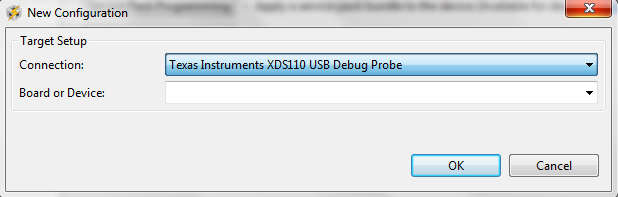
    Earlier i was selecting this target configuration:-

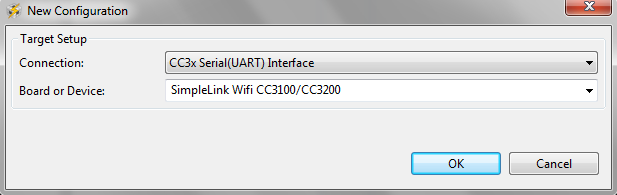
    After selecting this configuration i was getting this kind of GUI:- 

    So, for summary who is going to use XDS110 DEBUGGER PROBE for Debugging and Flashing CC3200 purpose, i am sharing few points and also @Josh and @Rafael please correct me if i am wrong:-

    For Debugging:-

    1. I am using ARM Cortex-M 20-pin (CM20) adapter.

    2. Connect these pins TMS, TDI, TDO, TCK, Gnd nd VTRef with your controller CC3200 TMS, TDI, TDO, TCK, GND and 3.3v pins

    3. In target configuration file, Under Basic tab-->select XDS110 USB debug probe configuration and Under advance tab---> select your probe and change the JTAG mode to 4- pin standard mode and save the file.

    4. After that run the Test connection and check for success.

    For Flashing your firmware.

    1. SOP---> 100

    2.  Follow these connections

    XDS110 Launchpad/CC3200 pins
    UARTRX J7 middle pin / TX pin
    UARTTX J6 middle pin / RX pin
    GND J20 GND pin / GND pin
    TGTVDD J20 VDD pin / 3.3v 

    3. Select following configuration in your Uniflash tool

    Following these steps will help you in debugging and flashing your software.

    Thank you @Josh and @Rafael for your kind help.

    Best Regards

    Shubham

  • Shubham,

    Thanks for the nice summary.

    Regards,
    Rafael