This thread has been locked.

If you have a related question, please click the "Ask a related question" button in the top right corner. The newly created question will be automatically linked to this question.

DLPLCR4500EVM: Non-linearity of image grabbed

Part Number: DLPLCR4500EVM
Other Parts Discussed in Thread: DLPC350

Hi,

I am displaying a 8 bit image from 0 to 255 by using pattern sequence[variable exposure] mode. I then take the projection image by using a camera and i am expecting a straight line when plotting the gray scale value from darkest to brightest. However , i saw different result as show in the attachment below. Can someone tell me the reason?

I attached the input bmp file, ini file and also the bin file at the link below.

Thanks,
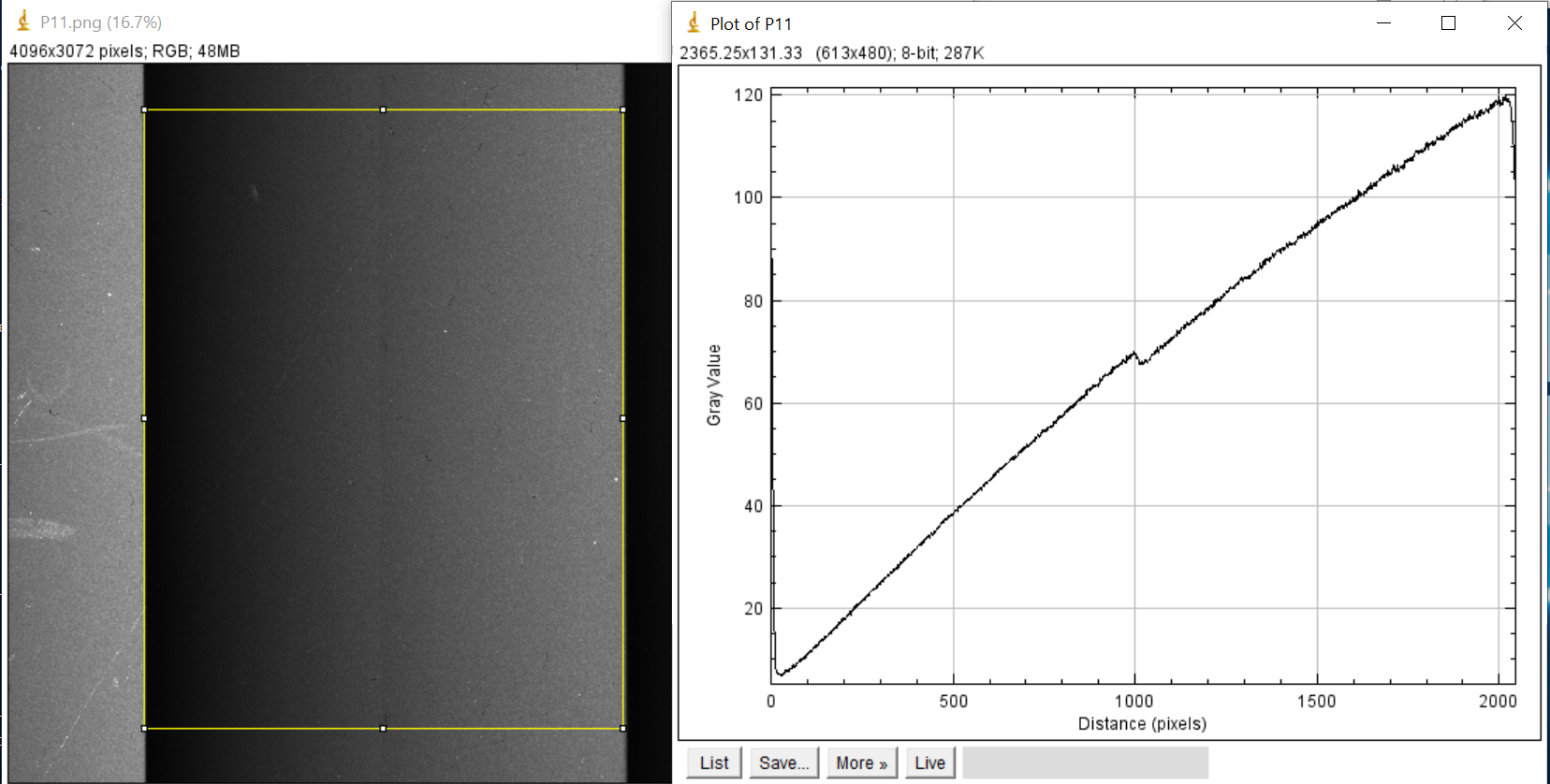
https://drive.google.com/open?id=1kuYYMOGY4HcvALwGaiepQ4NQaK9E2fRq

  • Hello Weiseong,

    Is the non-linearity observed in the center of each of the repeated transitions? Please also confirm what firmware version you are using. We will look into this and get back to you.

    Thanks,

    Kyle 

  • Hi Kyle,

    Yes, this behaviour is observed in the center of each of the repeated transitions. You can get the images from the google drive link with file name of cameraIMG.png .The firmware i am using right now is v3.1.0.

    Thanks alot.

  • Hi Weiseong, 

    I want to let you know that I was able to reproduce the issue! We will investigate more and get back to you soon! BTW, is this the same question you are asking on the thread  ?

    If yes I will close one of the thread due to duplication. Hope this is okay., 

    Thanks & Regards,

    Hirak.

  • Hi Weiseong,

    We have looked into this further, and can confirm that this problem is caused by LED ENABLE DISABLE Strobe delays. You can try changing the parameters

    DEFAULT.RED_STROBE.RDELAY 0xbb ;
    DEFAULT.RED_STROBE.FDELAY 0xbb ;
    DEFAULT.GRN_STROBE.RDELAY 0xbb ;
    DEFAULT.GRN_STROBE.FDELAY 0xbb ;
    DEFAULT.BLU_STROBE.RDELAY 0xbb ;
    DEFAULT.BLU_STROBE.FDELAY 0xbb ;

    in the INI file and reattaching the INI with the FW to check if you are able to improve the linearity. 

    Another workaround for this issue is, after starting the pattern sequence, on the GUI select "Manual" under the box "LED Driver control / LED SELECTION", select the LEDs you want to turn on and then click "Set" below it. After doing this the non linearity in the displayed image should be gone. 

    Thanks & Regards,

    Hirak.

  • Hi Hirak,

    Thanks for your reply and i will update once i try with your suggestion. However, I would want to confirm about these parameters

    DEFAULT.RED_STROBE.RDELAY 0xbb ;
    DEFAULT.RED_STROBE.FDELAY 0xbb ;
    DEFAULT.GRN_STROBE.RDELAY 0xbb ;
    DEFAULT.GRN_STROBE.FDELAY 0xbb ;
    DEFAULT.BLU_STROBE.RDELAY 0xbb ;
    DEFAULT.BLU_STROBE.FDELAY 0xbb ;

    You mentioned about changing the parameters. What value should I change to? 

    Thanks.

  • Hi Weiseong,

    This delay value corresponds to the delay from the DLPC350 controller LED strobe pin going high/low, and actual light output starting/stopping from the corresponding LED. This delay can vary depending on HW Design and manufacturing and we need to trial and error to find out correct values. If you can measure the delay described above, that value can be used.

    Thanks & Regards,

    Hirak.