This thread has been locked.

If you have a related question, please click the "Ask a related question" button in the top right corner. The newly created question will be automatically linked to this question.

Trouble importing and running example code from ControlSuite inCode Composer Studio

Other Parts Discussed in Thread: CONTROLSUITE

Hello,

I am new to CCS and programming microcontrollers. I am using a TMS320F28337S launchpad v191 with CCS, trying to use some example projects in ControlSuite.  There is a very simple command that can be used through the research explorer to import, build, debug, and run these example projects if they are one of the few, initially view-able projects.
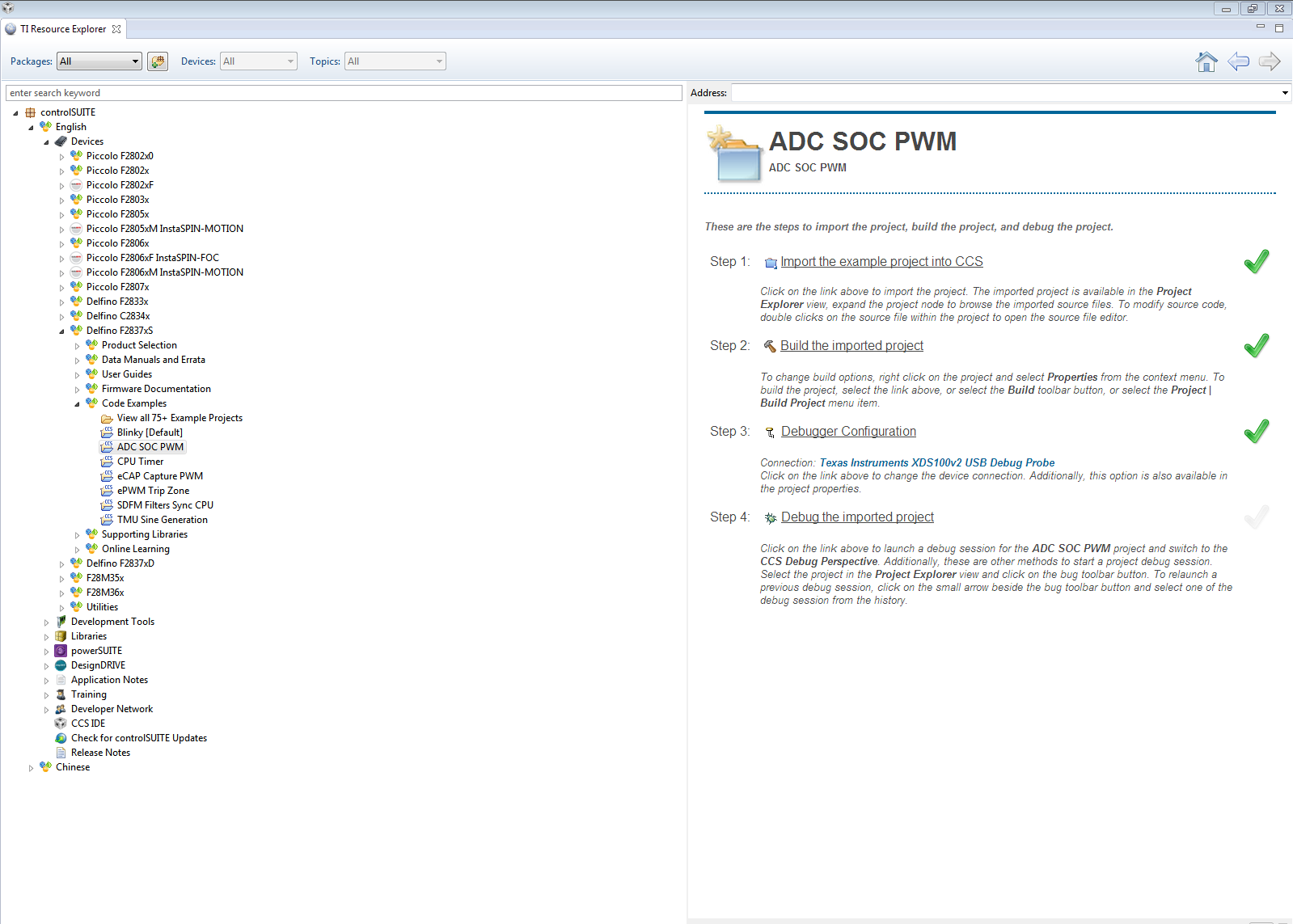
However, when viewing the 75+ examples, I must copy the source code directly and place it into a new project.

When I do this and debug the project I encounter fatal error #1965: cannot open source file "F28x_Project.h".  I also tried adding an include pathway directly to this file-

C:\TI\controlSUITE\device_support\F2837xS\v191\F2837xS_headers

- but the project still will not build.  

Please help.  I am new to using CCS and coding in general so even what may seem the most basic tips I will really appreciate.

Thanks,

Conner Shoop

  • Hello Conner,

    Sometimes this can happen when you try to import projects from controlSUITE itself.

    Can you please try importing the controlSUITE project you would like to load directly into CCS?  Start inside CCS and then from the menu bar go to:

    Project >Import CCS Projects...

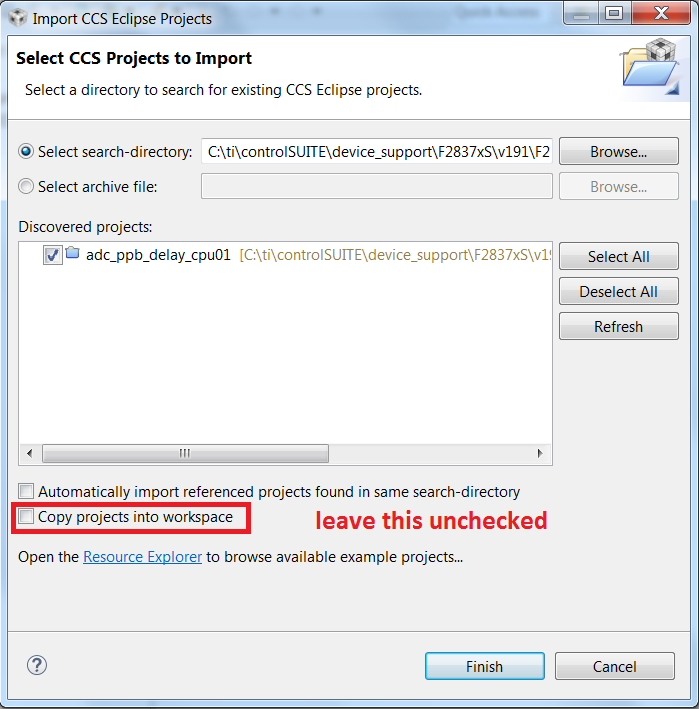
    From here you can use the "Browse..." button to point to the project's location.  For example:

    C:\ti\controlSUITE\device_support\F2837xS\v191\F2837xS_examples_Cpu1\adc_ppb_delay

    Your window should then look like this:

    Once the project is imported, try rebuilding it and then see if you can debug the project.  Let me know if this works for you.

    Kind regards,

    Billy Stevers

  • Conner,

    Welcome to C2000!

    Yes, the resource explorer only has a few examples (the ones with blue CCS folder) that can be imported and built through the GUI. Viewing all the projects is there to list what other projects are available and those need to be imported through CCS via the method Billy mentions above.
    Importing them into CCS and not copying them into the workspace will clear up the build issues.

    Best Regards
    Chris
  • Hello Billy,

    I tried that method but still encountered an error. My CCS projext explorer did import the adc_soc_continuous_cpu01 and the folder contains: includes, targetConfigs, adc_soc_continuous_cpu.c, along with many include .c files. However when I try to rebuild I counter error:
    "Errors accurred during the build
    Errors running builder 'CDT Builder' on project xxx.
    Could not write file"
    Followed by paths inside of adc_soc_continuous\cpu01\ccs\CPU1_RAM

    Best,

    Conner
  • Conner,

    Which versions of CCS and controlSUITE are you using?

    In the meantime, you might want to try creating a new workspace and importing the example there.


    Kind regards,

    Billy
  • William,

    6.1 for CCS and 3.3.9 for controlSUITE. I have been having success using your method except I checked both boxes, built the project, and then debugged it. This would cause it to immediately be loaded into its .c code and so far has worked for all example projects I've tried.

    Thanks again,

    Conner
  • I am glad your issue has been solved!

    In the future, understand that checking the second box copies all of the project files into the workspace.
    This means that the files in your controlSUITE installation will remain unchanged, but it also means that you may run into include errors down the road.

    Usually such errors are immediately noticeable, so if everything is working like you describe then you are not having this problem.