This thread has been locked.

If you have a related question, please click the "Ask a related question" button in the top right corner. The newly created question will be automatically linked to this question.

CCS/TMS320F28377D: *.CCMXL -> Launch Selected Configuration initializes RWAIT to 0x03.

Part Number: TMS320F28377D

Tool/software: Code Composer Studio

Hello,

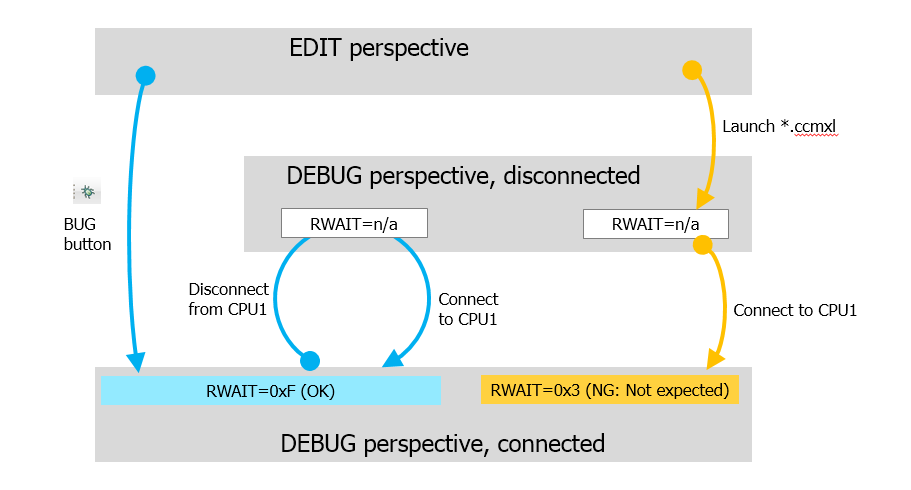
CCS (v720) initializes the FRDCTRL.RWAIT to 0x03 when we connect the CPU1 by [TMS320F28377D.ccmxl] --> [Launch Selected Configuration] --> [connect].

My customer requested us to disable this initialization. My customer requested that the CCS does the same initialization in the two ways, this way and the bug button.

Could you please advise?

Please try the attached project if need a duplication. Its just a ccs v720 hello world.

/cfs-file/__key/communityserver-discussions-components-files/171/4705.f28377d_5F00_cpu1_5F00_hello_5F00_ccs720.zip

  • Nambu-san,
    It appears that the register is being written to when the target is being connected. Assuming you are using the f28377d gel file that comes with CCS, it could be some action in the OnTargetConnect() call. Or perhaps it is something else.

    I will move this thread to the C2000 forum. The experts there can provide more insight.

    Thanks
    ki
  • Nambu-san,

    Gel files do not initialize RWAIT.  Did the customer modify the gel file?  

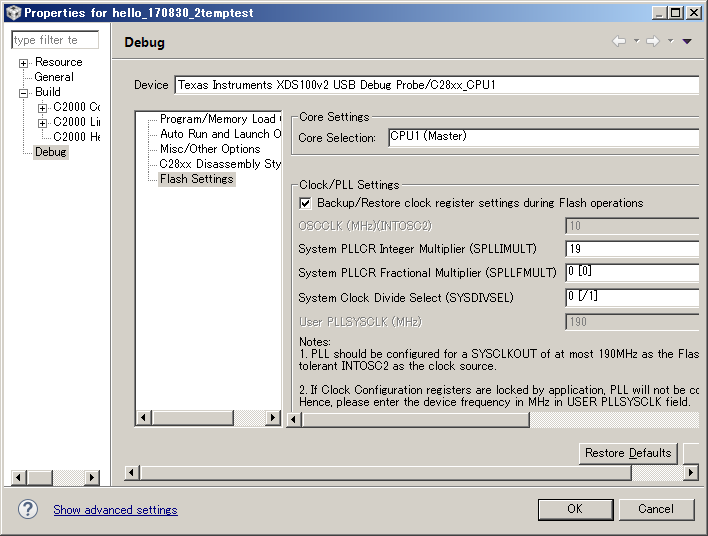
    One thing to note:  If code is loaded to Flash via CCS, then RWAIT will be set as per the frequency configuration in the On-Chip Flash Plugin GUI.  If the PLL config in GUI is left to default, Plugin will configure the RWAIT to 3 and erases/programs the Flash.

    Please expect delay in our responses.

    Thanks and regards,
    Vamsi 

  • Nambu-san,

    I forgot to mention that I could not test the project that you sent since our office is closed due to bad weather. However, the behavior that you mentioned is not related to your project. It might be with gel if it is edited by customer.

    Thanks and regards,
    Vamsi
  • Vamsi, Ki,

    Thank you for your replies under a limited environment.

    When you back to office, we would like to proceed to customer request. RWAIT not to be initialized by CCS.

    I think it is initialized when a *.CCMXL is Launched, as long as I tested.

    p.s.

    * The CCS project is 100% CCSv720 default. It was generated by [CCS new project]-->[hello].

    * GEL file was also CCSv720 default.

    * It was new information for me that the Clock settings decides the RWAIT. Although no changes when I tried the parameters in the dialog [Project property]->[Debug]->[Flash Settings].


  • Nambu-san,

    Hideaki Nambu said:
    * The CCS project is 100% CCSv720 default. It was generated by [CCS new project]-->[hello].

    It is unlikely related to the project since you also mentioned that a project-less debug session also reproduces the issue

    Hideaki Nambu said:
    I think it is initialized when a *.CCMXL is Launched, as long as I tested.

    It is more likely when the target is connected. Launching the debugger will not touch the target. Target connection will. In some cases (like project debug), the debugger will auto-connect the target after debugger launch, hence the confusion.

    One thing to try is to remove the gel file in use from the ccxml file. If the issue still occurs, then we know that the gel file is not to blame.

    Thanks

    ki

  • Ki-san,

    > One thing to try is to remove the gel file in use from the ccxml file. If the issue still occurs, then we know that the gel file is not to blame.

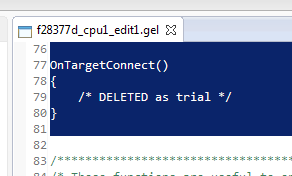
    RWAIT is still initialized to 0x3 when I delete the contents in the GEL function onTargetConnect().

    I'm sorry for a long thread. Can I ask any other idea that the RWAIT not to be initialized by CCS?

  • Can you have the customer remove the gel file completely so that none is used? Some of the GEL callbacks could have some actions that touch the target. If there is no gel file and the register still gets initialized, then it is likely not any direct action of CCS that is causing the modification
  • Ki-san:
    I tested that.
    - RWAIT is still initialized to 0x3 when my CCMXL - C28xx_CPU1 points an erased GEL.
    - RWAIT is still initialized to 0x3 when my CCMXL - C28xx_CPU1 points a blank GEL.

    Then, shall we leave from the GEL and move to somewhere else to look for the initialization RWAIT=0x03 ?
  • Hideaki-san,

    Do you have any application programmed in Flash? May be the application is initializing the RWAIT.
    Try erasing the flash and check again.

    Thanks and regards,
    Vamsi
  • 
    

    Vamsi,

    My only finding today was a bootrom code function c1brom_change_clock_dividers_powerup_flash() in [c1brom.boot.c].

    It operates the RWAIT field.

    Does it run on "Launch selected configuration" ?

    void c1brom_change_clock_dividers_powerup_flash()
    {
            EALLOW;

            // set the 1.6 multiplier bit
            AnalogSubsysRegs.INTOSC1CSR.bit.OSCCONFIG |= 0x2;
            // --NEED 20 uS settling time after the bit is written with 5-15 MHz clock

            asm(" MOV @T,#90 ");
            asm(" RPT @T \ 
                    ||NOP ");

            //set the divider to /1 to make flash init faster
            ClkCfgRegs.SYSCLKDIVSEL.bit.PLLSYSCLKDIV = 0;


            ClkCfgRegs.SYSPLLMULT.bit.IMULT = 12;
            ClkCfgRegs.SYSPLLCTL1.bit.PLLEN = 0x1;

            // set RWAIT to 0x3
            FlashCtrlRegs.FRDCNTL.bit.RWAIT = 0x3;
            //save the default PSLEEP value
            //change the PSLEEP VALUE for (15 * 1.6) MHZ...?
            FlashCtrlRegs.FPAC1.bit.PSLEEP = 0x120;

            //access OTP - read OTP revision or something to power up flash
            OTP_CPU_ID_VERSION;
            //change the PSLEEP value back to default

            FlashCtrlRegs.FPAC1.bit.PSLEEP = 0x860;
            FlashCtrlRegs.FRDCNTL.bit.RWAIT = 0xF;

            EDIS;

    }

  • Hideaki-san,

    BootROM configures the RWAIT back to 0xF. I will ask our BootROM expert to comment here.

    So, do you confirm that there is no code programmed in Flash that configures the RWAIT?

    Thanks and regards,
    Vamsi
  • Vamsi,
    Honestly, I didn't. I had no idea where to check in my code.
    We issue "Launch selected configuration" to pause a running code. I had no idea which of my code hook the pause and overwrite the RWAIT to 0x03.
  • Hideaki-san

    Regarding boot operations, as pointed out in the code posted, this is the only configuration of RWAIT performed during boot. Whenever the device is reset by a power-on-reset, XRS, or hibernate reset, that flash power up code is run. But as pointed out and mentioned by Vamsi, the RWAIT is always set back to 0xF.

    Best regards
    Chris
  • Chris,

    Thank you for your post.

    Once more let me remind that our goal is to find where the RWAIT=0x3 comes from.

    It would be good if you could tell that, but if it is not easy today, can I ask the followings?

    Q1. It was not clear to me whether the function c1brom_change_clock_dividers_powerup_flash() runs or not specifically in this case. We issue "Launch selected configuration" to pause a running code. Not the bug button. Could you please advise?

    If it runs, I'm afraid the line "FlashCtrlRegs.FRDCNTL.bit.RWAIT = 0xF;" is not successful.

    If not, we need to see somewhere else.

    Q2. Was it duplicated in TI now? I'm sorry for beginng this thread in the hurricane week.

  • Hideaki-san

    Yes I have duplicated what you are seeing. I'm still investigating why when you just connect it shows as 0x3.

    That function doesn't run when you launch through target config. It brings you to the beginning of boot and even if you run through boot, due to the reset cause, it won't run that function. If a watchdog is triggered or application is loaded, I see 0xF as expected. Stepping through boot with symbols loaded on watchdog reset, I can confirm that the code is running and setting 0xF as expected.

    Best regards
    Chris
  • Chris,
    Thank you again for your post.
    I would ask you to find how to suppress the unwanted update RWAIT=0x03.

    In my previous post my goal definition was not correct. Let me retry to explain the goal:
    The CCS doesn't change RWAIT unexpectedly, when "Launch selected configuration" to pause a running code.
  • Hideaki-san,

    Based on our experiments, looks like the CCS Flash Plugin is initializing the wait-states to 0x3 on a target launch and connect. I think there is no workaround to suppress it unless we update the tool. I will sync with the tool owner once he is back to office mid next week.

    Just curious: Why do you launch a target config to pause a running code? Why can't you use the suspend button? Also, what is the problem in initializing the waitstates to 0x3 on target launch - just want to know?

    Thanks and regards,
    Vamsi
  • Vamsi,

    We are glad to know your progress.

    > Just curious: Why do you launch a target config to pause a running code? Why can't you use the suspend button? Also, what is the problem in initializing the waitstates to 0x3 on target launch - just want to know?

    We often test a standalone operation. When crash, we decide to try a JTAG connection = "Launch selected configuration", and check program counter and so on. I think it is very useful.

    We were debugging a software timer. The "Launch selected configuration" changed the timer speed, so the change has been ivestigated.

    I would expect CCS to save values and writeback if CCS change register values even if the value is 0xF or 0x3...

  • Hideaki,

    We will update the tool for restoring the waitstate value.  Will update the details on this thread in October.

    Thanks and regards,
    Vamsi

  • Vamsi,
    I appreciate your response.
    We wait for your post.
  • Hideaki,

    This update should be available on October 2nd next week.
    Please check for TI C2000 Device Support package and Flash DebugServer package in the CCS updates and install them.

    Thanks and regards,
    Vamsi
  • Vamsi,
    I updated CCS730 and tried 'Launch Selected Configuration' again. This time the RWAIT was not 0x3 but 0xF (Good).

    I needed the following updates:
    1) DebugServer Flash Version 7.3.0.1083
    2) TI C2000 Device Support Version 4.2.2.0

    In my case the items were displayed by the following operations:
    In CCS, go to 'Windows -> Preferences' and then 'Install/Update -> Available Software Sites'. Find the 'Code Composer Studio v7 Updates' entry, click on it and click on 'Reload' button on the right hand side. After that, try searching for updates again.

    Thank you.
  • Hideaki,

    Glad to work with you offline on this. Thank you for confirming that the patches are working for you to restore the RWAIT.

    Best regards,
    Vamsi