Hello everyone,
We have a BLPFC kit in our lab. We have installed CCS and controlSuite. Now the GUI for this BLPFC kit is available from controlSuite.
But we are not able to connect.
Can anyone help in this matter..?
This thread has been locked.
If you have a related question, please click the "Ask a related question" button in the top right corner. The newly created question will be automatically linked to this question.
Hello everyone,
We have a BLPFC kit in our lab. We have installed CCS and controlSuite. Now the GUI for this BLPFC kit is available from controlSuite.
But we are not able to connect.
Can anyone help in this matter..?
Hi Gautam,
Yes I am using COM port.
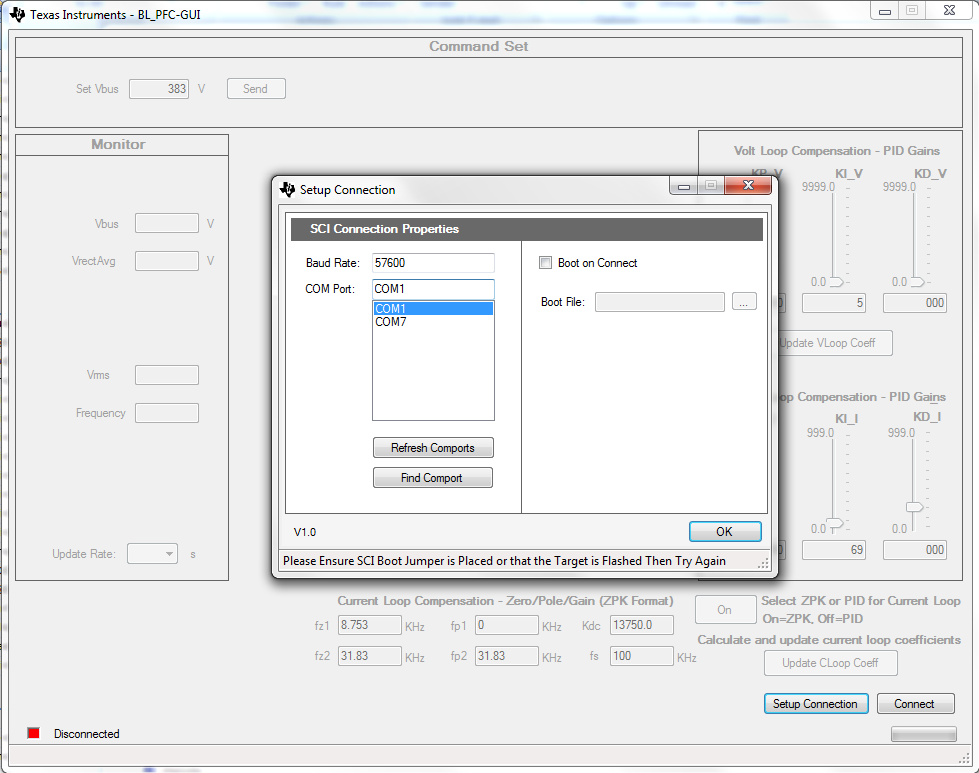
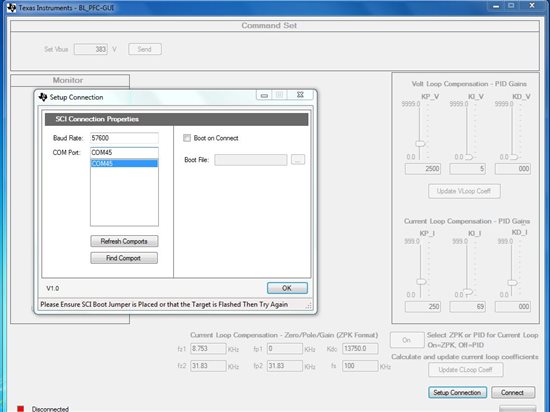
In the GUI "Setup Connection" it finds the com port, but when I click "Connect" button it gives some error "Access to Port xx is not available".
In my case COM port no. is 45 and I have checked that this port is available.
Any help would be great.
Thanks,
Vikas
Hi Vikas,
Here's a quick check:
1. Computer's serial port check: whether the computer's serial port is working or not
Procedure: Connect a RS-232 (serial) cable to the COM port of the computer -> Short the Rx and Tx pins on the other side of the cable -> open a terminal program -> After setting the connection check for the echo received!
>> If echoes are received properly then it means that computer's COM port is fine.
2. Board's serial port check: Connect a RS-232 (serial) cable to the COM port of the board -> Write and build a serial program (wherein you'll be transmitting a character/number continuously) -> Check the Tx signal from the board on the Oscilloscope
>> if you can see the data transmitted on the oscilloscope; boards COM port is also fine!
3. If both are fine.... then there is some error in the settings for eg. wrong baud rate etc
Regards,
Gautam
When I use the GUI for BLPFC kit,it is not able to connect with the board.
In the GUI "Setup Connection" it finds the com port, but when I click "Connect" button it gives some error "please load a valid .a00 file".
Can you give me a hand?
When I use the GUI for BLPFC kit,it is not able to connect with the board.
On the GUI "Setup Connection" it finds the com port, but when I click "Connect" button it gives me "Could not connect:please check connection"
And I have another question that if AC source supply to the BLPFC EVM is necessary before using the GUI.exe.
Hello, not sure this has been resolved, but I am also having issues connecting the GUI up to the board.
On the board I have the following jumper settings.
|
Jumper/Switch No. |
Jumper/Switch Connection |
Comments |
|
J3, J4, J5 & J8 |
Pin 1-2 |
|
|
J7 |
Pin 2-3 |
|
|
SW1 |
Switch position away from the side labeled Ext. |
|
I apply ONLY the 12 VDC supply (I just want to see if I can connect the GUI up).
I change the SW1 position to point towards the EXT. At this point I get a solid GREEN LED on the piccolo board and a blinking RED LED.
I launch the GUI and setup. It finds my USB com port. I hit continue and it states - "Please Turn EVM Board Off then Press "Continue"".
I turn the SW1 away from EXT (no GREEN or RED LED) and hit continue in the GUI. It tries to communicate and then says "Please Turn EVM Board On then Press "Continue"".
I turn the SW1 towards EXT (see solid GREEN LED and blinking RED LED). I hit continue in the GUI.
It tries to communicate then says "Please Ensure SCI Boot Jumper is Placed or that the Target is Flashed Then Try Again".
Which jumper is associated with the SCI Boot?
Not sure what the blinking RED LED is indicating?
I am trying this right out of the box (i.e. I have not over written the default application in the FLASH).
Any help would be greatly appreciated.
Brent
v
Brent,
I am not super familiar with this kit, but I do see one issue.
Make sure to uncheck the "Boot on Connect" checkbox. See step (2) of the QSG document. (this will make the GUI try to directly connect to the MCU rather than trying to boot an image via SCI)
Hopefully that solves it, but let us know if it doesn't and we can continue debugging.
Thank you,
Brett
Yeah, thanks for the response Brett. I forgot to mention in my previous post, I did have that unchecked.
Usually a blinking RED LED is indicative of something wrong. I can not find in any of the BLPFC kit documentation a reference to what it is indicating.
Thanks again,
Brent
Brent,
I don't mean to second-guess, but can you double-check the "Boot on Connect" setting for me? If that setting is unchecked, it shouldn't ask you to turn the board off, turn it back on, and the error message shouldn't suggest anything about SCI boot jumpers.
Long ago we chose to have the power LED be green and the IO controlled LEDs (LD2 and LD3) be red on our controlCARDs. Often we toggle one of our LEDs to show that the MCU is actively running code and for this kit we toggle GPIO34 (which ties to LD3). The fact that it is blinking is actually a good sign in this case.
Thank you,
Brett
Brent,
Alright, I think I get what's going on now. I assume you're clicking the Find Comport button to try to choose the right comport.
If so, don't. Click on the comport you know it to be (use the 'manually find the comport' option). Once you've chosen the right comport click 'OK'. Then in the main GUI window click 'Connect' and all should work. (if it doesn't, it will at least throw a new error now :) )
Thank you,
Brett
That is good information Brett. Unfortunately I get a "Could not connect: Please check your connections"
I have tried this on two computers (both running CC4). When I first plugged in the USB cable it is able to install a driver and I do see the com port in my Device Manager.
If you think of anything else to try, let me know.
Thanks,
Brent
Brent,
Getting closer then...
Is [M5]-J4 populated? (the jumper labelled J4 within the M5 hardware macro section)
Is the controlCARD's SW1 switched toward 'OFF' (down)?
Let me know how the above goes.
Thank you,
Brett
Hi Brett,
Found out the issue. My bad. When I launched the GUI, it shows a baud rate of 57600. I was assuming it was configuring the com port for this baud rate. In Device Manager when I looked at the properties for it, it still showed 9600. When I switched this to 57600 in Device Manager, it works.
Thanks for all of your help, I appreciate it.
Brent
Brent,
That's great. I'm glad that were about to find the issue and get things working,
Happy experimenting!
Thank you,
Brett