This thread has been locked.

If you have a related question, please click the "Ask a related question" button in the top right corner. The newly created question will be automatically linked to this question.

question installing driver for TMDX28069usb

Other Parts Discussed in Thread: CONTROLSUITE

TMDX28069usb driver doesn't install properly. by quick start guide page for I should go to device manager and open device property and go to advance tab and check the enable load VCP. but there is no advanced tab is available on port property. how can I enable Load VCP on this port?  I have  64bit windows 7 Home premium service pack 1 operating system in my laptop.

  • Hi Behzad,

    Which driver are you using? Can you mention the location in controlSuite?

    Regards,

    Gautam

  • Hi Gautom,

    when I connect the controlstick it shows me the texas on other drivers and I tried to update darvers manually on disk. by direction on quick start guide it should let me go to device property and advance tab and check vcp, but there is no advance tab available. if I need to pick driver manually by myself, which drivers should I pick? best regards Behzad

  • Behzad, drivers can be found here: C:\ti\controlSUITE\device_support\f2806x\v136\MWare\windows_drivers

    These drivers are for USB implementation and not for the controlStick recognition.

    Regards,

    Gautam

  • Hi Dear Gautam,

    I found the driver but when I connect control stick to laptop in device driver it shows it on other device not usb device.

    by information on quick reference I should go to device property and the go to advance tab and click on VCB checkbox and then update the drivers but because my controlstick shows in other device, no advance tab is available and I don't know how should I update drivers in this situation. I have a windows xp that controlstick works well with windows xp but

    it doesn't work with windows 7 or windows 8. I tried 2 laptop with windows 7 and two laptop in windows 8 and in all of them, controlstick shows in other device section and I have same problem. there is two TI icon are available in device manager. in other device section it shows  XDS100-RS232 V1.0. could you advice me which driver I should update in this situation. operating system is windows 7 64 bit service pack 1. I appreciate your help and thanks for your time.

                              Best Regards   Behzad

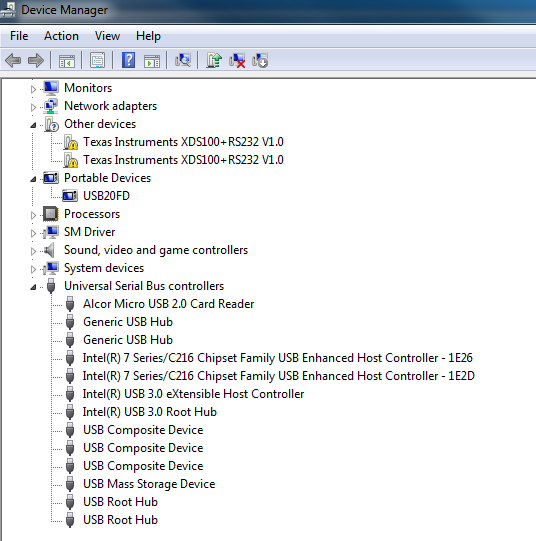
  • Behzad, when you insert the stick what is the status of your device manager?

    Can you paste Device Manager's screenshot by expanding the USB controllers option?

    Regards,

    Gautam

  • thanks so much for your helpihT      ihT     

    this is device manager screen. Thanks for help Gautam     Best Regards    Behzad

  • Yes, the drivers are not installed. Have you already installed CCS v5.5 or CCS v6? If not then please install; also while installing CCS go for complete installation with driver packages. Drivers for this emulator comes with the compiler and gets detected automatically.

    Regards,

    Gautam

  • Thanks Gatam,

    now it works.   Best Regards   Behzad

  • That's Great, Behzad!

    Goodluck & Regards,

    Gautam