This thread has been locked.

If you have a related question, please click the "Ask a related question" button in the top right corner. The newly created question will be automatically linked to this question.

JTAG daisy-chain for 2 x 28377D evalboards

Other Parts Discussed in Thread: TMDSCNCD28379D

Dear TI community,

I am looking to hook up two F28377D evaluation boards with a single JTAG emulator BlackHawk 510L. I have built a tap of my own based on resources available online.

Assuming that my hardware is ok, I went into configuring the Target and the number of settings are overwhelming. Hopefully there is someone with previous experience around.

There first thing I notice is that the nTRST pin is always low when I try to test the connection. Either I am missing a pull-up or my initial configuration for the target is wrong.

Let me share the screenshot below which shows where the process gets stuck:
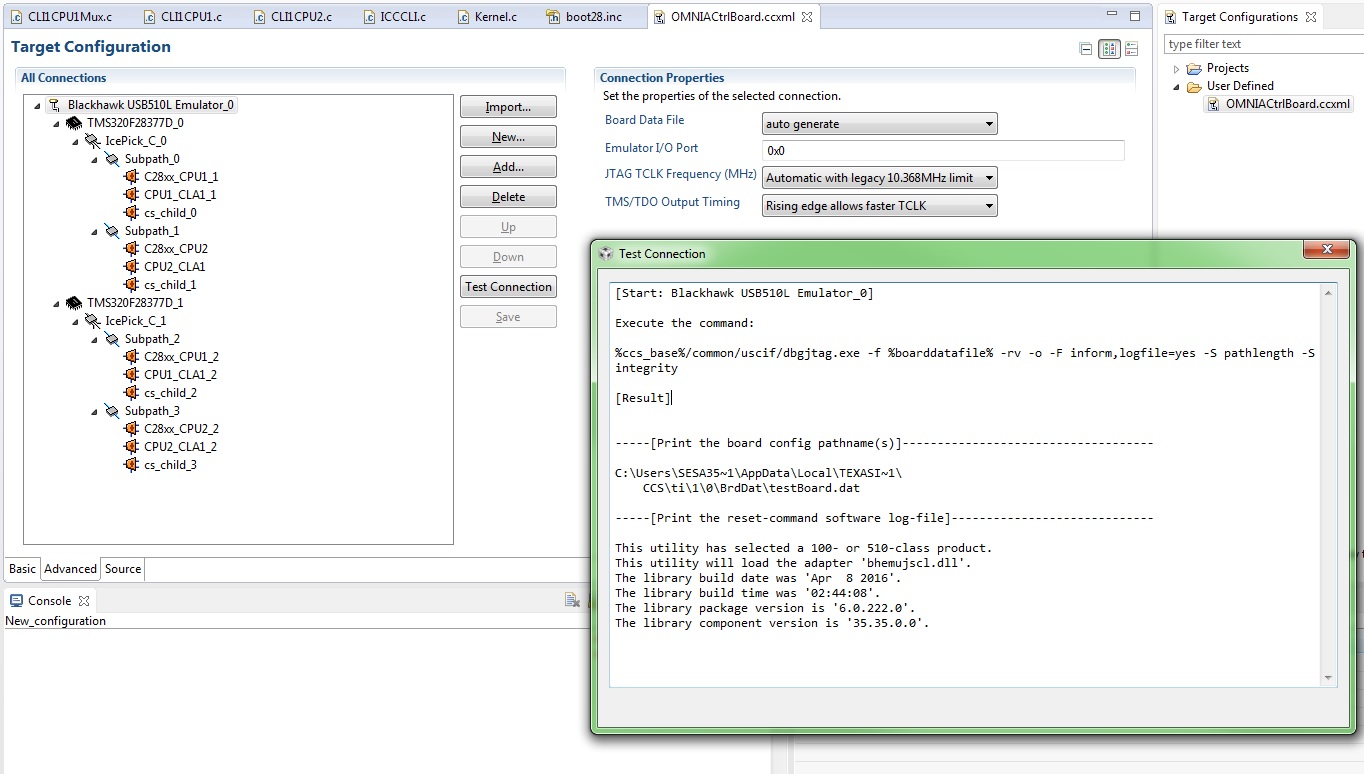
Any input is highly appreciated.

Thanks in advance,

Matias

  • Hi Matias,

    Some thoughts/comments:
    1) Are you able to connect CCS to your F28377D if you just use your 1 emulator to connect to only 1 of your eval boards (ie without your tap)?  This is a good first step to make sure that you don't have any computer driver, getting started with CCS, and other such issues.
    2) Assuming you are using the TMDXCNCD28377D/TMDXCNCD28379D/TMDSCNCD28379D + a Docking Station, please note that the controlCARDs themselves contain pullups/pulldowns on parts of the emulation circuitry.  I'm not sure what your tap looks like, but undoubtedly you'll need to be looking at the full circuitry on these nets to make things to create a full picture of the system.
    3) I'd recommend taking a look at the following wiki (if you haven't already) - especially for the video near the end of the page.
    http://processors.wiki.ti.com/index.php/Target_Configuration_-_Custom_Configurations
    4) May also be a good reference:
    http://processors.wiki.ti.com/index.php/XDS_Target_Connection_Guide#Multiple_Devices
    5) TRSTn should be low until the emulator itself pulls it high.  Therefore, if you never see TRSTn go high, my feeling is that (a) there's something odd going on with the emulator/your tap or (b) the pull-downs on the eval boards are together too strong and overpowering the ability for the emulator to control the line.  My feeling is that its most likely the former - (a).


    [For other readers: the other option in having one CCS session control two chips is to have one emulator per device and let CCS work with both emulators simultaneously.  For more see: http://processors.wiki.ti.com/index.php/Multi-Emulator_Debug_with_CCS]


    Thank you,
    Brett

  • Hello Brett,

    Thanks for the input provided. Please see below my answer:

    1 - Yes, the debugger works correctly individually for each of the 28377D DSP.

    2 - I have checked for the 28F377D control card and docking station, that there are no pull-ups. I have added them on my tap based on the circuitry mentioned in

    processors.wiki.ti.com/.../XDS_Target_Connection_Guide

    No buffers included since they boards are 10cm away (aprox) and no EMU pins since they are not supported in this board

    The debug session in unable to launch after finishing the compilation process and yes (5), this is most likely the tap built (hardware problem) or some configuration is missing (software config).

    I believe that the target config adding two 28F377D devices should be complete by CCS including subpath's have port numbers and a .gel file per core.

    On the other front:

     - I don't have info regarding the TraceDeviceId field, whether is required or not.

     - Should each subpath have a unique Port Number irrespective of the device it belongs to?

    Thanks everyone.

    Matias 

  • Hi Matias,

    Well there is a pull-down on each cCARD's TRSTn, but perhaps you've seen that.

    If you're still having issues, I'd recommend posting the CCS-centric questions to the CCS forum.  They will have better advice on what the CCS setup should be in your circumstance.


    Thank you,
    Brett