This thread has been locked.

If you have a related question, please click the "Ask a related question" button in the top right corner. The newly created question will be automatically linked to this question.

CCS/TMS320F28069: Bootloader - Autobaud seems to complete successfully, but additional bytes are transmitted

Part Number: TMS320F28069
Other Parts Discussed in Thread: CONTROLSUITE, C2000WARE

Tool/software: Code Composer Studio

Hello -

I'm testing with SCI bootloader on the F28069.   I have CCS 6.2 loaded on my Windows 7 laptop.

I'm monitoring the SCI Tx and Rx lines and I see some unusual behavior occasionally.

Most of my testing has been successful.   I send the 0x41 (A) to the F28069 after powering up with GPIO34=1 and GPIO37=0.   It responds with another 0x41 and then I continue on with the AA... 08... etc.

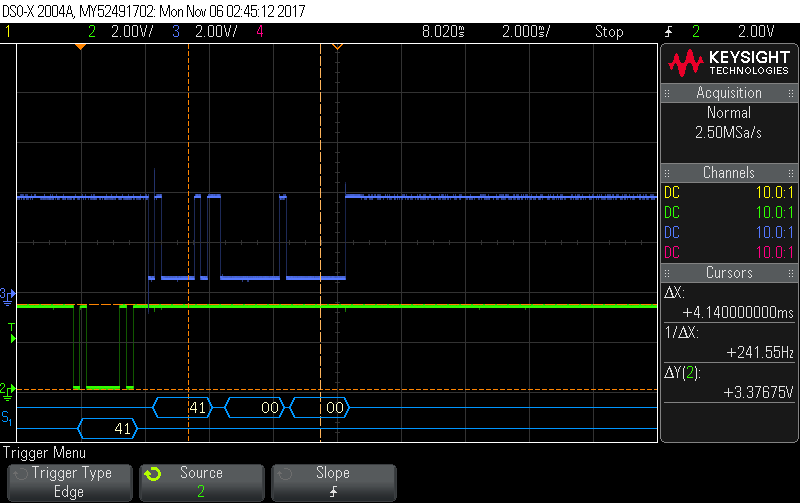
However, A few times I have seen the F28069 respond with a 0x41 followed almost immediately by one or more 0x00 bytes.   I've attached a screenshot of my oscilloscope output.  The green is the RX line into the F28069 and the blue signal is the TX line response back out of the F28069.

I'm trying to understand where these 0x00s are coming from.   I don't know whether the autobaud is jumping out of SCI mode and into flash after what seems like a successful autobaud, jumping to RAM for some mysterious reason or if it is sending the 0x00 bytes while still in boot ROM code.

Is there a way to step through the boot ROM code using the CCS debugger?   I know how to load a program and debug from the first part of main(), but in this case I need the code to break at bootup and allow me to step through the ROM.   Then, perhaps I can identify exactly where the 0x00 is getting loaded into the TX buffer and get this straightened out. 

Thank-you!
  • Anne,
    yes, the ROM code for F2806x is available in controlSuite and C2000Ware.

    C:\ti\controlSUITE\libs\utilities\boot_rom\2806x\2806x_boot_rom_v1_1
    C:\ti\c2000\C2000Ware_1_00_02_00\libraries\boot_rom\f2806x\v1_1\rom_sources

    You can select Load Symbols and choose the COFF (*.OUT) file in the Release directory and do source level debugging of ROM code. Note that you don't have to build the ROM CCS project, you can import the project into CCS but don't have to build the image but instead use the OUT file provided.

    If you want to have ROM symbols along with your application, then you first load your application and then use 'Add symbols' option and choose the ROM COFF file.

    Hope this helps.

    Best Regards
    Santosh Athuru
  • Thank you for your quick response Santosh!

    I don't have an 'Add symbols' option available in CCS. I think there is a setting I am missing.

    After doing some searching in CCS's help files, I see that the Add Symbols button is available in the Target Menu or on the Modules View Toolbar. I don't have either the Target menu or the Modules View available to me. I've been unable to locate these in my Customize Perspective options.

    How do I get access to the Target menu and/or the Modules View?

    Many Thanks!
    Anne
  • Anne,
    the load symbols/add symbols should be available from the debug perspective of the CCS. Once you connect to the target, look at the RUN menu to find the options.

    To connect to the target you have two options
    1.> view target configurations -> create one for your target if one is not already available; right click on the target configuration and choose launch, this should open up the debug perspective and then you can connect to the target and load symbols or load programs.

    2.> you can click the debug button from the CCS edit perspective, this will usaully choose the target config available for the project and automate the above steps and take you directly to the debug perspective and load the program.

    If you have worked with any TI provided examples for your devices you should be aware of the CCS debug perspective and above steps.

    Best Regards
    Santosh Athuru
  • Anne,
    were you able to make any progress on this, can you update your findings and any fixes you had to do?

    Best Regards
    Santosh Athuru