This thread has been locked.

If you have a related question, please click the "Ask a related question" button in the top right corner. The newly created question will be automatically linked to this question.

LAUNCHXL-F28069M: Instaspin Lab 13B: motor running continuously without executing the desired position sequence

Part Number: LAUNCHXL-F28069M

Hello,

I've been succesfully running my PMSM in labs 12a-13a. Speed control works really well also at lower speeds.

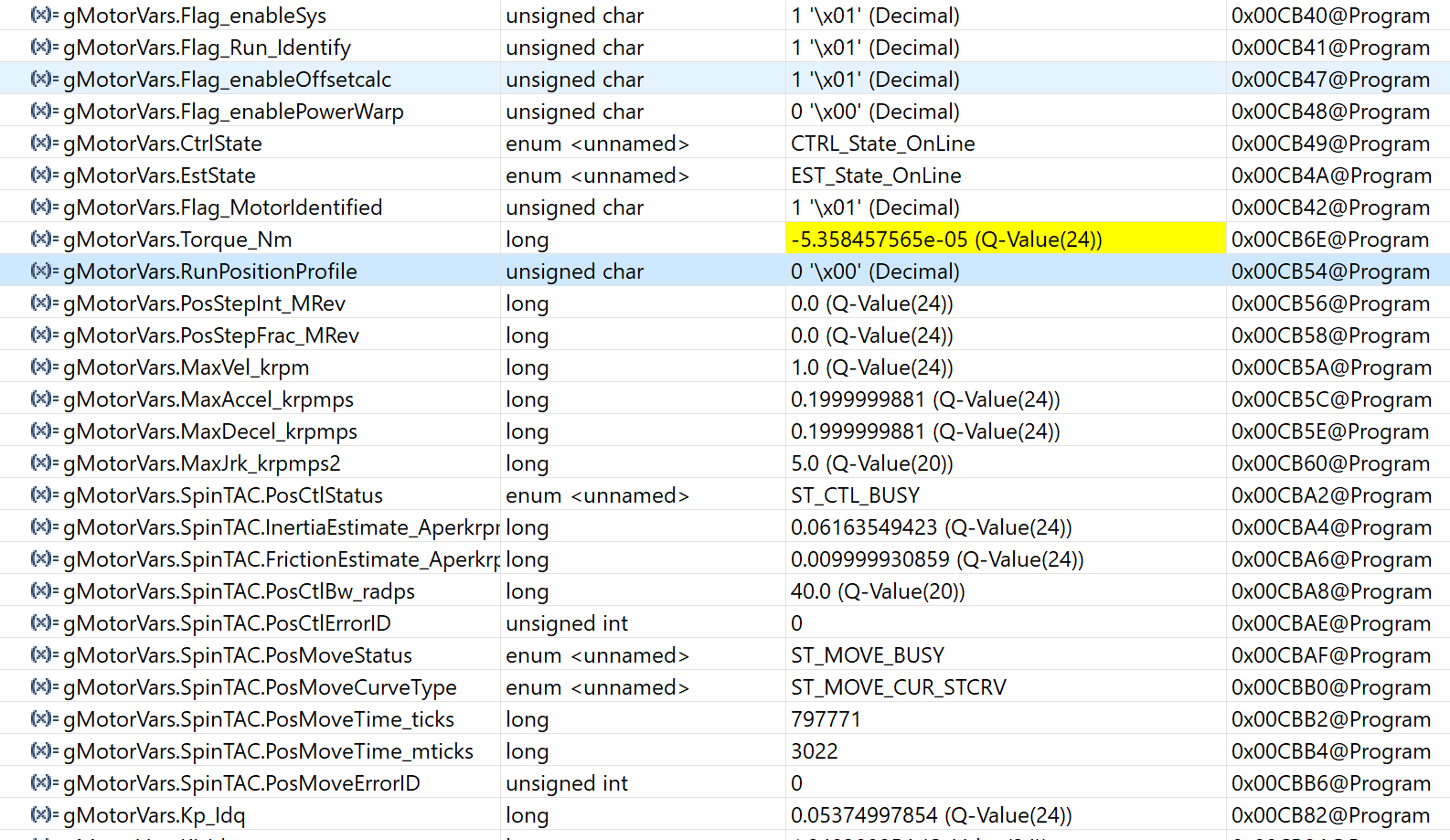
In lab 13B, I have a wierd problem. When I turn on the position step, the motor starts running and accelerates to the max velocity set and does not stop without disabling the system. This is not dependent on the gMotorVars.PosStepInt_MRev” and “gMotorVars.PosStepFrac_MRev variables and the system is not giving any error code in either gMotorVars.SpinTAC.PosCtlErrorID or gMotorVars.SpinTAC.PosMoveErrorID. User.h and hw settings are identical than in previous labs. Thought initially that increasing loop decimations would help but unfortunately it did not have impact.

Any idea of possible mistakes?
[edited 13a -> 13b]

  • Could you clarify the problem was met in lab13a or lab13b? What gMotorVars.PosStepInt_MRev and gMotorVars.PosStepFrac_MRev did you set? May you have any waveform to show the problem and have a clear description of the testing steps?
  • Hi Yanming,

    Could you clarify the problem was met in lab13a or lab13b?

    Sorry for the typo, meant 13B :).

    What gMotorVars.PosStepInt_MRev and gMotorVars.PosStepFrac_MRev did you set?

    I've been trying values like gMotorVars.PosStepInt_MRev = 1 , gMotorVars.PosStepFrac_MRev = 0.5 (as in the lab guide) but also smaller ones like 1 and 0.1 respectively.

    May you have any waveform to show the problem and have a clear description of the testing steps?

    I've proceeded according to the following steps.

    - Open the command file “sw\solutions\instaspin_motion\src\proj_lab13b.js” via the Scripting Console

    - Enable the realtime debugger

    - Click the run button.

    - Enable continuous refresh on the watch window.

    - Set the variable “gMotorVars.Flag_enableSys” equal to 1.

    - Set the variable “gMotorVars.Flag_Run_Identify” equal to 1.

    - Set “gMotorVars.PosStepInt_MRev” to “1” and “gMotorVars.PosStepFrac_MRev” to “0.5”.

    - Set “gMotorVars.RunPositionProfile” to true

    - Other parameters kept as default:

    - gMotorVars.MaxVel_krpm = 2.0

    - gMotorVars.MaxAccel_krpmps = 0.2

    - gMotorVars.MaxDecel_krpmps = 0.2

    - gMotorVars.MaxJrk_krpmps2 = 5.0

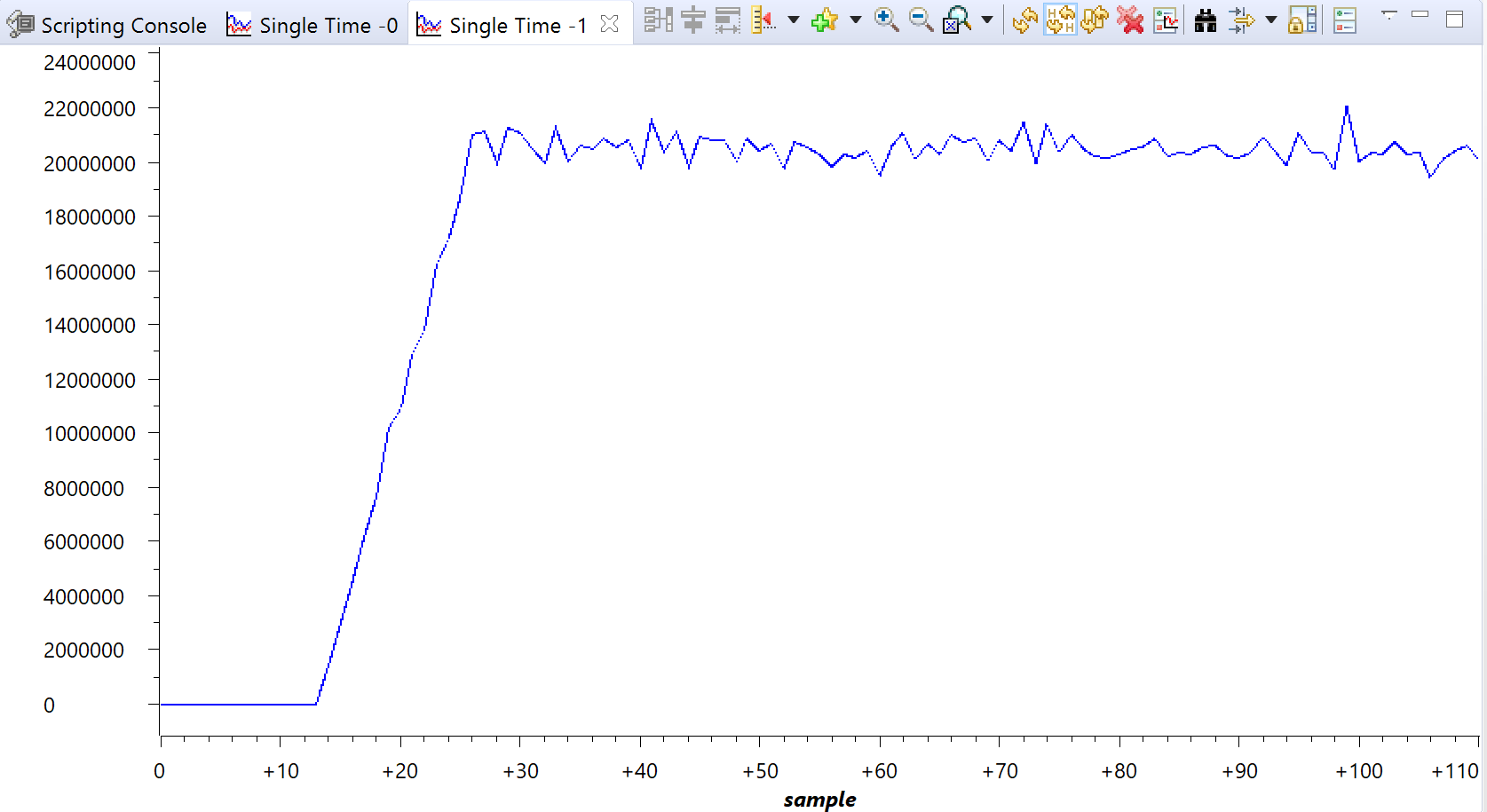
    After this the motor starts running, accelerates to full speed and runs at the set max speed until you disable the system (see the attached speed curve). No remarkable current ripple is induced. gMotorVars.SpinTAC.PosCtlStatus and gMotorVars.SpinTAC.PosMoveStatus remain BUSY as long as the motor runs. gMotorVars.RunPositionProfile, gMotorVars.PosStepInt_MRev and gMotorVars.PosStepFrac_MRev turn to 0 as soon as you enable the step and the motor starts running. And as mentioned, the system gives no errors. 

    Hope these help to clarify the problem!