This thread has been locked.

If you have a related question, please click the "Ask a related question" button in the top right corner. The newly created question will be automatically linked to this question.

CCS/TMS320F28069M: WATCHDOG Reister don't change value after run code to configure this module for Lab5 in C2000ware workshop

Part Number: TMS320F28069M
Other Parts Discussed in Thread: C2000WARE

Tool/software: Code Composer Studio

Hi everyone,

I'm a newbie in TI communication. I'm trying learn more about lauchpad tms32f28069m by doing exercises in C2000ware workshop.

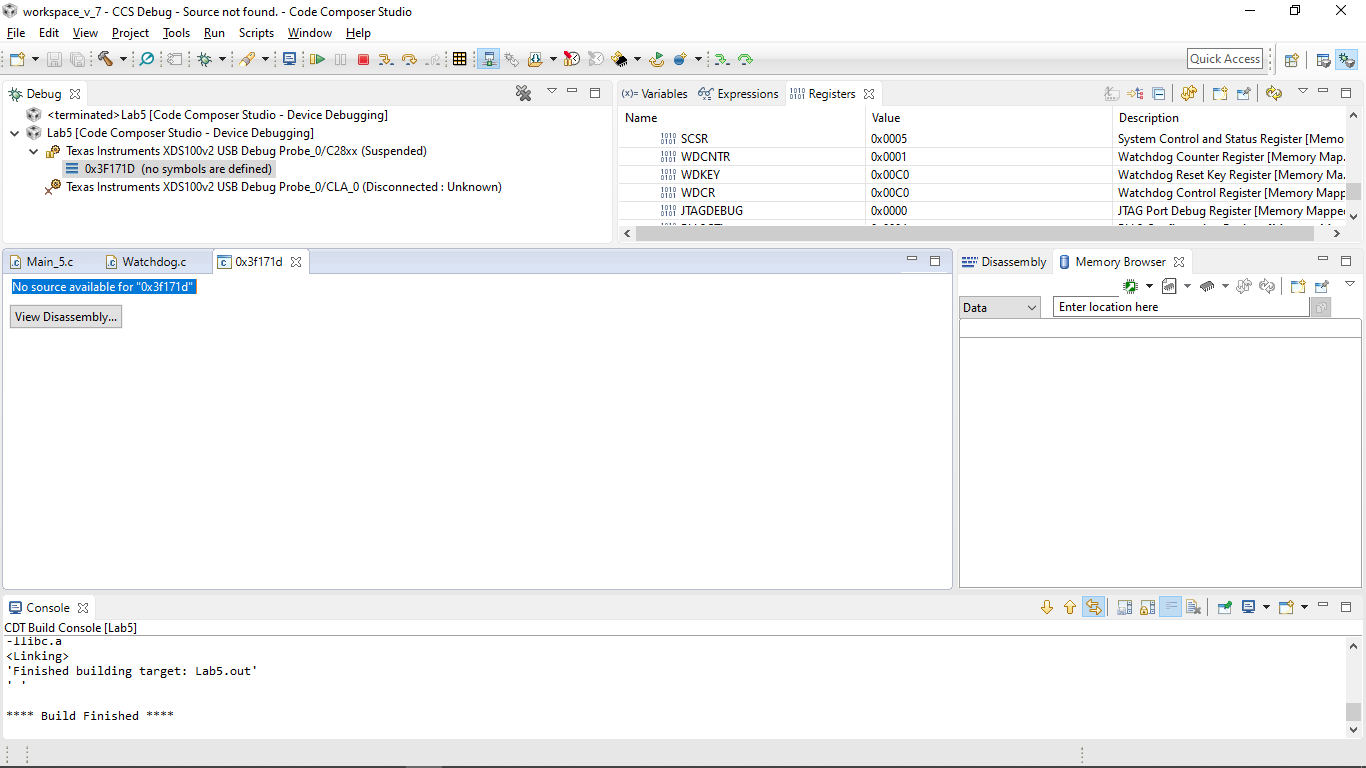
When doing Lab5 about watchdog, the WATCHDOG register (WDCR, WDKEY and SCSR) don't change right value after run code to configure this module which required in Lab5.

Before run code:
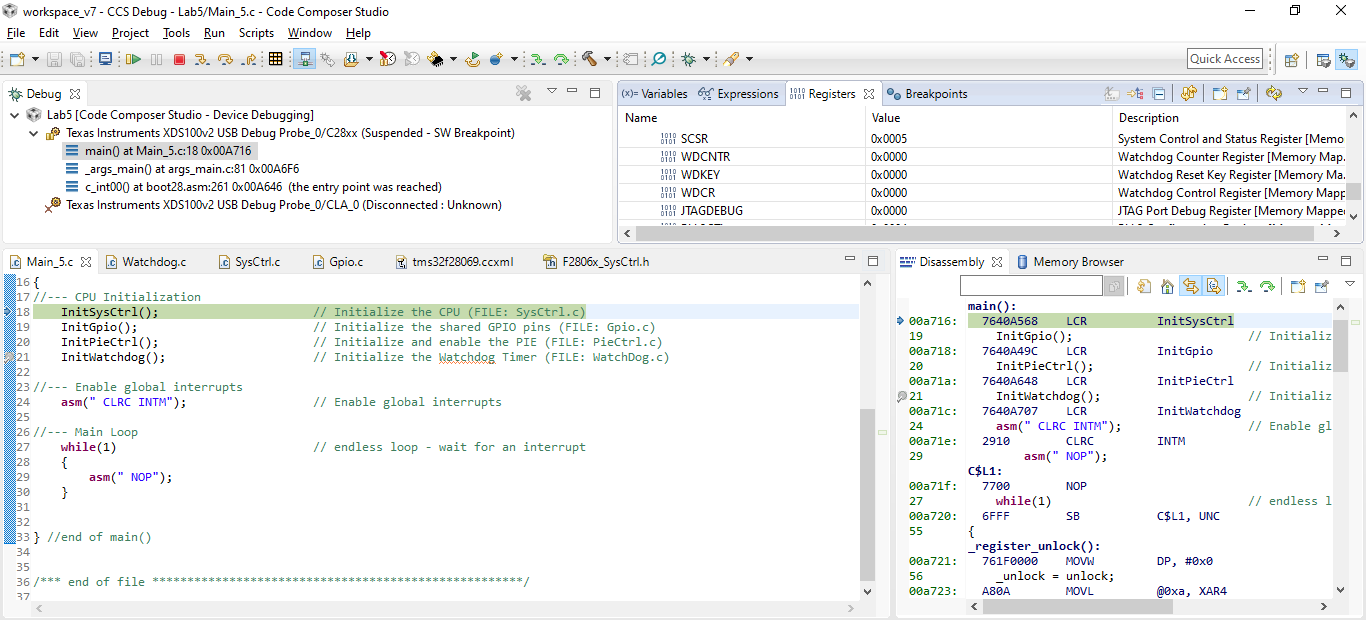
After run code:
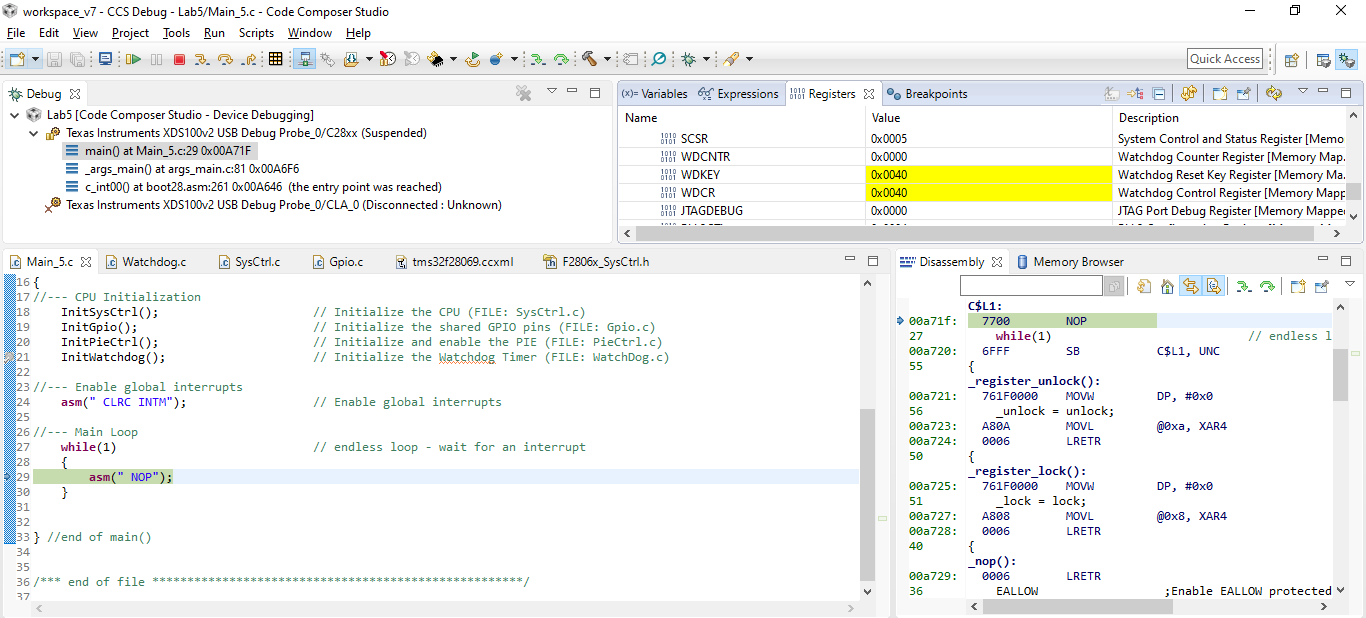
So I cannot control watchdog module to complete this lab5.

Please help me, I'm using CCS v7.3.0

Thanks very much

  • Ngô Phúc Danh,

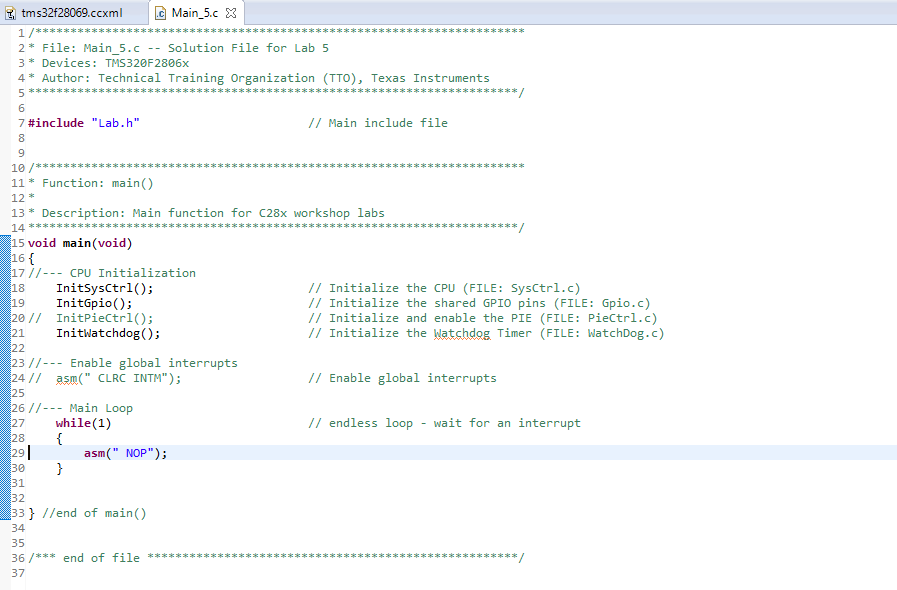
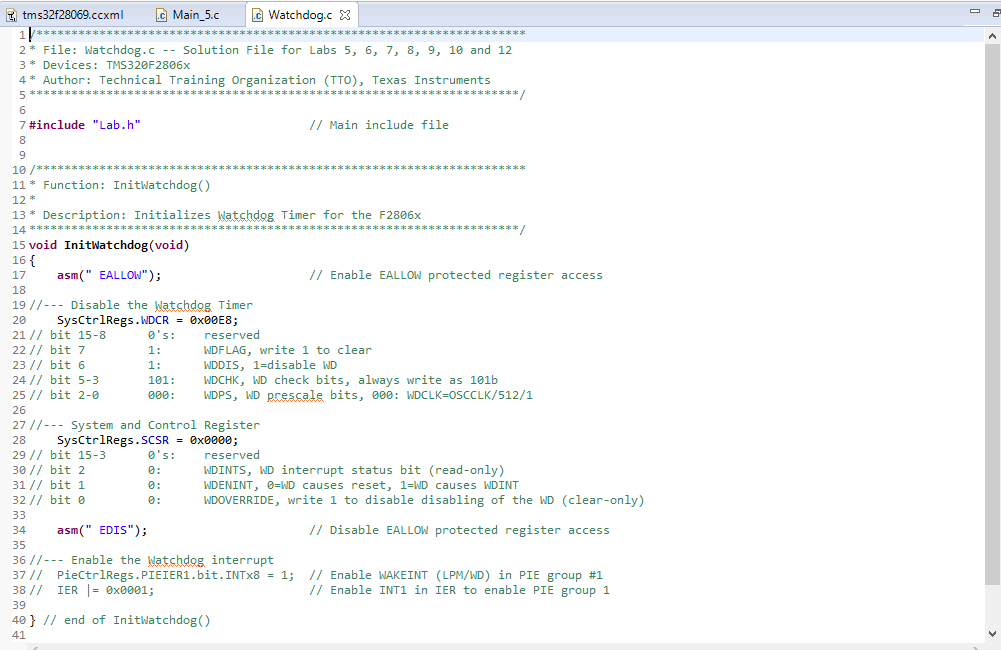
    Please provide more information, such as a screen capture of your watchdog.c file.  From your screen capture it looks like you are working on the second part of the lab exercise because the InitPieCtrl() function call is included in main.c.  Does this mean that the first part of the lab exercise worked?

    - Ken

  • Hi Ken,

    I'm in first part of Lab5 and I cannot complete it because the WATCHDOG registers don't change right value after run code to configure this module. 

    Yesterday, I completed it once times but when I try again, this project appeared this bug.

    Main.c:

    Watchdog.c:

    Please help me.

    Thanks a lot.

    - Danh - 

  • Danh,

    I ran the lab exercise and it works perfectly.  We have been using this workshop for many years without any issues.  In the first part of the lab exercise you need to place a breakpoint at the beginning of main().  I noticed that you are using the solution files, which is ok, and you did comment out the code for interrupts that is used in the second part - again this is fine.  I do not see the breakpoint set on line 18 in main().  Then you need to run the code with the watchdog disable.  In watchdog.c  the WDCR should be set to 0x00E8, which it is and when running the code it should be in the while loop.  Next, you need to enable the watchdog by setting the WDCR to 0x00A8.  Now when you run the code it should stop at the breakpoint.

    You might want to try deleting the project from CCS, close and open CCS, and import it again.  Also, you could delete the workspace and try again.  This might help.

    I hope this helps. If this answers your question, please click the green "Verified Answer" button. Thanks.

    - Ken

  • Ken,

    I did with your advice but it doesn't work.

    In once time, I tried to set WDOVERRIDE = 1 and I don't know this affected anything to this problem because I read a sentence in workshop "The watchdog override switch is a safety mechanism, and once closed, it can only be open by resetting the device. "

    After do this, I cannot change right value with my congfigure in InitWatchdog().

    Example:

    I try to set Watchdog register allow to disable Watchdog

    SysCtrlRegs.WDCR = 0x00A8;

    SysCtrlRegs.SCSR = 0x0000;

    But after debug, I watched registers:

    SCSR = 0x0005;

    WDCR = 0x00C0;

    WDKEY = 0x00C0;

    And when I try to enable Watchdog, it appear new bug:

    "No source available for "0x3f171d" "

    I cannot understand.

    Please help me, I'm using TMS32F28069M and CCS ver 7.3.0

    Thanks a lot.

    - Danh -

  • My watchdog module does not work. Please help me everyone.

    - Danh -

  • Hi Ken,

    I forgot setting the bootloader again. However, I don't understand exactly this step:

    Scripts => EMU Boot Mode Select => EMU_BOOT_SARAM

    Thanks a lot

    - Danh -

  • Danh,

    Each time your board is power cycled you must configure the boot mode.  Using the scripts in CCS the values are written to the EMU_KEY and EMU_BMODE registers.  For details please see module 4 'Reset - Bootloader' section starting on page 4-4 (page 60) through page 4-7 (page 63).

    To answer your question about the WDOVERRIDE bit, after reset the WDOVERRIDE bit is ‘1’ and the WDDIS bit can be used to enable and disable the watchdog.  If you write a ‘1’ to the WDOVERRIDE bit, then the bit changes to a ‘0’ and the WDDIS  has no effect.  This means that the watchdog is enabled and cannot be disabled until a reset occurs.  So, after reset if you want to enable/disable the watchdog with the WDDIS bit do not write a ‘1’ to the WDOVERRIDE bit or you will change the value to ‘0’.  (You should then write this bit as a ‘0’ and it will not change from a ‘1’).  The WDOVERRIDE is a ‘protection’ bit, and the SCSR is one of the very few registers that does not allow a ‘.bit’ structure (only ‘.all’) to avoid accidently configuring this bit.

    Also, the "No source available for "0x3f171d" is not an error or bug.  This address is in the boot ROM and CCS is just letting you know that it cannot display the source without the symbols.  By clicking "View Disassembly" you will then view the boot ROM contents in the Disassembly window.

    At this point it look like your lab is working.  Just remember to configure the boot mode each time you power cycle your board.

    I hope this helps. If this answers your question, please click the green "Verified Answer" button. Thanks.

    - Ken

  • Ken,

    Thanks you very much, my project have done corectly

    - Danh -