This thread has been locked.

If you have a related question, please click the "Ask a related question" button in the top right corner. The newly created question will be automatically linked to this question.

CCS/LAUNCHXL-F28379D: Program does not "Halt" on main() and freezes on "Terminate" with --ramfunc=on

Part Number: LAUNCHXL-F28379D

Tool/software: Code Composer Studio

Hi all,

This post is a continuation of my earlier question which is resolved.

I have an example project (blinky LED) for LaunchPad LAUNCHXL-F28379D. Program is saved to Flash, but runs from RAM with --ramfunc=on option. Please find attached the example project.

8741.Blinky.zip

I have two issues with this example when I run it in the debug mode:

(1) Program does not halt when it reaches main(), but it starts as soon as device is programmed. I would like to have the program halt when it reaches main(), is this possible?

(2) When I hit the "Terminate" button, program freezes. I tried pressing the RESET button on the LaunchPad, it does not restart the program. I need to power cycle the device in order for program to restart. I would like to have the program keep running when I hit the "Terminate" button, is this possible?

Side note: when I do not use --ramfunc=on, i.e., when --ramfunc= or --ramfunc=off, the above issues do not happen.

Thank you!

Marko.

  • Hello Marko,

    Marko Gulin said:
    (1) Program does not pause when it reaches main(), but it starts as soon as device is programmed. I would like to have the program pause when it reaches main(), is this possible?

    When I debug the example you provided, it always halts at main.

    Please carefully check the debugger auto-run options and make sure it is configured to run to main:

    https://software-dl.ti.com/ccs/esd/documents/users_guide/ccs_debug-main.html#auto-run-and-launch-options

    Marko Gulin said:
    (2) When I hit the "Terminate" button, program freezes. I tried pressing the RESET button on the LaunchPad, it does not restart the program. I need to power cycle the device in order for program to restart. I would like to have the program keep running when I hit the "Terminate" button, is this possible?

    Yes you can terminate while the program is running. I just did that with your example application and I did not see any issues. What CCS version are you using?

    Thanks

    ki

  • Hello ki,

    Thank you for your reply.

    I went through the web page you recommended, and my settings match the settings on the web page.

    I am using CCS Version: 9.3.0.00012.

    Can you please confirm that when you open the "Blinky" example, the field

    Project > Properties > Build > C2000 Compiler > Advanced Symbols > Runtime Model Options > Run functions from RAM. (--ramfunc)

    is set to "on". When this field is clear (--ramfunc=off or --ramfunc=), the program halts on main and does not freeze on "Terminate". However, halt-on-main and continue-after-terminate do not work with --ramfunc=on.

    Please note that I changed the post title to better describe the problem.

    Thank you!
    Marko.

  • Marko Gulin said:
    is set to "on". When this field is clear (--ramfunc=off or --ramfunc=), the program halts on main and does not freeze on "Terminate". However, halt-on-main and continue-after-terminate do not work with --ramfunc=on.

    ah, I just loaded the program in the attachment. When I checked the build options, I see that the field was clear.

    I set it to "on" and rebuilt the application. When I go to debug the project, it does halt at main. But main is at address 0xcc19 and memory at that address is blank. I assume I am missing a step somewhere. Do I need to do tweak some other setting in the project? Or if you have a working application, you can attach that.

    Thanks

    ki 

  • Ah, I probably posted wrong version of the example project.

    Here is the correct version.

    7178.Blinky.zip

    Thank you,
    Marko.

  • Thanks, this looks more like it. When you halt the target, do you get a similar error below/

    C28xx_CPU1: Trouble Removing Breakpoint with the Action "Finish Auto Run" at 0xcbc3: (Error -1066 @ 0xCBC3) Unable to set/clear requested breakpoint. Verify that the breakpoint address is in valid memory. (Emulation package 8.4.0.00006) 

    I still don't have an issue with the freeze on debug session termination of a running target. Which exact CCS version are you using?

    Thanks

    ki

  • Yes, I confirm that when I click "Suspend" I get the same error:

    C28xx_CPU1: Trouble Removing Breakpoint with the Action "Finish Auto Run" at 0xcbc3: (Error -1066 @ 0xCBC3) Unable to set/clear requested breakpoint. Verify that the breakpoint address is in valid memory. (Emulation package 8.4.0.00006)

    However, target halts, and I can resume it after that. When I suspend again after resuming it, I do not get errors any more. When I terminate the debug session after all this, the program keeps running.

    Can you please try terminating the debug session without suspending the target before that. On my LaunchPad, the program freezes, i.e., one of the LEDs is ON and the other is OFF, permanently.

    As for CCS version, I use Version: 9.3.0.00012

    Thank you,
    Marko.

  • Marko Gulin said:
    Can you please try terminating the debug session without suspending the target before that. On my LaunchPad, the program freezes, i.e., one of the LEDs is ON and the other is OFF, permanently.

    I can reproduce this only if I have auto-run to main enabled. If you disable it, do you still see the issue?

    Marko Gulin said:
    However, target halts, and I can resume it after that. When I suspend again after resuming it, I do not get errors any more. When I terminate the debug session after all this, the program keeps running.

    yes it seems to have issue with the auto-run to main breakpoint. I suspect the issue is related to the below FAQ:

    https://e2e.ti.com/support/microcontrollers/c2000/f/171/t/714009

    The debugger sets the breakpoint for main before the copy happens. Since it is a "hidden" breakpoint, it does not appear in the breakpoints view and the breakpoint toggle workaround does not apply. 

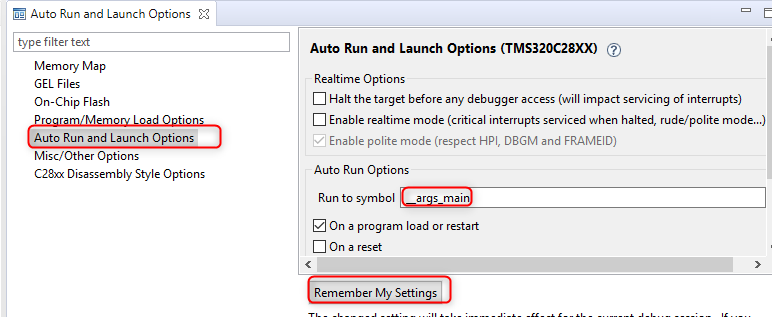
    Hence try the below instead. Change the auto-run symbol to __args_main like below:

    Make sure you press the "Remember My Settings" button.

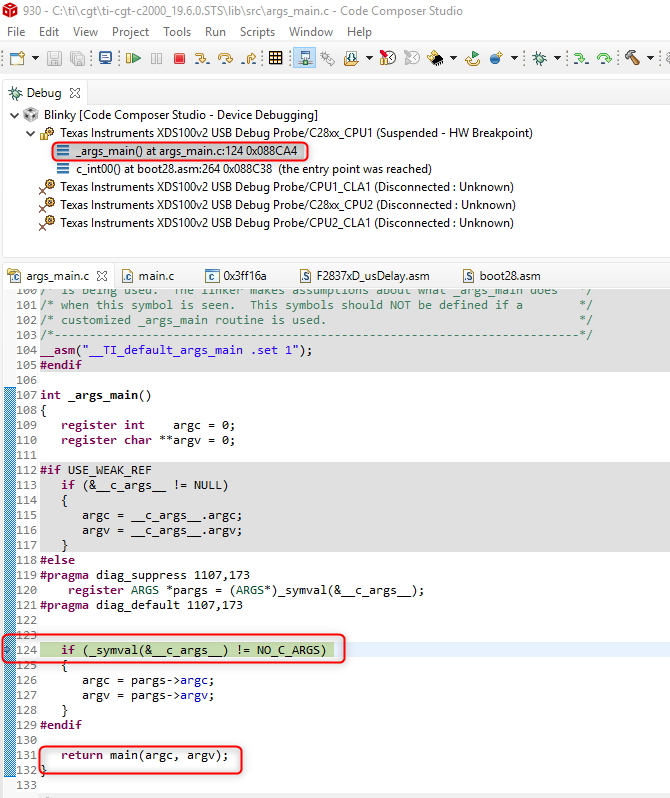
    Then relaunch the debugger for the project. It should halt at __args_main, right before main is called.

    You can then step into main without issue. 

    I also noticed that if I resume execution from this breakpoint and then terminate the debugger, the program still runs fine. Looks like the screwed up SW breakpoint at main in the scenario before is the culprit for that issue also.

    Thanks

    ki

  • You solution exactly answers my question, the "Run to symbol: __args_main" did the trick.

    Thank you for your support!

    Best regards,
    Marko.