This thread has been locked.

If you have a related question, please click the "Ask a related question" button in the top right corner. The newly created question will be automatically linked to this question.

CCS/TMS320F28388D: Debug the project tcpEchoF2838X

Part Number: TMS320F28388D
Other Parts Discussed in Thread: C2000WARE

Tool/software: Code Composer Studio

Hello,

I am able to run this tcpEchoF2838X sample project successfully by sending data to the server and getting the echo data back. However,  the target did not run to the symbol "main". Also, I am not able to set any break point in the code and keeps getting: "Error Enabling this function; There is no AET resource to support this job."

In the README.md, it stated:

"* When building in Code Composer Studio, the kernel configuration project will be imported along with the example. The kernel configuration project is referenced by the example, so it will be built first. The "release" kernel configuration is the default project used. It has many debug features disabled. These feature include assert checking, logging and runtime stack checks."

May be it is because of some debug features are disabled. Can you suggest a way that I could set break point and run the code step by step in debug mode?

Also, how can I use static IP instead of DHCP?

The following are my software tools:

CCS v9.3

bios_6_76_04_02

C2000Ware_2_01_00_00

ndk_f2838x_3_61_01_01

ns_2_60_01_06

Thanks,

  • Hi,

    Good to know that you are now able to build the example at your end. 

    Andy Fung said:
    Can you suggest a way that I could set break point and run the code step by step in debug mode?

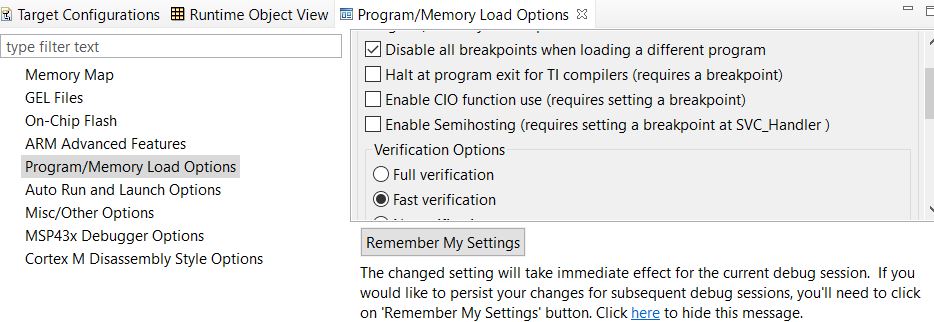
    When I need breakpoints on Flash based projects like the TCP Echo example I do below in Tools-> Debugger Options->


    Since the number of hardware breakpoints are limited when debugging on Flash, I usually disable the settings like above that frees up breakpoints and I keep breakpoints to run it. It will also let you do Go main. Also place break point at the code line I need.

     ..

    Andy Fung said:
    how can I use static IP instead of DHCP?

    For Static IP the IP initialization function in ndk_tirtos.c can be modified as below:

    /* Static IP Address settings */

    char *LocalIPAddr = "10.90.90.3";

    char *LocalIPMask = "255.255.255.0";

    /*

    * ======== initIp ========

    * Configure the stack's IP settings

    */

    static void initIp(void *hCfg)

    {

       CI_IPNET NA;

       CI_ROUTE RT;


       /* Add global hostname to hCfg (to be claimed in all connected domains) */

       CfgAddEntry(hCfg, CFGTAG_SYSINFO, CFGITEM_DHCP_HOSTNAME, 0,

               strlen(hostName), (unsigned char *)hostName, NULL);


       /* Setup manual IP address */

       memset(&NA, 0, sizeof(NA));

       NA.IPAddr = inet_addr(LocalIPAddr);

       NA.IPMask = inet_addr(LocalIPMask);

       strcpy(NA.Domain, DomainName);

       NA.NetType = 0;


       CfgAddEntry(hCfg, CFGTAG_IPNET, 1, 0,

               sizeof(CI_IPNET), (uint8_t *)&NA, 0);

    }

    One request, in future please don't post the same question in multiple threads. I see that you posted these questions, in the older thread about building the NDK example. 

    Regards,

    Sudharsanan

  • Thanks for the solution. The static IP is working now. 

    Does the flash based project you mentioned means the code run from flash instead of from ram? 

  • Andy Fung said:
    Thanks for the solution. The static IP is working now

    Thanks for the update. Glad to know that it is working.

    Andy Fung said:
    Does the flash based project you mentioned means the code run from flash instead of from ram? 

    Yes. that is correct the code is placed in flash for that project.

    Regards,

    Sudharsanan

  • Is there any documentation that provide instructions of moving code to ram?

  • Hi,

    It is achieved through linker command file:

    Following linker command files might be of help to start with:

    <C2000ware>\device_support\f2838x\common\cmd\2838x_RAM_lnk_cm.cmd

    <C2000ware>\device_support\f2838x\common\cmd\2838x_RAM_combined_lnk_cm.cmd

    To understand the concept behind that, the following link may be of use.

    https://processors.wiki.ti.com/index.php/C28x_Compiler_-_Understanding_Linking

    Please note that you may not be able to fit in the tcpEcho kind of application to RAM. 

    Regards,

    Sudharsanan