Other Parts Discussed in Thread: CONTROLSUITE, C2000WARE
Tool/software: Code Composer Studio
Hello,
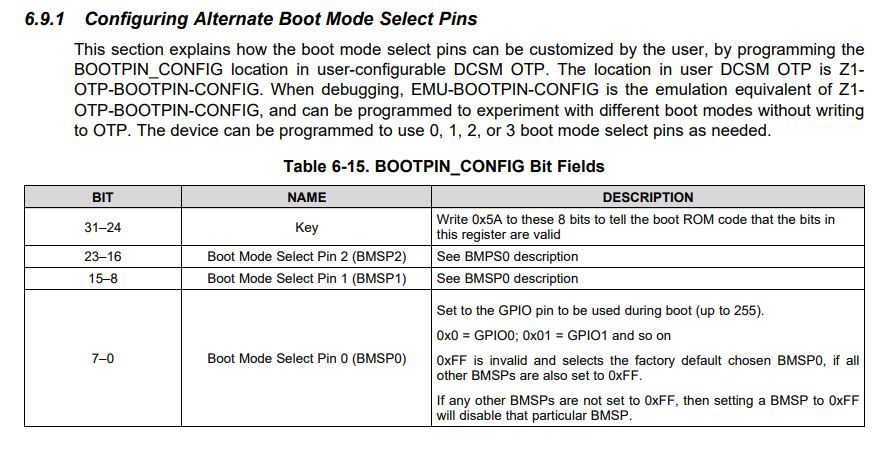
I am designing a control card using a 64-pin F280049 DSP (P/N:F280049PMS). The default boost pin is GPIO24 and GPIO32. Since I want to use them for EPWM, I have to change the boot pin to other GPIO.
Unfortunately, no examples in CCS controlsuite is found.
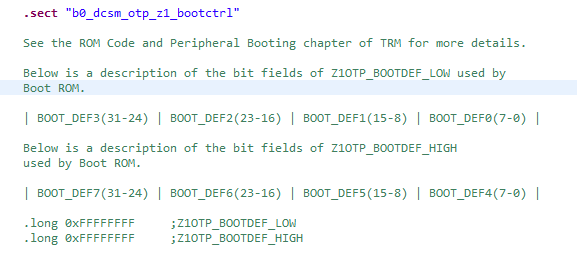
1. Datasheet tells me that this could be achieved by using Z1-OTP-BOOTPIN-CONFIG in DCMS OTP. Could anyone one please tell me how to access that?
I am using a CCS 8.2 and the "Tools -> On-Chip Flash" method does not apply to this version of CCS.
2. After changing the values, how to verify that other GPIOs are selected for Boot Mode selection successfully?
I really appreciate the time anyone made in helping me with this problem. Thanks!