This thread has been locked.

If you have a related question, please click the "Ask a related question" button in the top right corner. The newly created question will be automatically linked to this question.

TMS320F28335: About the BIOS operating system of F28335.

Genius 3095 points
Part Number: TMS320F28335


Hi team:

CCS version: CCS9.1. BIOS version: 5.42.1.09.

In theory, the semaphore of a task should be 0 or 1, but it will change to 45 after running for a period of time. What is the cause of this problem?

It is a semaphore for the task of communicating with the lower computer. There are three tasks in my project, which are: communication function with lower computer, communication function with upper computer and storage operation of SD card. The cycle is 2ms 2ms 4ms.

Before the problem occurs, the SD card reading and writing operations are generally carried out, and there is no fixed time. After the problem occurs, only the tasks communicating with the lower computer cannot be scheduled, and the other two are normal.

What's more, the task execution time of operating SD card sometimes exceeds 4ms. Is it related to this? The scheduling logic is as follows:

while((0xFFFF != GenTaskInfoTable[cnt16_1].taskID))
 {
  if((0 == (sysTime % GenTaskInfoTable[cnt16_1].period))
   && (SEM_count(GenTaskInfoTable[cnt16_1].taskSEM) < 2))
  {
          SEM_post(GenTaskInfoTable[cnt16_1].taskSEM);
  }
          cnt16_1 ++;
 }

//The tasks with problems are as follows:

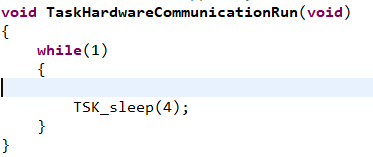
void TaskHardwareCommunicationRun(void)
{ 

  while(1)
  {
        SEM_pend(&SEM_HardwareCommunication, SYS_FOREVER);
        HardwareCommunicationProc();
  }
}

When there is a problem, the value of "SEM_count(GenTaskInfoTable[cnt16_1].taskSEM" is 45, so it can't be "SEM_post" all the time. As a result, "TaskHardwareCommunicationRun" is stuck at "SEM_pend" all the time and cannot run.

Best Regards

  • Hi,

    The semaphore in DSP/BIOS is a counting semaphore, so the count can be 0 to N. 

    Its hard to venture a guess on your other questions. I'd try to resolve why the count is growing before trying to address those.

    Todd

  • Hi,


    Thank you very much for your help!


    Semaphores are currently only used in two places in my project:


    ①In the task scheduling logic

    while((0xFFFF != GenTaskInfoTable[cnt16_1].taskID))
     {
      if((0 == (sysTime % GenTaskInfoTable[cnt16_1].period))
       && (SEM_count(GenTaskInfoTable[cnt16_1].taskSEM) < 2))
      {
              SEM_post(GenTaskInfoTable[cnt16_1].taskSEM);
      }
              cnt16_1 ++;
     }
    ②At the beginning of task execution
    void TaskHardwareCommunicationRun(void)
    {
      while(1)
      {
            SEM_pend(&SEM_HardwareCommunication, SYS_FOREVER);
            HardwareCommunicationProc();
      }
    }
    So,in theory, according to our logic, the value of the semaphore should be 0 or 1, but in reality it reached 45.
    Best Regards!
    Minty
  • The only other possibility is that the application is corrupting the SEM object. If your device supports Hardware Watchpoints, I'd put a breakpoint on the address of the count field in the semaphore in guestion and have it halt on a write. Then see if it is ever is above 1 and how did it happen.

    Todd

  • Hi,

    Thanks for your help!

    The problem I'm encountering is difficult to reproduce. If the application  caused the semaphore of a  task to increase, is it caused by this task or may it be caused by

    other tasks? What‘s more ,what is the general reason for the increase of semaphore?

    Minty

  • There are only two ways that the semaphore count could increase 

    1. Calling Semaphore_pend 

    2. Something corrupting the Semaphore_Object.

    When the situation occurs, I'd do a ROV->BIOS->Scan for errors. This will check for blown stacks and other corruption errors in the kernel.

    Todd

  • Hi

    Thank you very much for your help!

    Does stack overflow mean that every task exceeds the stack size(MAUs),like the red circle in the picture below:

    How do we know whether it exceed?

  • Hi

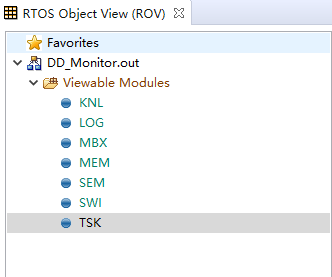
    What's more, my ccs has ROV,but BIOS is not included.How should I debug now?

    When I click TSK,it showed like below which is different from online:

    Best regards!

    Minty

  • BIOS version: 5.42.1.09.

    XDCtools version :3.24.05.48

    The ROV does not include BIOS,but includes TSK which can help view status of each task.When I stopped my project,clicked TSK,it showed many info,

    such as stackPeak,stackBase,stackSize.

    When displayed stackPeak bigger than stackSize , is it mean stack overflow?

    In addtion,there is a task,I set stackSize = 2048.The program has just been burned in the DSP, but it has not yet started running.Its stackPeak showed 2047; When I click the run button, and after running for a while,I stoped ,but it also showed 2047.When I modified stackSize to 4096,it showed 4097 forever.Is it normal?There are five tasks in my project, there are two tasks are in this situation.

    What's more,the stackPeak of other three task is always smaller than its stackSize. When I have other operations, the stackPeak of this task will change.

    Best regards!

    Minty

  • Minty,

    None of your pictures were included. Please use the "Insert/Edit Media" icon above.

    Todd

  • Hi

    Now I have the following problem:

    ①My ccs has ROV,but BIOS is not included. (BIOS version: 5.42.1.09. XDCtools version :3.24.05.48)

    ②The ROV does not include BIOS,but includes TSK which can help view status of each task.When I stopped my project,clicked TSK,it showed many info,such as stackPeak,stackBase,stackSize.

    When displayed stackPeak bigger than stackSize , is it mean stack overflow?

    ③There are five tasks in my project,and two of them are quite special. The details are as follows:

        I set  stackSize = 2048.The program has just been burned in the DSP, but it has not yet started running.Its stackPeak showed 2047;

        When I click the run button, and after running for a while,I stoped ,but it also showed 2047.

        When I modified stackSize to 8192,it showed 8191 forever.

        When I delete all functions in this task, that is to say, it is an empty task, but it still showed 8191.

        Is this phenomenon normal?

        What's more,the stackPeak of other three task is always smaller than its stackSize. When I have other operations, the stackPeak of this task will change.

    Best regards!

    Minty

  • Hi

    Sorry, the XDCtools version number was wrong in the reply just now, not 3.24.05.48 , but 3.55.22.2

  • There is no BIOS for in ROV/KOV for DSP/BIOS. 

    If you increased the task stacks and it is still be blown, you might want to look at what is right before it memory. Could you get writing past that memory and it corrupting the top of the stack.

    Todd