This thread has been locked.

If you have a related question, please click the "Ask a related question" button in the top right corner. The newly created question will be automatically linked to this question.

CCS/TMS320F28388D: CCS project example for F28388D?

Part Number: TMS320F28388D
Other Parts Discussed in Thread: C2000WARE,

Tool/software: Code Composer Studio

Dear Sir or Madam,

Is there any CCS project example for F28388D to implement the ethernet communication between F28388D controlCARDs(MCU063B) and PC.

Yes, I have installed C2000Ware on my computer,

but I can not find any valuable helpful projects in the \C2000Ware_3_03_00_00\driverlib\f2838x\examples directory.

Could you please give some clues?

Thanks!

zhou ping

  • Hi Zhou,

    There is a TCP ICMP webserver example implemented using lwIP stack. It is located at location C2000Ware_3_03_00_00\libraries\communications\Ethernet\third_party\lwip\examples\enet_lwip\cm in C2000Ware. You can refer to Readme.txt in that repo to see what all protocols are supported. 

    Thanks,

    Yashwant

  • Dear Yashwant,

    I read the readme.txt file as follows,

    Steps to run this example:
    1. Program the c28 core with correct pinmux configuration.
    2. Program the cm core with the enet_lwip example binary. Let the controller run.
    It is programmed with a static IP address - 192.168.0.4.
    3. On any sending device, set the IP address to something like 192.168.0.x so that
    the sending device and the f2838x device are in the same network. Now, both the
    device can be connected directly or even through a switch in between. Since the
    f2838x device supports ARP, it will be able to respond to ICMP/HTTP requests
    even through the switch.
    4. For ping example:
    a. Ping the f2838x device which can be typically done with standard 'ping' command
    on most devices.
    ping 192.168.0.4
    b. The sender device should be able to see ping replies from the f2838x device's
    IP address.
    5. For Webserver example:
    a. Open a web browser in the other device. Type 192.168.0.4 in the address bar.
    b. A webpage shows up with TI logo and an interactive button. Clicking on the
    button should update a number value on the webpage. Button click sends an
    HTTP query to the device which sends back the value of a global counter and
    then increments the value of the counter. So, the webpage value should increase
    with each button click.

    Actually the existing enet_lwip project in the installation directory is not workable, is it?

    What do I need to do to make it workable except for the pinmux configuration?

    Thanks!

    zhou ping

  • Zhou,

    Every project in the package is completely tested and validated. 

    Follow the steps in the readme to get the ping reply. 

    First program the C28x Core using cm_common_config_c28x project with predefined symbol ETHERNET to correctly configure the pinmux and the clock configuration of the CM core. 

    Regards,

    Yashwant

  • Dear Yashwant,

    Now I am trying to add the pinmux configuration function in the enet_lwip.c file by myself.

    I am trying to realize the pinmux configuration and lwip on one single project.

    Is it reasonable?

    So according to your advice, C28 CPU1 is responsible for pinmux configuration, and Arm Cortex-M4 is responsible for the lwip.

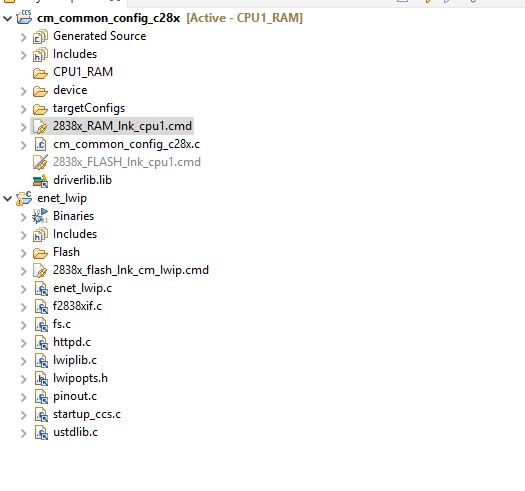
    So there are supposed to be two projects in my CCS workspace as the attached screenshot, right?

    But how to burn the two projects' bin files into one F28388 chip (non-volatile)?

    Thanks!

    zhou ping

  • Zhou,

    The C28x CPU1 core is the master core. The pin mux configuration can be done only through CPU1 and not the CM.  Please go through f28388x TRM to understand more about the core capabilities.

    Yes you need to have 2 projects in the CCS. 1 that generates the binary for CPU1 and the other for CM.

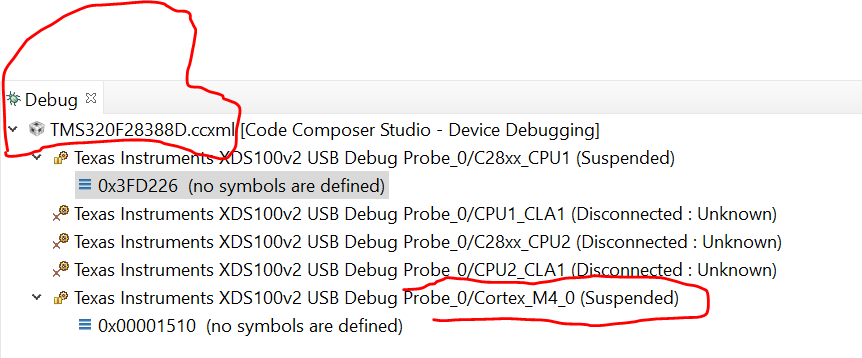
    To run lwip on CM4, you will have to first load and run binary of the project : cm_common_config_c28x on the C28 CPU1 core by selecting it in the TMS320F28388D.ccxml debug session and then load and run CM4 project : enet_lwip on to the CM core.

    Regards,

    Yashwant

  • Dear Yashwant,

    Thanks very much for the valuable suggestions.

    I have established two CCS projects, one runs on CPU1 RAM, the other run on CM flash.

    And the lwip protocol works well when I use emulator XDS100V2 to run the two projects in debug mode.

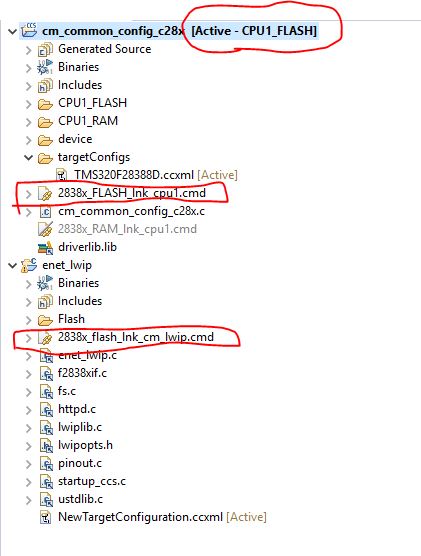
    BUT when I switch the CPU1 project to CPU1 FLASH, and the other is still on CM flash.

    The LWIP does not work after both CPU1 flash and CM flash have been burned !!

    Why?

    Could you please give some clues?

    Please see the attached screenshot.

    2838x_FLASH_lnk_cpu1.cmd and 2838x_falsh_lnk_cm_lwip.cmd were used.

    Thanks!

    zhou ping

  • Yes, I would like CPU1 and CM to boot from flash without XDS100V2 Debug probe.

  • Zhou,

    Can you go through this e2e with similar issue. https://e2e.ti.com/support/microcontrollers/c2000/f/171/t/956874

    Look for the replies marked as resolved in that e2e.

    Can you also click on "This resolved my issue" button for the replies that solved your issue.

    Thanks,

    Yashwant