This thread has been locked.

If you have a related question, please click the "Ask a related question" button in the top right corner. The newly created question will be automatically linked to this question.

LAUNCHXL-F28069M: under Windows 10 no COM port and no TI XDS100 Channel A or B.

Part Number: LAUNCHXL-F28069M
Other Parts Discussed in Thread: DRV8301-69M-KIT, MOTORWARE

I am currently working with the LAUNCHXL-F28069M under the motor-ware suite.

I am using windows 10.

No problems with compiling and running the labs on my launchpad with the BOOSTXL 8305 ( I have the debug probes ) BUT I noticed I have no COM port and no TI XDS100 Channel A or B under USB to tick the VCP (as I saw on the forum many did and worked). 

Any fix for this?  

  • Make sure the power supply and connection properly, and refer to below link to install the driver. Should have a "Texas Instruments Debug Probes" in Windows Device Manger since you can debug and run the lab project.

    processors.wiki.ti.com/.../XDS100
  • Hello Yanming,

    I tried different things among other, to reprogram my boards FTDI chip, I have reinstalled code composer and updated it, uninstalled xds100 class auxiliary and debug and reinstalled them from the emulation folder.

    I have looked on the wiki page but it din not help a lot. Can you be more specific ? 

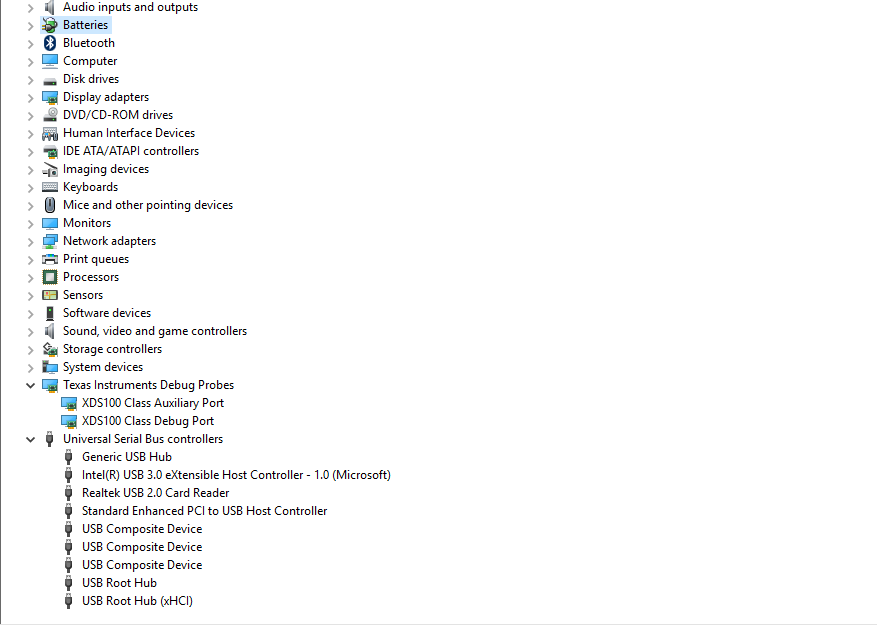
    Please see the image attached. This is what I have in device manager.

    What would you recommend me to do in order to get the COM port in device manager?

    Thank you so much for everything.

  • It seems you have installed the driver for XDS100 properly, and you can use the XDS100 emulator for CCS lab project. I am confused why didn't have any Ports(COM) in your Device Manger. Did other USB devices have the same issue in your PC? Or can you try other PC for this XDS100?
  • Hi Sabin,

    I notice that there is an entry for 'Texas Instruments Debug Probes' in your Device Manager window.  I haven't personally seen these as entries before, but I think these are your XDS100 entries.

    To help prove this:  If you unplug and re-plug in your launchPAD, do these entries go away & then return?

    If so, I suspect double-clicking on the 'XDS100 Class Auxiliary Port' may bring up a window which will let you figure out what COMport is being assigned.

    ===

    Yanming and I work in the C2000 MCU group.  It is possible that the CCS team is/has changed the naming of devices within Windows to try to improve readability.


    Thank you,
    Brett

  • Hello,

    Thank you both for taking the time.

    I tried from another computer and the result is the same.

    Yes "TI debug probes " disappear if I unplug the USB and reappear when plugging the board.

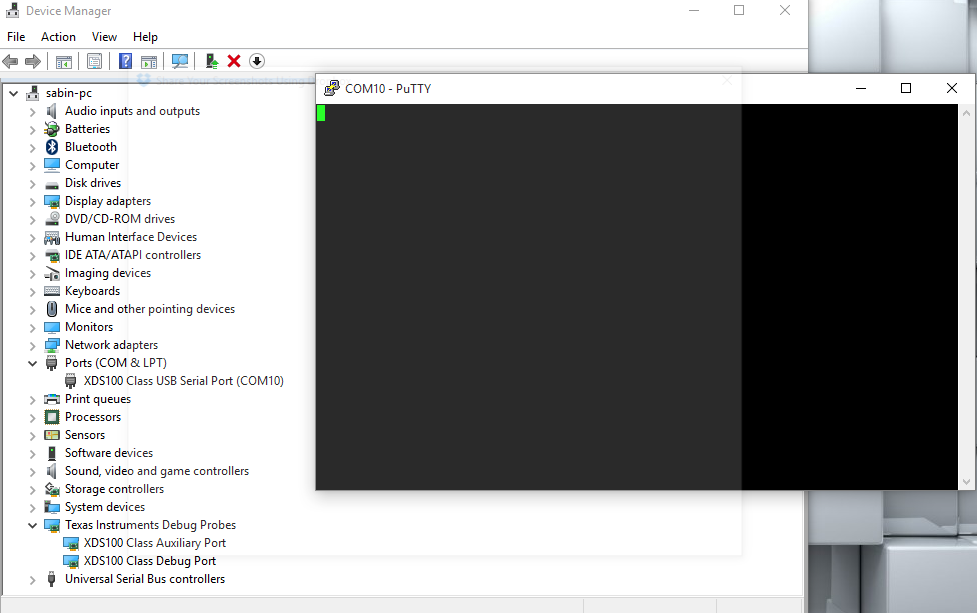
    Now I did as instructed and loaded the VCP of the auxiliary port and I can connect trough the terminal but I can not see anything when using the out of the box demo. I tried both 9600 and 115200.

    Any other suggestions? 

    Thanks again.

    Please see attached bellow:

  • From you posted the image of device manager, the drive is installed properly, both JTAG and UART can work well. I don't make sure your demo tool can support this UART testing. You need to set correct switches (MUX_SEL and CH_SEL, Boot Mode) on LunchXL-PAD if you want to use SCI of F28069.
  • Hello Yanming,

    I think I set the correct switches and I made all the propper settings.
    Maybe the driver is not installed properly or ... could it be something on the board? From your experience, could it be the board at fault?

    Thanks again.

    PS: I got tired of debugging it and what I've done is I have shunted JP6 adnJP7 and used an external serial to USB (ftdi) on J1-3 and J1-4. Now I can use the UART.
  • OK. I have tested the XDS100 like you used it in Windows 10, all worked well include JTAG and UART on LAUNCHXL-F28069M. Make sure the power supply is right and enough, you can try use the power supply of BOOSTXL-8305 for F28069.
  • Hello Yanming,

    Sorry for my late reply. Yeah I tried that also and with no success.

    Even when I tick the VCP on the auxiliary probe this dose not emulate a port properly. 

    It might be also because I reprogrammed the FTDI in my attempt to fix it . I will try another time with another board .

    Thanks.

  • I came across this thread with the same issue. Were you able to resolve it?
    I too had the problem of COM port not appearing and selected the load VCIP check box.

    However my SCI communication doesn't seem to display anything even with the program running.
    My LED blinking program works fine though.

    I am not sure if I should go ahead and test with my BOOSTXL-8305 board while still stuck.
    My Switch S1 positions for 1,2,3, are "up up and up".
    Any ideas?
  • Hello,

    Put S1 -3 to off and try like that. (read the board description again)

    You can still run the 8305 even without the com port being displayed properly.Be sure you have the driver installed correctly.I specifically needed SCI because I was controlling my  board trough uart from a remote linux machine and no I did not fix it but purchased another board that works perfectly.

    I strongly believe my problem was because I reinstalled the USB drivers on the first launchpads FTDI chip.

    So read again the user guide and board descriptions, put S1 -3 to off and they the example. Hopefully my issue is that I messed with the FTDI drivers and your issue is that you need to read the user guide carefully.

    Let me know how it works out.

    Cheers,

  • Hello,
    I have exactly the same problem except of my system is running under Windows 7 ( 64-bit ). Any fix ?
    Thanks
    Tibor
  • Hello Tibor,

    The way I 'fixed' the problem was that I have purchased a new board . Like I wrote previous I think my problem was because I messed with the board's FTDI driver.
    Try to read previous replies from Yanming and Brett . On my new board I activated the VCP on the aux probe and used that com port -- it works.
  • Hello Sabin,
    Thank you for your quick response: in fact, since this morning I read through all possible information on this topic, and finally I managed to solve the problem - at least in my installation.
    In my case the board settings ( jumpers, MPX selectors, etc... ) were correctly configured, in my Device Manager I got under the "chapter" Texas Instruments Debug Probes two entries, XDS100 Class Auxiliary Port and XDS100 Class Debug Port, but I did not have an additional COM port under the Ports ( COM & LPT ) chapter.
    According to previous replies I clicked on the XDS100 Class Auxiliary Port, and its "Advanced" tab I checked the Load VCP checkbox, than the OK button. Nothing happened... however, in disconnecting/re-connecting the board ( I guess I re-started the driver ), I got a new COM port under the Ports ( COM & LPT ) chapter, named XDS100 Class USB Serial Port ( COM9 ). Connecting putty to this port was successful, and then I was also able to successfully run the "Example_2806xSci_Echoback" example project: it communicated with putty with 9600,n,8,1 settings, as it was expected.
    Cheers
    Tibor
  • I have the same problem with DRV8301-69M-KIT. The XDS100 is discovered in Device Manager just as in the screenshot posted on the first page, works like a charm in CCS (both debugging and printf to console), but not for a terminal... I'm using "Tera-Term" (works OK for communication with another MCU) which detects XDS100 on a COM port, however no data is printed.

    I have the switches on the control card in default positions, I guess it's necessary for the debugger to work and load the program via CCS. Should something be changed there nevertheless?

    If not, what are the other possible sources of problems?
  • Hello Jakub,

    Sorry for the late reply. 

    Is this still an issue or did you find a fix?

    If its still an issue I would recommend you try running the demo software the board comes with to see if that works. (also try to use putty)

    If that is OK and you can not communicate with another MCU (motorware board communicating with PC or other MCU) please look in the settings of your SCI module. Maybe you have SCIB activated and not SCIA.

  • Hi Sabin,


    Thanks for the answer, although I have already found what's wrong - the SW3 (pos 2) switch on my control card redirects SCI pins to XDS100 port B output. So everything was working fine (at least from some moment), but not for "external" pins!
  • Hello Jakub,

    Great you figured it out.

    Cheers.