This thread has been locked.

If you have a related question, please click the "Ask a related question" button in the top right corner. The newly created question will be automatically linked to this question.

Device Specific Header Files???

Other Parts Discussed in Thread: CONTROLSUITE

I have...

...a TMX USB ControlStick with a TMX320F280269PNA installed.

...the latest version of controlSuite.

...the latest version Code Composer Studio with EVERYTHING installed.

I have 5.57GigaBytes of TI stuff installed, and I do not have any device specific header files?!?!

CCS looks at me like I am crazy, because I am, apparently, lacking device specific header files, such as:

#include "F2806x_Adc.h"                // ADC Registers
#include "F2806x_BootVars.h"           // Boot ROM Variables
#include "F2806x_DevEmu.h"             // Device Emulation Registers
#include "F2806x_Cla.h"                // Control Law Accelerator Registers
#include "F2806x_Comp.h"               // Comparator Registers
#include "F2806x_CpuTimers.h"          // 32-bit CPU Timers
#include "F2806x_ECan.h"               // Enhanced eCAN Registers
#include "F2806x_ECap.h"               // Enhanced Capture
#include "F2806x_EPwm.h"               // Enhanced PWM
#include "F2806x_EQep.h"               // Enhanced QEP
#include "F2806x_Gpio.h"               // General Purpose I/O Registers
#include "F2806x_I2c.h"                // I2C Registers
#include "F2806x_NmiIntrupt.h"         // NMI Interrupt Registers
#include "F2806x_PieCtrl.h"            // PIE Control Registers
#include "F2806x_PieVect.h"            // PIE Vector Table
#include "F2806x_Spi.h"                // SPI Registers
#include "F2806x_Sci.h"                // SCI Registers
#include "F2806x_SysCtrl.h"            // System Control/Power Modes
#include "F2806x_XIntrupt.h"

I have spent an enormous quantity of time searching every directory looking for anything that would tell c2000_6.2.0 that there is such thing as an F28069.

Please, help!

Thanks,

Steve.

  • Hi Steve!

    Here paths which you need:

    ti\controlSUITE\device_support\f2806x\v136\F2806x_common\include\

    ti\controlSUITE\device_support\f2806x\v136\F2806x_headers\include\

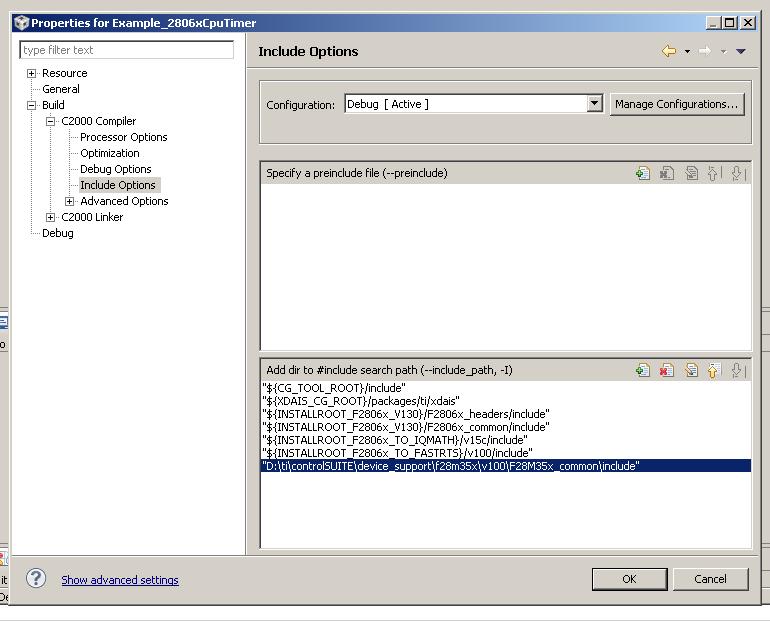
    Paste these paths at "Include options" of project's properties for your F28069 projects. 

    Regards,

    Igor

  • Thanks!  That got it!  I looked through controlSuite stuff on my hard drive, but I guess I wasn't thorough enough.  Now, to blink an LED.  Hmmm...I wonder what morse code would be for "Hello World!"

    One more quick question regarding these header files, do I need to add this path and file name every time for every project?

    Ahem, should anyone else have this same question:

    1.)  Right-click the project in the "Project Explorer" and select "Properties" at the bottom.

    2.)  "Include Options" is the section at the left of the window titled, "Properties for ...".

    3.)  After selecting "Include Options", click the tiny paper like button with the green plus sign on the right-hand side of the screen.

    Steve.

  • Steve,

    if you will import example project form controlSUITE to your CCS workspace through menu Project>Import CCS Project then these paths will be included to project by default. But if you will create own new F28069 project then you need do this action: right click on your project folder > left click on "properties">"Include options":

    Regards,

    Igor