This thread has been locked.

If you have a related question, please click the "Ask a related question" button in the top right corner. The newly created question will be automatically linked to this question.

MSP430FR5964: CCS v11 Upgrade leaves references to a non-existing (or obtainable!) MSP430 GCC toolchain

Part Number: MSP430FR5964
Other Parts Discussed in Thread: CCSTUDIO

I've just been and upgraded CCS from V10 to V11. The install appeared to go fine, but has left me with a problem that I'm unsure how to resolve.

Any attempt to rebuild any of the projects is showing the project with a single error;

    This project was created using a version of compiler that is not currently installed - GNU_9.3.1.11:Mitto Systems Limited [MSP430].....

My immediate thoughts were that the GCC toolchain was not installed as part of the upgrade, so I went ahead and installed the latest GCC, which appears to be 9.3.0.31 - which is an older version than it reports the project was created with (I assume this was recreated as part of the upgrade).

I'm not sure how to resolve this. GCC 9.3.1.11 doesn't appear anywhere in the CCS 11 directories, nor is there any indication how to obtain it. But now that the projects have been 'created' with this version, I effectively need to downgrade the version. Just what is 9.3.1.11, and how do I convince CCS that I can use 9.3.0.31?

Regards

Andrew

  • Just went and had a look at the 10.4 directories, and GCC 9.3.1.11 is installed as part of that CCS version, which at least explains where the version that created the project(s) came from. But that version doesn't appear to be available with CCS V11. And because the workspace was upgraded to V11, reverting back to CCS V10 is no longer an option.

  • Just went and had a look at the 10.4 directories, and GCC 9.3.1.11 is installed as part of that CCS version

    Looking at a CCS 10.4 installation, can see that the MSP430 GCC 9.3.1.11 was previously installed. Yet, if go to the CCS 10.4 Available Software the current latest version available for download is MSP430 GCC 9.3.0.31 (as is the case for CCS 11.2).

    Perhaps the MSP430 GCC 9.3.1.11 version had some some issue, and the CCS updates are no longer offering that for download.

        This project was created using a version of compiler that is not currently installed - GNU_9.3.1.11:Mitto Systems Limited [MSP430].....

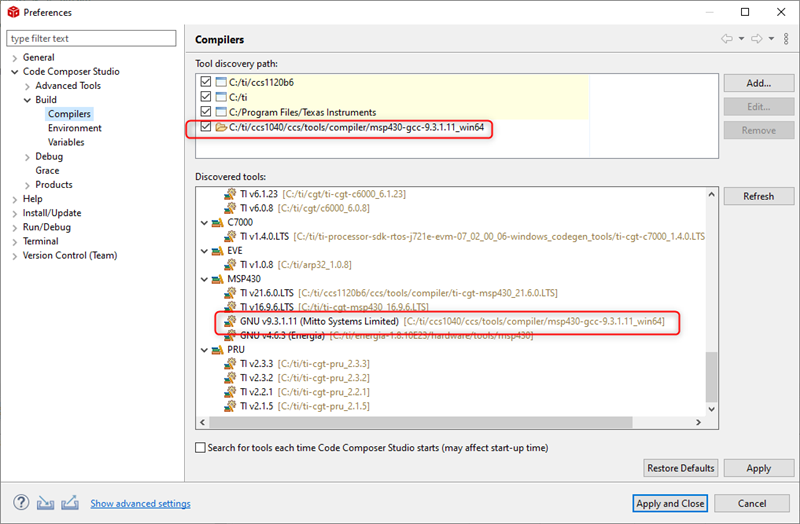
    If the PC still has GNU_9.3.1.11 install in a different work CCS installation, one work-around is to go to the Compiler preferences in the CCS 11 workspace and use the Tool discovery path Add option to point at the CCS 10.4 directory containing GNU_9.3.1.11, which allow CCS 11 to use that compiler:

    However, that is not a maintainable solution if TI are no longer providing the download for GNU_9.3.1.11.

    I effectively need to downgrade the version. Just what is 9.3.1.11, and how do I convince CCS that I can use 9.3.0.31?

    You should be able to change the Compiler Version in the CCS General Properties

  • Thanks for the thoughts. From what you have gleaned, it definitely appears that 9.3.1.11 has been removed. Good idea of simply adding a path back to the CCS 10 version. I had thought of simply copying the 9.3.1.11 structure into CCS 11, but wasn't sure if that was all that was needed to 'install' the version, or there was something more convoluted that happened at install time. Easy to try though - as you said, its a bit nasty, but could at least buy some time.

    On your comments on just changing the compiler version, its not quite as simple as that. I've already reverted the compiler versions back to the 9.3.0.31, but that doesn't fix the error. The wording implies that the project was somehow created using the 9.3.1.11 version, and not just built with it - maybe just semantics, but seems deeper than a simple rebuild. One of the projects just provides some cross project dependencies, and never uses the compiler in a real sense, but still displays the error. And what exactly does the compiler have to do with 'creating' a project? I've been through the obvious project configurations (.settings, .cproject, .cproject, .project etc) trying to glean exactly where it is picking this up from, but haven't found any references to it as yet.

    Regards - Andrew

  • Just tried adding the GCC 9.3.1.11 path from CCS V10 to the CCS V11.2 installation.

    This picks up that the 9.3.1.11 compiler is available, and can be selected as the compiler version for the project. However, this doesn't resolve the project 'creation' error - this still states "This project was created using a version of compiler that is not currently installed - GNU_9.3.1.11:Mitto Systems Limited [MSP430].....". Not sure where to go from here, other than archive every project, recreate the project itself, and import back from the archive. This would be a real pain! I'm still curious exactly what the compiler version has to do with the 'creation' of the project (which I'm guessing is purely the CCS structures), or where this reference is held. Maybe if I can figure this out, some way forward might present itself.

    I keep thinking that I can't be the only person to trip over this, or maybe I was just unlucky enough to upgrade the compiler in a small window where the 9.3.1.11 version was 'available'. When systems restrict backward migration, reverting support to an earlier version is a bit nasty. Even if there were errors in 9.3.1.11, a much more preferable option would be to move the compiler version forward but with the 9.3.0.31 codeset.

    Regards - Andrew

  • I've got as far as finding where in the .cproject configuration the compiler version is defined - as part of the xml there is a definition 'com.ti.ccstudio.buildDefinitions.core.OPT_CODEGEN_VERSION" value="GNU_9.3.1.11:Mitto Systems Limited"', but tweaking this appears to do nothing more than change the compiler version. Its not the reference I am after! Still looking.

  • From the CCS downloads page (https://software-dl.ti.com/ccs/esd/documents/ccs_downloads.html), it still shows GCC 9.3.1.11 as available for CCS 10.3.0 through to 10.4.0. It doesn't state anything regarding GCC for CCS 11 versions. Where did you find this?

    Regards - Andrew

  • Hello,

    GCC no longer ships with CCS 11. TThis was intentional. There were a variety of reasons ranging from lack of interest among majority of users, reduce the overal CCS package size, etc.

    However:

    Just tried adding the GCC 9.3.1.11 path from CCS V10 to the CCS V11.2 installation.

    This picks up that the 9.3.1.11 compiler is available, and can be selected as the compiler version for the project. However, this doesn't resolve the project 'creation' error - this still states "This project was created using a version of compiler that is not currently installed - GNU_9.3.1.11:Mitto Systems Limited [MSP430].....".

    This should work. I tried something similar - I imported an existing MSP430 GCC project from 10.4 into my 11.2 workspace. I initially got the same error as you regarding GCC 9.3.1.11 not being installed. I then added the path to that compiler in my 10.4 directory to the discovery path in 11.2. I applied the changes and that resolved the issue. If that didn't work for you, thhen CCS 11.2 must have not properly detected it.

    Does it appear in the list of discovered tools?

  • This should work. I tried something similar

    I have tried another variation on that theme, with CCS running on Linux:

    1. Create a project in CSS 10.4 using GNU v9.3.1.11

    2. Use a CCS 11.2 installation which already had GNU v9.3.0.31 installed. Was able to import the project created using GNU v9.3.1.11. As expected showed that it had switched the project to the older version of the GNU compiler which was installed:

    3. In CCS 11.2 add the tool discovery path to the GNU v9.3.1.11 installation in CCS 10.4.  CCS 11.2 then switches to using GNU v9.3.1.11  for the imported project.

    When the example project was created, the Effective compiler version validation was left at the default of "Flexible":

    Haven't checked the behaviour if the original project had set the Effective compiler version validation to "Strict".

  • Haven't checked the behaviour if the original project had set the Effective compiler version validation to "Strict".

    The default setting should be flexible. But even if it was "strict", it should not matter if the same version of the compiler is discovered by CCS (as Andrew mentioned he has done).

    I tried an example where I set a 10.4 project with "strict" setting for the compiler version and as long as 11.2 has discovered the same compiler version, it importes fine without issue.

  • Finally had some time to have a good play with this.

    Sad to say, I haven't found any way to resolve this without freshly recreating the projects, then repopulating back from the repository. I'm currently in the process of rebuilding the complete project tree (and to make it worse, I had a few source files that hadn't been committed back to the repository when the CCS V11 upgrade was done, but can only blame yours truly for that!). I had a system rebuild about a year ago, and it appears the whole CCS project tree was recreated and repopulated. Just my luck that all of them used the (then current) V9.3.1.11 as part of the creation, so all projects are impacted.  It's been a bit of a trial, but about half way through it now.

    While I don't fully understand what is happening here, it appears that when a CCS project is created CCS/Eclipse is capturing the GCC (or presumably TI compiler if that is being used) as a dependency of the project itself. This is in addition to the compiler version that can be modified in the projects General properties, which becomes a dependency of the build. The second of these can be readily modified via the projects properties, but haven't found any way of changing the compiler dependency from the projects creation. This in itself has only become a problem with the regression of the supported GCC compiler from V9.3.1.11 in CCS V10, back to V9.3.0.31 in CCS V11.

    I haven't any idea why Chester's hack of simply adding a path back to the V10 compiler didn't work. This definitely allows the later compiler to be selected in the projects properties, and used for subsequent builds, but this failed to alleviate the error complaining of the version the project was created with.

    So for now, I'm almost back running. Thanks for the comments and advice.

**Attention** This is a public forum