This thread has been locked.

If you have a related question, please click the "Ask a related question" button in the top right corner. The newly created question will be automatically linked to this question.

TPS65987D: "DP Mode" is not being recognized

Part Number: TPS65987D
Other Parts Discussed in Thread: TUSB1146, , TPS65987

I have a design using a TPS65987D which uses the GPIO mode to communicate with a TUSB1146. On my board, I am getting USB3.2 data to pass through when I connect a data drive, however I am having issues enabling Alt-mode to get video to pass through when I connect a USB-C display. My settings are:

GPIO0: Port 0 DP Mode Select Event
GPIO1: Port 0 Cable Orientation Event
GPIO2: Port 0 USB3 Event

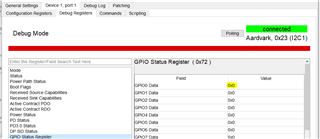
I have used the "Debug" mode in the TPS6598X GUI and I noticed that I never see GPIO0 change states. However, if I connect a USB3 drive I will see GPIO2 change to 0x1, and if I flip the cable I will see GPIO1 change to 0x1. So that seems to be working. However whenever I connect an Alt-mode device to use DP signaling, I never see GPIO0 change. Therefore I think this is an issue with the TPS65987D, and not the TUSB1147.

I have verified that I have the "DisplayPort Capabilities" configurations set and stored into the flash. I have also tried several different USB-C video cables and adapters and different monitors, but the register never changes to indicate that the TPS65987 is correctly detecting a DP mode device. I have also tried to force it into this mode by setting the initial value of GPIO0 to 0x1, but this has no effect either. 

Can you help me troubleshoot my issue? Thanks

  • Hi,

    Thank you for your query, we have received your request. Please give our team some time to look at this and we will provide a response in the next few days.

    Thank you for your patience as we work through a high intake of E2E posts.

    Best,

    USB-C/PD Team

  • Hi Kevin,

    Thanks for reaching out on E2E!

    Can you please share a PD log and your project file with me?

    Thank you,

    Kevin

  • Sorry, what is a PD Log. Is the just saving the output from the "Debug Log" in the GUI?

    For_TI_20240403.pjt

    DebugLog.csv

  • Hi Kevin,

    A PD log is a capture that decodes the CC lines communication between two devices.

    It will tell us if the PD successfully entered DP ALT mode when a connection was established.

    Thank you,

    Kevin

  • I see. Is there a way to capture and save that log through the TPS6598X GUI? Or are you referring to a more sophisticated trace using a PD Analyzer, like described in SLVA844B. I don't have such a device. 

    My assumption was that the device was never entering DP Alt mode because the GPIO0 register never changes from 0x0. 

    I am also getting this popup in Windows when I try to connect a USB-C display device. This is the same pop-up I see if I plugged the same USB-C display into a non-Alt-Mode port. It just doesn't seem that the TPS65987D is correctly identifying the DP device.

  • Hi Kevin,

    You may be able to get a simple log using the debug log function in GUI debug mode. However, we would most likely need a full PD analyzer log to debug the Display Port issue since that would allow us to see the full DP negotiations. I'll let Kevin from our team take back over from here. He may be able to at least confirm your project configuration for DP.

    Best,

    Alex

  • Hi Kevin,

    That is a potential, but without a PD log I wont be able to tell what communication is going on and figure out as to why the PD is not entering DP alt mode. 

    Can you try the following PD project file and see if that changes it? I noticed you had some of the sink assignments for DP set up, but I believe that you are a DP source correct?

    For_TI_20240404.pjt

    Thank you,

    Kevin

  • Kevin, thanks for feedback.

    The project file you sent unfortunately did not work to enable DP Mode. I also noticed that USB3 mode no longer works either. If I revert back to the project file I posted, USB3 mode works again. Was there another setting you changed that may have disabled USB3?

    I do have a couple other follow-ups:

    1. Because I never see the "DP Mode" register change, can you confirm that this does appear to be a negotiation issue between the device and the TPS65987D? I would like to be able to rule out the TUSB1146 and anything else upstream (such as the DP signaling).
    2. Is the negotiation purely a communication issue or could there be something in the HW design that is wrong. For example, CC lines or HPD not connected correctly, boot config wrong, etc.?
    3. Shouldn't I be able to force the TPS65987D into DP mode by setting its default value to 0x1? I did try this, and the value does default to 0x1, but even when plugging a DP device into the USB-C port, I do not get video.
    4. What is the difference between these firmware: f707.10.10 (TPS65987_88_F707_10_10.bin) and f907.14.14 (TPS65987_88_F907_14_14.bin)

    Thanks

  • Hi Kevin,

    Thanks for reporting back to me!

    Because I never see the "DP Mode" register change, can you confirm that this does appear to be a negotiation issue between the device and the TPS65987D? I would like to be able to rule out the TUSB1146 and anything else upstream (such as the DP signaling).

    Yes I  would believe that to be true.

    Is the negotiation purely a communication issue or could there be something in the HW design that is wrong. For example, CC lines or HPD not connected correctly, boot config wrong, etc.?

    Unfortunately without a PD log, I would be unable to tell.

    Shouldn't I be able to force the TPS65987D into DP mode by setting its default value to 0x1? I did try this, and the value does default to 0x1, but even when plugging a DP device into the USB-C port, I do not get video.

    You could force the IO high, but the far end device would also need to negotiate a DP connection as well in order for video to work.

    What is the difference between these firmware: f707.10.10 (TPS65987_88_F707_10_10.bin) and f907.14.14 (TPS65987_88_F907_14_14.bin)

    F707.10.10 is for the TPS65987D, whereas the f907.14.14 is for the TPS65987DK.

    Which device are you using here? Are you using the TPS65987D or TPS65987DK?

    Thank you,

    Kevin

  • Thanks again.

    I'm use a TPS65987D. 

  • Hi Kevin,

    Thanks for the clarification!

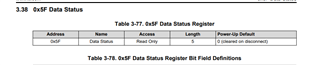
    Can you try taking a snapshot of what the data status register 0x5F reports when you connect with your PD?

    Thank you,

    Kevin Kosta

  • Kevin,

    Sorry for the delay in getting back to you. 

    However, I can't seem to find a way to read 0x5F in the GUI. I don't see it shown anywhere in the Debug Mode or in the Raw View either. Could you help me?

    Thanks

  • Hi Kevin,

    No worries!

    Let me double check and see if this device supports that register in 0x5F.

    I see it in the TRM so I would assume its under the debug registers.

    Thank you,

    Kevin

  • Hi Kevin,

    It does not look as though 5F is supported with this device.

    Can you check the DIP SID Status register? 

    I think we will still need a PD log to debug this if possible.

    Thank you,

    Kevin