This thread has been locked.

If you have a related question, please click the "Ask a related question" button in the top right corner. The newly created question will be automatically linked to this question.

CC1352P: Is the tx power table of CC1352P launchpad in smartrf studio correct?

Part Number: CC1352P

Hi TI,

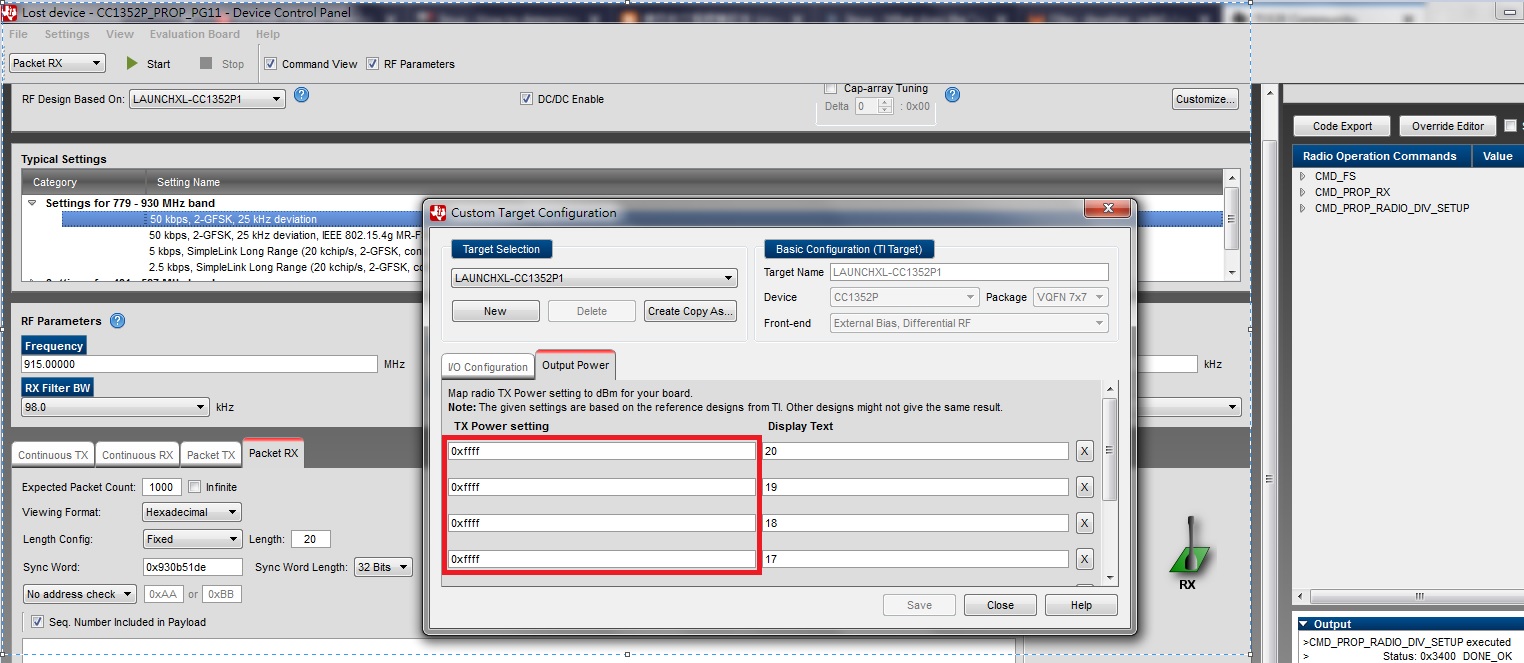
We found the tx power table of CC1352P launchpad strange.

All tx power setting value are 0xFFFF for 20dbm to 14 dbm.

Is this tx power table correct? Why all valuses are the same?

Thanks!

Best regards,

Vince

  • The table is correct. The output power is set with an override. If you are using SmartRF Studio 2.10, you will see that the last entry in the override list (ending with 0x2B) change if you select a different power setting.
  • Hi TER,

    Thanks for your response, but I still have a question.
    We used to do tx power calibration on our module by using this output power table in smartrf.
    We tune the 4 bytes tx power setting value and measure the tx power to find the correct value.
    But for CC1352P1, you mean the output power is set with an override instead of this table.
    How will we do calibration for CC1352P1 on our module?
    Thanks.

    Best regards,
    Vince
  • When you do the calibration today, do you do the calibration by going up or down one value following the PA table or do you do it differently? If the later, please elaborate some.

    You will be able to do adjust the output power for CC1352P1 in the same manner. How SmartRF Studio gives the txpower value will change between version 2.10 and 2.11, the later will come out later this month. In this version the power will be given as TX20_POWER_OVERRIDE(override).
  • Hi TER,

    I install smartrf 2.11 now.

    I can find TX20_POWER_OVERRIDE changed when I select different tx power for CC1352P1.

    But I can't find where can I change the TX20_POWER_OVERRIDE setting.

    Would you please help to explain how to do it?

    Thanks!

    Best reagrds,

    Vince

  • The easiest would be to change the override in your code and not use SmartRF Studio. 

  • Changing the override in our code is inconvenient for calibration.
    Because we need to change the value and build code many times to do calibration.
    So there is no method to change the override in SmartRF Studio?
  • All settings in SmartRF Studio is set in xml files which you can modify. But: The value given sets the IB (bias current for the PA) and in addition the temperature coefficient. How have you planned to derive the values that are not included in SmartRF Studio?