This thread has been locked.

If you have a related question, please click the "Ask a related question" button in the top right corner. The newly created question will be automatically linked to this question.

CCS/TMS320F28069: CCS/TMS320F28069

Part Number: TMS320F28069
Other Parts Discussed in Thread: CONTROLSUITE, C2000WARE

Tool/software: Code Composer Studio

Dear sir,

I am using control STICK- Piccolo F28069 to generate PWM.

I am using CCS version 8.

I am getting various error while starting the CCS.

Can you give me the settings that has to be done while starting with the same.

  • I am getting the error as follows:


    Description Resource Path Location Type
    #1965 cannot open source file "DSP28x_Project.h" main.c /mynew line 77 C/C++ Problem
  • Hitesh,

    It looks like you have a path issue with the CCS "Include Options". Could you please let me know which example project you are trying to build in C2000Ware or controlSUITE?

    Also, in the F2806x Workshops we have a lab exercise for generating PWM waveforms. This will serve as a good reference for learning more about CCS and the device. There are two versions for the F2806x workshop - the one-day workshop which uses the F28069 controlSTICK and the multi-day workshop which uses the Experimenter Kit. The multi-day version provides more details and should be used as a reference. (Note, for generating the PWM waveform, the header pins on the Experimenter Kit can be mapped back to the controlSTICK). Both workshops can be found in the "Archive" section at:

    processors.wiki.ti.com/.../C2000_32-bit_Real-Time_MCU_Training

    In the one-day workshop see lab 3 exercise starting on page 93 for generating the PWM waveform. Also, in the multi-day workshop see lab 5 starting on page 95 (page 5-21) for setting up the header files, and lab 7 starting on page 171 (page 7-45) for generating the PWM waveform.

    I hope this helps. If this answers your question, please click the green "Verified Answer" button. Thanks.

    - Ken
  •  Dear sir,

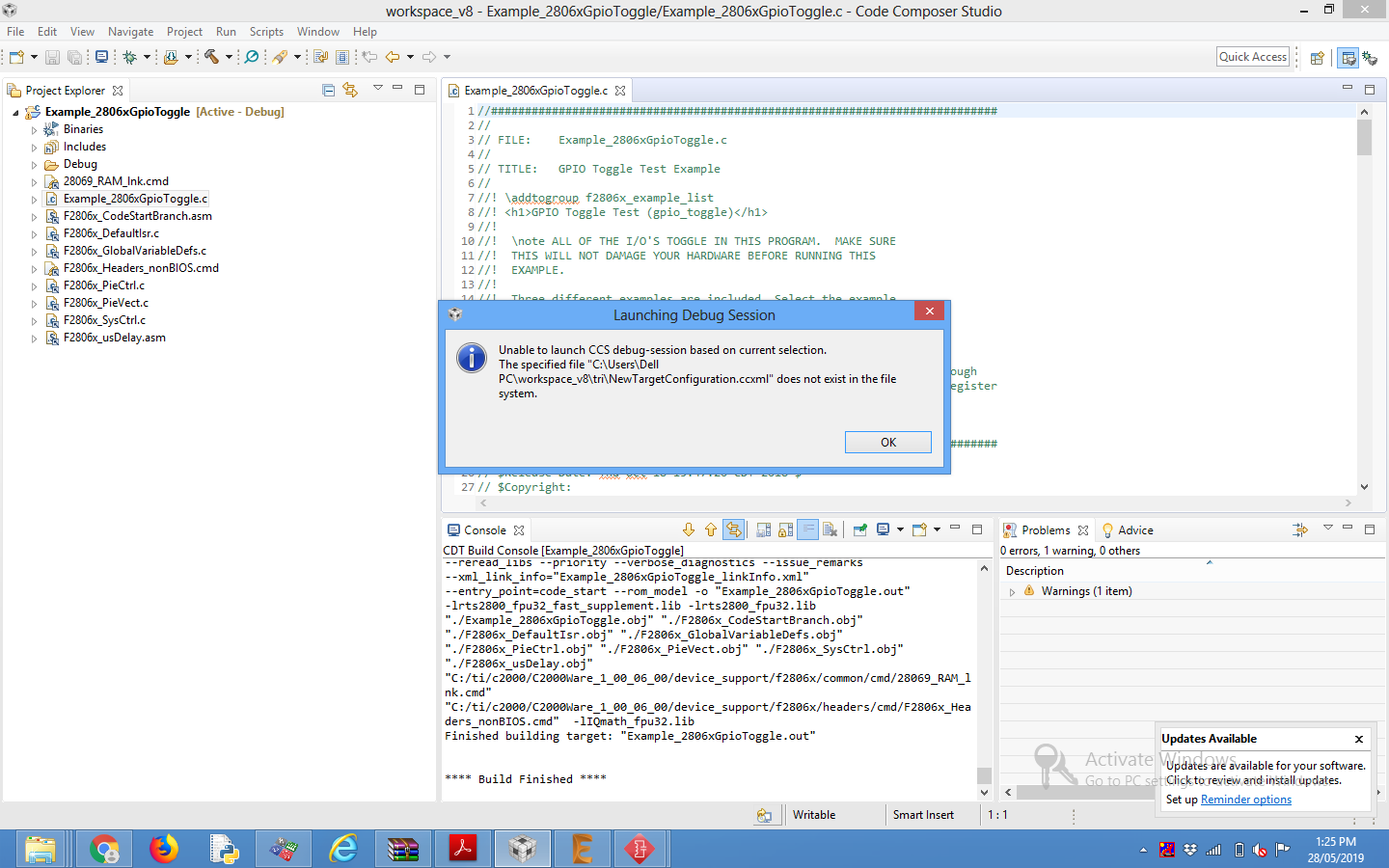
    I am using the example code of gpio toggle.

    I am able to build the code but not able to debug it.

  • Hitesh,

    You need to set up a target configuration. For the controlSTICK:

    Open the emulator target configuration dialog box. On the menu bar click:
    File -> New -> Target Configuration File

    In the file name field type F28069_ctrlSTK.ccxml. This is just a descriptive name since multiple target configuration files can be created. Leave the “Use shared location” box checked and select Finish.

    In the next window that appears, select the emulator using the “Connection” pull-down list and choose “Texas Instruments XDS100v1 USB Emulator”. In the “Board or Device” box type F28069 to filter the options. In the box below, check the box to select “controlSTICK – Piccolo F28069”. Click Save to save the configuration, then close the “F28069_ctrlSTK.ccxml” setup window by clicking the X on the tab.

    To view the target configurations, click:
    View -> Target Configurations

    and click the plus sign (+) to the left of User Defined. Notice that the F28069_ctrlSTK.ccxml file is listed and set as the default. If it is not set as the default, right-click on the .ccxml file and select “Set as Default”. Close the Target Configurations window by clicking the X on the tab.

    I hope this helps. If this answers your question, please click the green "Verified Answer" button. Thanks.

    - Ken
  • Hitesh,

    It's been a while since I have heard from you last. Therefore, I am assuming that my last reply resolve your issue and I will close this thread. If this isn’t the case, please reject this resolution or reply to this thread. If this thread locks, please make a new thread describing the current status of your issue. Thank you.

    - Ken