Other Parts Discussed in Thread: BQSTUDIO, , BQ24770, BQ24773, BQ40Z50EVM-561, BQ40Z50-R2
I've been working through the User's Guide with my bq24770EVM-540. I finally got it to communicate with bqStudio by switching the input USB port on my lab PC to a different port. I still have the following issues.
1.) After applying 19.5V to the input via PS#1, I still don't see the D5 LED (ACOK) lit, even though V(TP7 (ACDET)) = 2.59V
2.) When I measure V(J3(BAT, GND)), I measure 8.9V, but I should be measuring 1V +/-1.1V
All the other default parameters are measuring within correct range.
I am now able to read the Default Parameter Settings by clicking the "Read Register" button in bqStudio. I know correctly get the response “Device ACK OK” and the following readings:
Charge Option 0
EN_LWPWR is checked
WDTMR_ADJ is set at 175 seconds
IDPM_AUTO_DISABLE is unchecked
SYSOVP is unchecked
Audio Frequency Limit is unchecked
Switching Frequency is set at 800kHz
ACOC is set at Disable
LSFET OCP Threshold is set at 290mV
EN_LEARN is unchecked
IADPT Gain is set at 40X
IDCHG Gain is set at 16X
EN_IDPM is checked
CHRG_INHIBIT is unchecked
Charge Option 1
RSNS_RATIO is set at RAC and RSR 1:1
EN_IBAT is unchecked
EN_PMON is unchecked
PMON Gain is set at 1uA/W
CMP_REF is set at 2.3V
CMP_POL is set at Negative Feedback
CMP_DEG is set at 2 us
FORCE_LATCHOFF is unchecked
FORCE_BATFETOFF is unchecked
EN_SHIP_DCHG is unchecked
EN_AUTOWAKEUP is checked
Charge Option 2
EN_EXTLIM is unchecked
IBAT_SEL is set at Charge Current
Charge Current
Charge Current Limit is set at 0 mA
Maximum Charge Voltage
Charge Voltage Limit is set at 13504 mV
Minimum System Voltage
Minimum System Voltage Limit is set at 9216 mV
Input Current
Input Current Limit is set at 3200 mA
Prochot Option 0
ILIM2_VTH is set at 150%
ICRIT_DEG is set at 100 us
In OCP THRESHOLD is set at 200% of ICRIT
VSYS_VTH is set at 6.00 V
EN_PROCHOT_EXT is unchecked
PROCHOT_WIDTH is set at 12 ms
PROCHOT_CLR is set at Idle
INOM_DEG is set at 1 ms
Prochot Option 1
IDCHG_VTH is set at 16384 mA
IDCHG_DEG is set at 100 us
EN_PROCHOT_CMP is unchecked
EN_PROCHOT_ICRIT is checked
EN_PROCHOT_INOM is unchecked
EN_PROCHOT_IDCHG is unchecked
EN_PROCHOT_VSYS is unchecked
EN_PROCHOT_BATPRESZ is unchecked
EN_PROCHOT_ACOKZ is unchecked
Manufacture ID Read Back
Manufacture ID is set to TI
Device ID Read Back
Device ID is set to <blank>
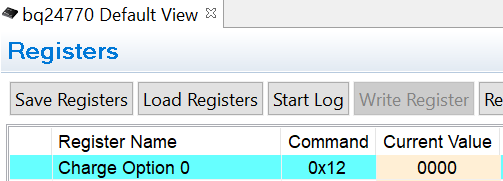
3.) I tried executing the Procedure Step 3.2 “Charge Regulation and System Load Checks.” But I could not execute step 3.2.1: For SMB Mode: type in “810E” into the 0x12 address and click Write. I am not able to "Write" anything. The "Write Register" button is grayed-out in bqStudio and when I go to "Advanced Comm," I arrive at a window labeled "Advanced Comm I2C. There is an I2C Master Control Panel that has "Write" and "Read" buttons. But, am I not using the SMB version of this EVM (bq24770EVM-540)? How do I use bqStudio to get this EVM to charge my battery line up? Right now V_bat is stuck and around 9V and I_batt is zero. I am able to set a system load and vary the load current, but I can't get anything happening with my batteries.
How do I write to my bq24770EVM-540 with bqStudio? Please let me know.
Thanks,
Carl Olen