This thread has been locked.

If you have a related question, please click the "Ask a related question" button in the top right corner. The newly created question will be automatically linked to this question.

IWR1443BOOST: TWS1400/MMWave-Devpack/MMWave Studio SPI fails to connect.

Part Number: IWR1443BOOST
Other Parts Discussed in Thread: UNIFLASH, MMWAVE-STUDIO, IWR1443

Hi,

I've been attempting to get data from my IWR144BOOST board via the TWS1400, and unfortunately MMWave Studio hangs when I press the SPI Connect button

On the IWR1443BOOST board I have:

1. Erased the flash via Uniflash

2. Placed jumpers across SOP0 and SOP1

On the Devpack-MMWAVE:

- JP1, 2, 3, and 4 are set to mux into the FTDI chip (short pins 2/3) and JP5 is set to short pins 1/2.

I am able to communicate with the device, upload the two firmware files from the MMWAVE-Studio RSS and MSS folders.

But when I get to the point to connect SPI the system simply hangs, buttons go grey

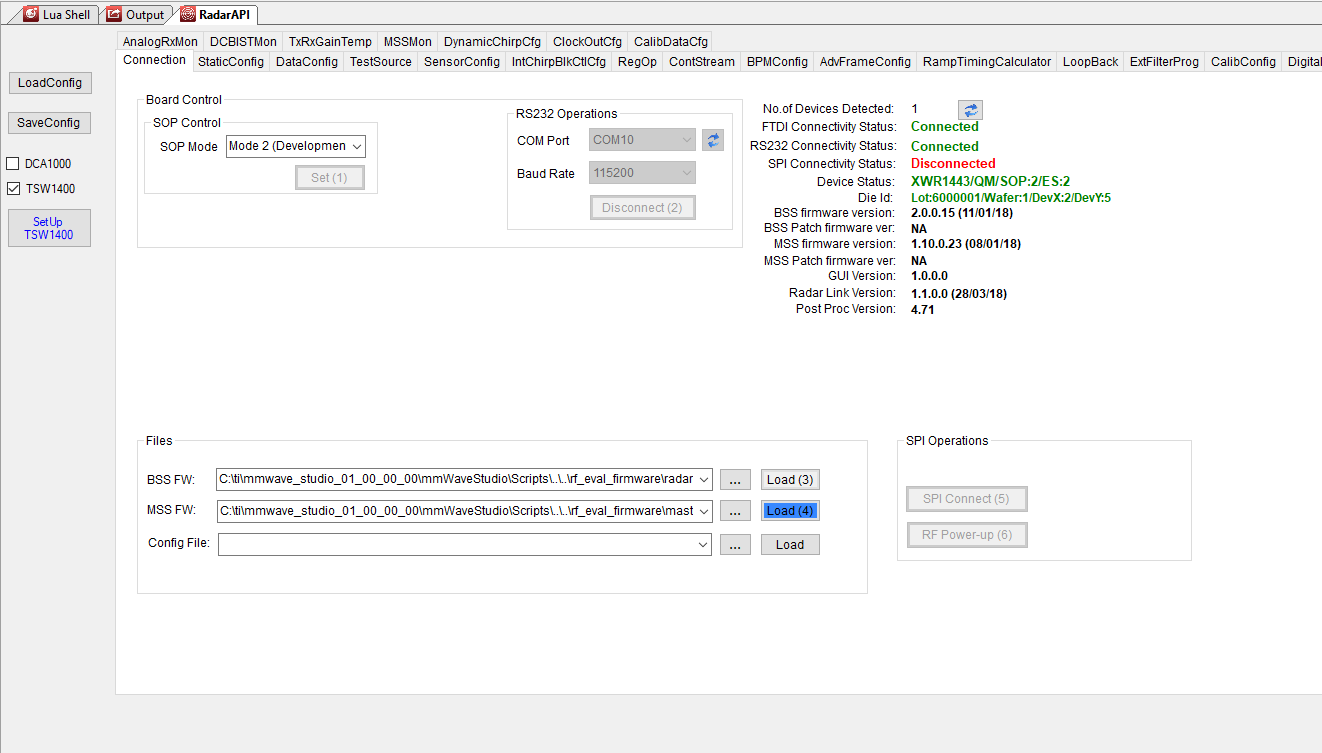
Screen as the DataCaptureDemo hangs:
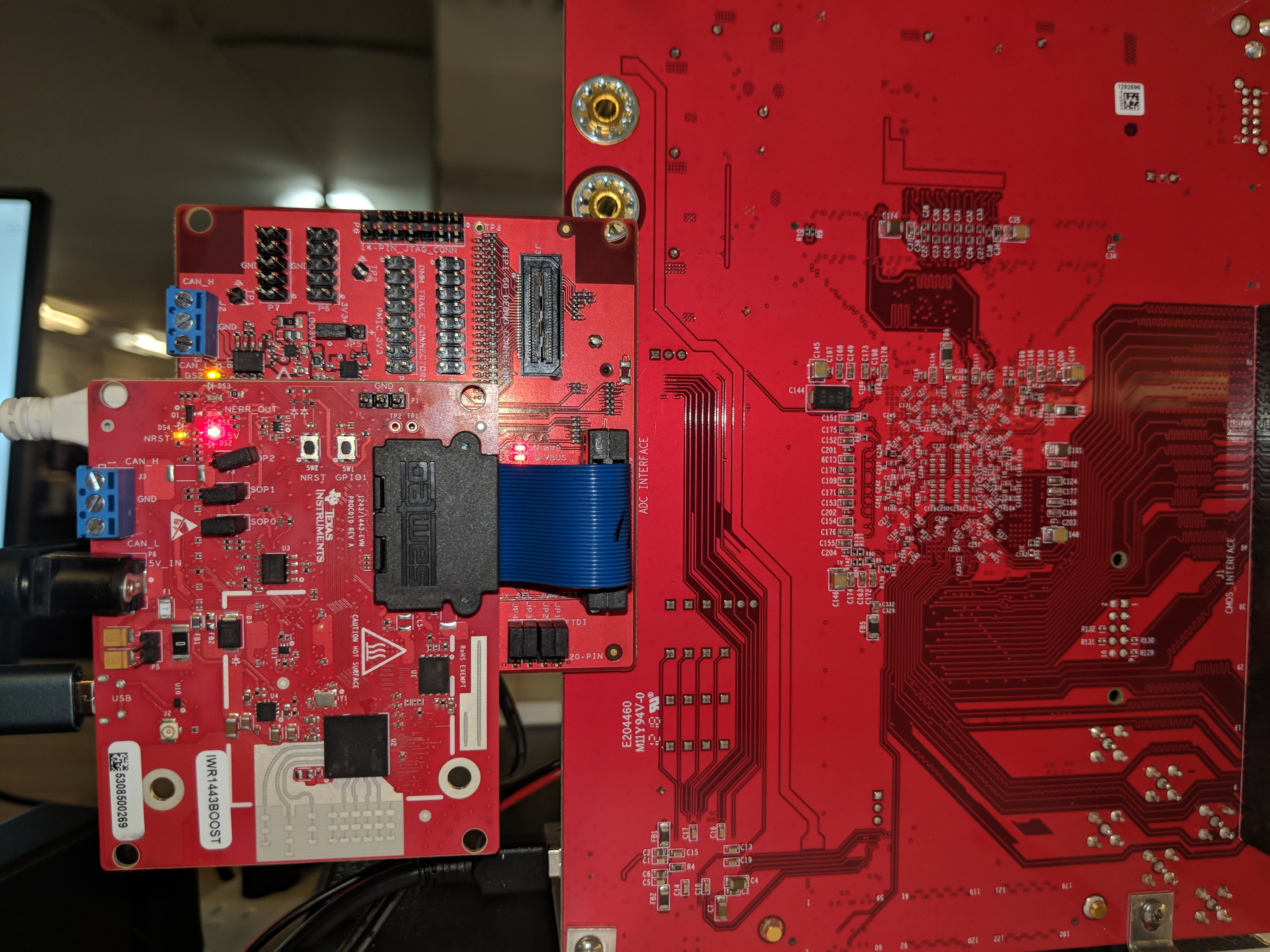
My physical setup:
  • Former Member
    0 Former Member

    Hello Jas,

    There is a training video that details the steps and possible issues to watch for: 

    Have you been able to replicate successfully this training video?

    -Amanda

  • Hi Amanda,
    I've been through the training video as cautiously as I possibly can and make the adjustments that are not detailed in there at the appropriate times (aka placing the SOP1 jumper after erasing the flash memory and before attempting to use mmwave-studio.)

    MMWAVE-Studio waits indefinitely when I hit SPI-connect while following along with the video.

    The only troubleshooting in the PDF related to SPI shows verification of JP5, which as I mentioned in the initial post is across pins 1 and 2, as indicated in the troubleshooting guide.

    Addtional troubleshooting steps with my current situation in case it's helpful to debug:
    1. insufficient power supplies
    - TWS1400 is powered from a 60W lab bench supply and 5.1A
    - EVM is powered from a CUI wall wart rated at 5V-5A
    - DevPack is connected to a powered USB-hub.

    2. Need to use a cable
    - Directly connected, skipping the cable issue.

    3. Matlab initialization issue
    - MMWave studio shows matlab initialized correctly.

    4. SPI not connected after having clicked on the SPI button. (Check JP5)
    - JP5 is placed as is shown in the diagram.

    5+ (All related to getting beyond this point and data output. I haven't made it here.)

    "• For other issues, please use the mmWave e2e forum:"
    Here I am! :)

    Any thoughts on what else might be going on here? It's baffling to me at the moment.
    Points I could probe with an oscilloscope to find potential issues with the boards?
  • Perhaps one other detail that has been concerning me:
    When the MMWAVE-DEVPACK is powered on the nRST light on the EVM dims. Is this normal behavior?
  • Further debugging is showing that
    ar1.PowerOn(1, 1000, 0, 0) appears to be the problematic command.
    Despite having the 1s timeout, the function never returns.

    I have yet to track down where this function is implemented.
    I'm also seeing indications that maybe this is a problem with MMWAVE-Studio and Windows 10?
  • I've now attempted a fresh install with Windows 7 in a VM (which I understand is not well tested anyway) but I do achieve the same outcome, able to flash RSS/MSS connect the COM port and then hang indefinitely with no output messages on the SPI bringup.

    At this point, I'm completely stumped. Suggestions? Call an FAE?
  • Former Member
    0 Former Member in reply to Jas Condley
    Hello Jas,

    The TSW1400 has no bearing on the SPI connection so to simplify the debug process can you do the following:

    1) Remove the boosterpack/devpack from the TSW1400 (keeping the two smaller boards connected).
    2) Connect both USBs and power to booster and dev packs.
    3) Check jumpers - J1-J4 on the devpack should be on FTDI side. On boosterpack SOP0 should be on, SOP1 and 2 are off.
    4) Start up mmwave studio.
    5) Issue Reset, Connect to COM port (UART not Data), Load BSS and MSS FW and then try the SPI Connect button.

    Can you try the above and post the log if there any issues?

    Thanks,
    Amanda
  • Hi Amanda,

    Thanks for the response.

    I am still having trouble with the TSW1400 not in the loop.

    The log is attached, although no debug information is spit out when the "SPI Connect" button is pressed.

    Here are photos of the setup:

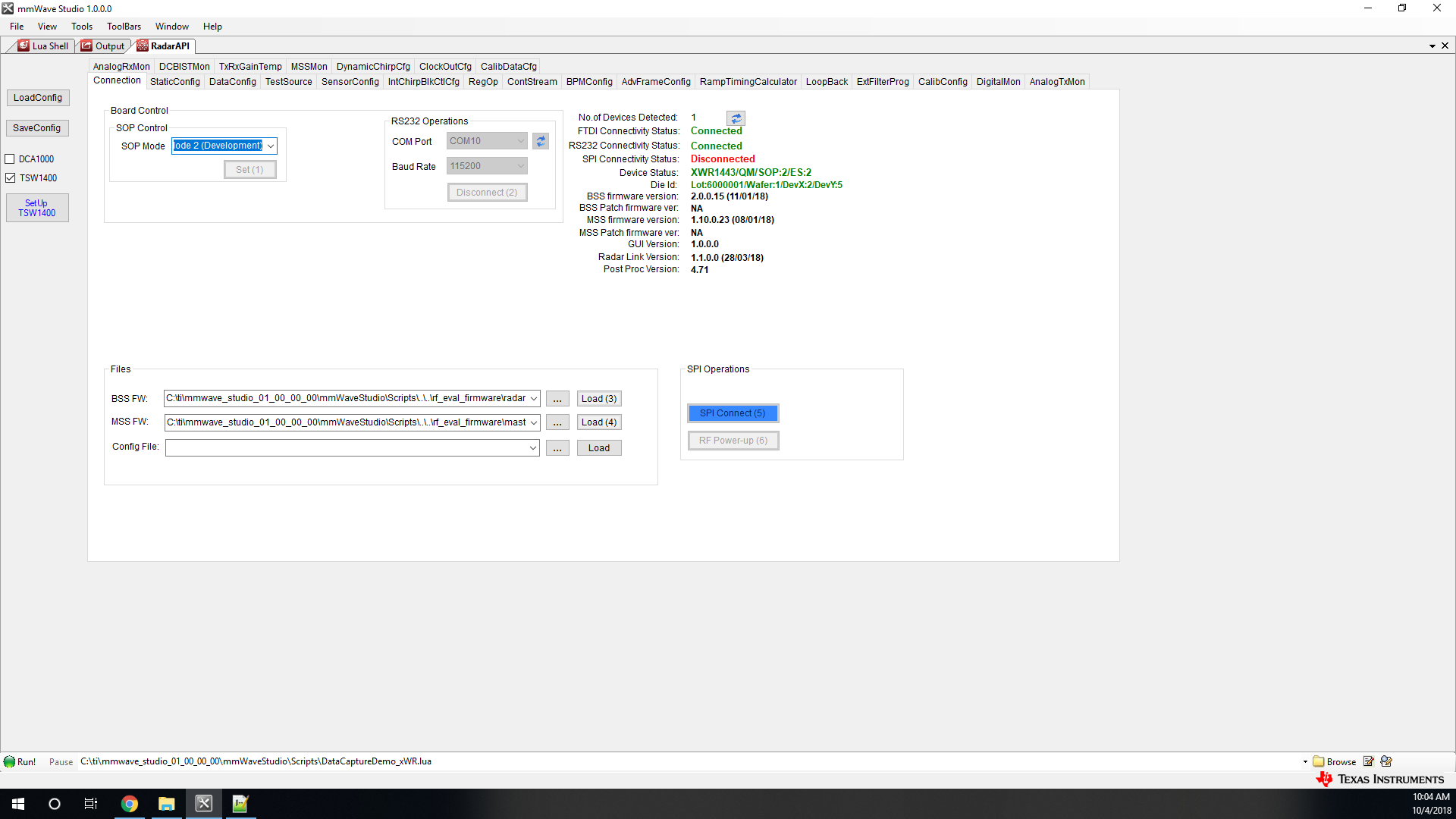
    and finally, a screenshot of MMWAVE-Studio at the point in which it hangs, log file is attached.

    GM: Constructor
    GM: Thu Oct 04 09:59:31 2018
    RSTD.Transmit("/Settings")
    [09:59:31]  
    [09:59:31]  ### Running Startup script: "C:\ti\mmwave_studio_01_00_00_00\mmWaveStudio\Scripts\Startup.lua" ###
    [09:59:31]  RSTD.SetAndTransmit ("/Settings/Scripter/Display DateTime" , "1")
    [09:59:31]  RSTD.SetAndTransmit ("/Settings/Scripter/DateTime Format" , "HH:mm:ss")
    [09:59:31]  Scripter ignored: Attempt to UnBuild() again or before Build.
    [09:59:31]  RSTD.SetVar ("/Settings/Clients/Client 0/Dll" , "C:\\ti\\mmwave_studio_01_00_00_00\\mmWaveStudio\\Clients\\\\LabClient.dll")
    [09:59:31]  RSTD.SetVar ("/Settings/Clients/Client 0/Use" , "TRUE")
    [09:59:31]  RSTD.SetVar ("/Settings/Clients/Client 1/Use" , "FALSE")
    [09:59:31]  RSTD.SetVar ("/Settings/Clients/Client 2/Use" , "FALSE")
    [09:59:31]  RSTD.SetVar ("/Settings/Clients/Client 3/Use" , "FALSE")
    [09:59:31]  RSTD.SetVar ("/Settings/Clients/Client 4/Use" , "FALSE")
    [09:59:31]  RSTD.SetVar ("/Settings/AL Client/AL Dll" , "C:\\ti\\mmwave_studio_01_00_00_00\\mmWaveStudio\\RunTime\\SAL.dll")
    [09:59:31]  RSTD.SetVar ("/Settings/Clients/Client 0/GuiDll" , "")
    [09:59:31]  RSTD.SetVar ("/Settings/AutoUpdate/Enabled" , "TRUE")
    [09:59:31]  RSTD.SetVar ("/Settings/AutoUpdate/Interval" , "1")
    [09:59:31]  RSTD.SetVar ("/Settings/Monitors/UpdateDisplay" , "TRUE")
    [09:59:31]  RSTD.SetVar ("/Settings/Monitors/OneClickStart" , "TRUE")
    [09:59:31]  RSTD.SetVar ("/Settings/Automation/Automation Mode" , "false")
    [09:59:31]  RSTD.Transmit("/")
    [09:59:31]  RSTD.SaveSettings(): Settings saved to "C:\Users\Jas\AppData\Roaming\RSTD\config.xml"
    [09:59:31]  RSTD.Build()
    [09:59:31]  RSTD.SaveSettings(): Settings saved to "C:\Users\Jas\AppData\Roaming\RSTD\config.xml"
    [09:59:31]  RSTD.Transmit("/")
    [09:59:31]  RSTD.AL_Build()
    [09:59:31]  RSTD.AL_LoadXml()
    [09:59:31]  RSTD.Transmit("/")
    [09:59:31]  RSTD.AL_Init()
    [09:59:31]  RSTD.Clients_Build()
    [09:59:31]  GM: Init
    [09:59:31]  GM: Loaded 'C:\ti\mmwave_studio_01_00_00_00\mmWaveStudio\Clients\\LabClient.dll'
    [09:59:31]  GM: 1 Guest (s) init
    [09:59:31]  GM: 1 Module(s) init
    [09:59:31]  GM: 2 Tab   (s) init
    [09:59:31]  RSTD.Client_LoadXml()
    [09:59:32]  [RadarAPI]: Starting Matlab Engine..
    [09:59:34]  [RadarAPI]: Matlab Engine Started!
    [09:59:39]  [RadarAPI]: ar1.LoadSettings('C:\Users\Jas\AppData\Roaming\RSTD\ar1gui.ini')
    [09:59:40]  TESTING = false
    [09:59:40]  
    [09:59:40]  ***Script completed successfully.***
    [09:59:43]  [RadarAPI]: Opening Gpio Control Port()
    [09:59:43]  [RadarAPI]: Status: Passed
    [09:59:44]  [RadarAPI]: Opening Board Control Port()
    [09:59:44]  [RadarAPI]: Status: Passed
    [09:59:45]  [RadarAPI]: ar1.FullReset()
    [09:59:45]  [RadarAPI]: Status: Passed
    [09:59:46]  [RadarAPI]: Closing Board Control Port()
    [09:59:46]  [RadarAPI]: Status: Passed
    [09:59:46]  [RadarAPI]: Closing Gpio Control Port()
    [09:59:46]  [RadarAPI]: Status: Passed
    [09:59:46]  [RadarAPI]: ar1.SOPControl(2)
    [09:59:46]  [RadarAPI]: Status: Passed
    [09:59:47]  [RadarAPI]: ar1.Connect(10,115200,1000)
    [09:59:48]  [RadarAPI]: ar1.Calling_IsConnected()
    [09:59:49]  [RadarAPI]: ar1.SelectChipVersion("XWR1443")
    [09:59:49]  [RadarAPI]: Status: Passed
    [09:59:50]  [RadarAPI]: ar1.SelectChipVersion("XWR1443")
    [09:59:50]  [RadarAPI]: Status: Passed
    [09:59:50]  [RadarAPI]: ar1.SaveSettings('C:\Users\Jas\AppData\Roaming\RSTD\ar1gui.ini')
    [09:59:51]  [RadarAPI]: ar1.DownloadBSSFw("C:\\ti\\mmwave_studio_01_00_00_00\\mmWaveStudio\\Scripts\\..\\..\\rf_eval_firmware\\radarss\\xwr12xx_xwr14xx_radarss_ES2.0.bin")
    [09:59:51]  [RadarAPI]: Downloading BSS ROM Legacy Binary..
    [10:02:17]  [RadarAPI]: ar1.DownloadMSSFw("C:\\ti\\mmwave_studio_01_00_00_00\\mmWaveStudio\\Scripts\\..\\..\\rf_eval_firmware\\masterss\\xwr12xx_xwr14xx_masterss_ES2.0.bin")
    [10:02:17]  [RadarAPI]: Downloading MSS Legacy Binary..
    

  • Former Member
    0 Former Member in reply to Jas Condley

    Hello Jas,

    I have double checked the photos you've attached and do not see anything wrong with your jumper settings either.

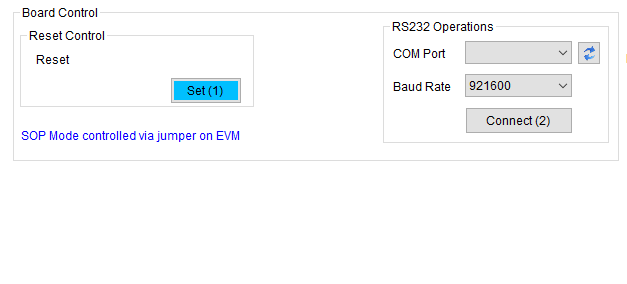
    Can you repeat the same process I described above with devpack+boosterpack only to SPI Connect but this time in mmWave Studio right after it is initialized:  check DCA1000 instead of TSW1400. This should change your GUI window to appear as below: 

    Can you also confirm that the IWR1443 is working as expected when running the Out of Box Demo?

    Thanks,

    Amanda

  • Hi Amanda,

    Unfortunately, no, this did not fix anything.

    I've purchased a DCA1000 and all appears to be working correctly with that device.

    As a consequence I am forced to believe I received either:

    - a defective MMWave-Devpack

    - The software workflow with the TWS1400 has been broken in favor of the DCA1000 (which, at the time I purchased the setup I was having issue with was entirely out of stock across all vendors.) 

  • Former Member
    0 Former Member in reply to Jas Condley

    Hello Jas,

    The issue you are having is not related to the TSW1400 mode for the software. I have replicated the process using same version of mmWave Studio and a devpack and do not have an issue with SPI Connect.

    If you have confirmed that you can operate the DCA1000+1443Boost without issue then this would indicate that the devpack is the problem. 

    Amanda