This thread has been locked.

If you have a related question, please click the "Ask a related question" button in the top right corner. The newly created question will be automatically linked to this question.

SPUSI2/NOPB

Other Parts Discussed in Thread: SPUSI2, LMP92018

Hi,

We purchased SPUSI2/NOPB  from MOUSER, Singapore and having USB Driver Issue . We installed   Sensor Signal Path Control Software &  TinyI2CSPI software and personality files Software and followed  SPUSI2 USB Interface Dongle User Guidelines . Basically once we connect this SPUSI2/NOPB  with USB Cable, USB device does not recognize . It prompts as unknown device .  It looks for USB Driver and please let us know location of USB driver .

Best Regards.

SudhaL

-------------------

  • Hi TI Technical Support Team,

    In addition, I noticed that the Operating System for Evaluation Board recommended to use Window-XP . However, I am using Window-10 . Can I know whether given S/W   Sensor Signal Path Control Software &  TinyI2CSPI software and personality files Software will work in Window-10 and automatically download USB driver . It seems , it is not . Please help to evaluate and advise further .

    Best Regards

    SudhaL

    -------------------

  • Hello User, 

    Thanks for using the TI Forum and I am sorry to hear that this is an issue. The software was designed for Windows XP as a primary OS. 

    We may have other alternative solutions. Can you please help us understand more about the application ? Are you looking to use any of our sensing solutions ? Is there a specific part that you have that you are considering ? 

  • Hi Arjun,
    Thank you for your mail. Application is to measure DC voltages of our products for Testing . We are using LMP92018 Eva board together with SPUSI2/NOPB .
    Installation guidelines also states , need to copy "sensorpath.sys" " sensorpath.inf" . Can I know where can I find these files .
    ======================================
    1.0 SPUSI2 Setup Procedure.


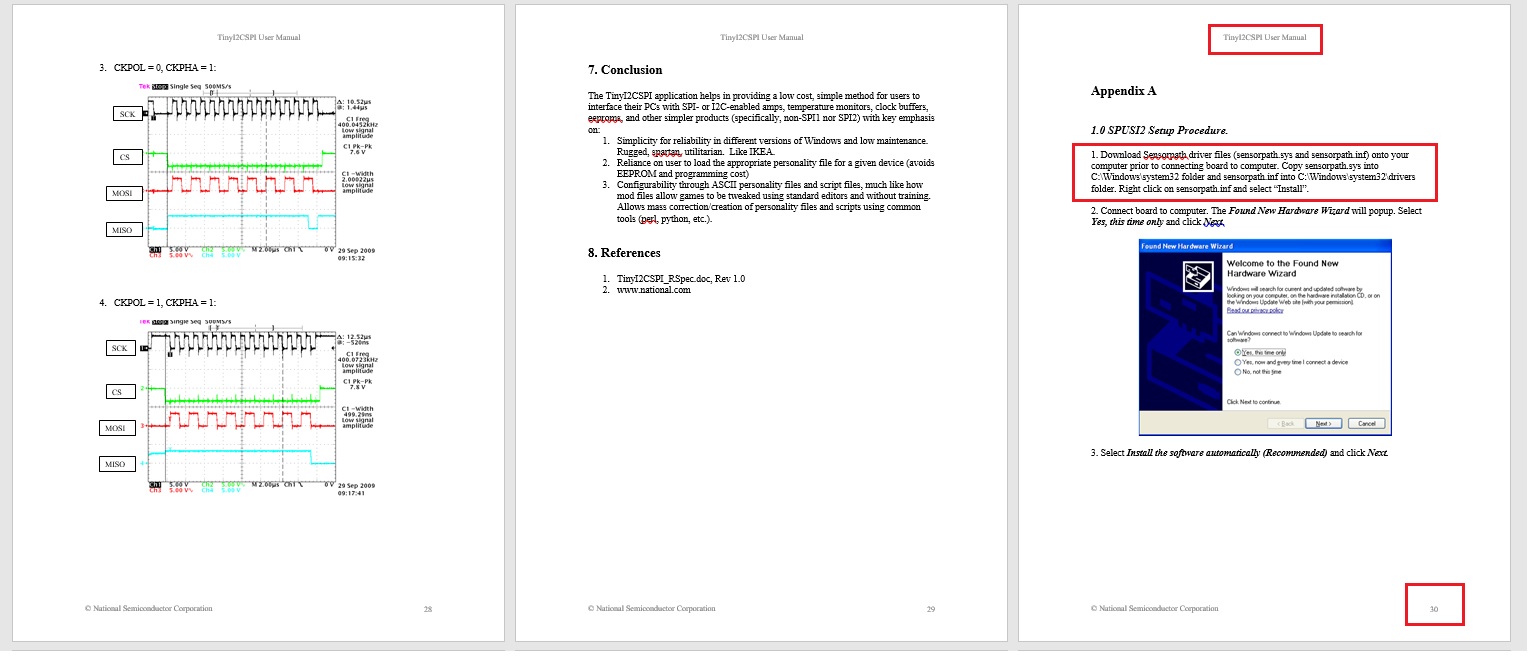
    1. Download Sensorpath driver files (sensorpath.sys and sensorpath.inf) onto your computer prior to connecting board to computer. Copy sensorpath.sys into C:\Windows\system32 folder and sensorpath.inf into C:\Windows\system32\drivers folder. Right click on sensorpath.inf and select “Install”.

    =========================================
    Best Regards.
    SudhaL
    ------------------
  • Hi Arjun,

    Thank you for your mail. Application is to measure DC voltages of our products for Testing . We are using LMP92018 Eva board together with SPUSI2/NOPB .

    Installation guidelines also states , need to copy "sensorpath.sys" " sensorpath.inf" . Can I know where can I find these files .
    ======================================


    1. Download Sensorpath driver files (sensorpath.sys and sensorpath.inf) onto your computer prior to connecting board to computer. Copy sensorpath.sys into C:\Windows\system32 folder and sensorpath.inf into C:\Windows\system32\drivers folder. Right click on sensorpath.inf and select “Install”.


    =========================================

    Best Regards.
    SudhaL
    ------------------

  • Hi SudhaL,

    Thank you for providing more information on the application and also indicating you need help with the LMP92018 parts. Since this is a DAC I am going to assign the thread to our DAC team and they will get you the help you need. 

  • Hi Sudhal,

    I have looked into this, and it is my understanding that the driver is incompatible with Windows 10.  Windows 10 requires that all drivers feature a "digitally signed" certificate, which this driver does not.  

    You will need to run the software using windows XP or possibly windows 7.  

    It should be noted that the EVM hardware requires a simple SPI interface, so any microcontroller should allow you to interact with the registers if you implement the SPI code.  I can assist with the example commands for configuring the device once you have something running.

    Thanks,

    Paul

  • Hi Paul,

    Thanks you for your feedback .

    a) Could you help me to provide Sensorpath driver files such as "sensorpath.sys"  and "sensorpath.inf".  Please refer Page-30 of Doc. "TINYI2CSPI.doc" . This file is located at 

    C:\Program Files (x86)\TinyI2CSPI\dist\doc. I can try with this .

    b) Parallally, could you provide me the example command for configuring the LMP92018 device through Micro-controller . I am using PIC18F46K42  from Micochip.

    Best Regards.

    SudhaL

    ----------------------

  • Hi Sudhaleswar,

    I have not been able to locate the files you are looking for.  The original engineers that created this are no longer with the company.  I recommend you try the software on a Windows 7 PC.

    Thanks,

    Paul

  • Hi Paul,

    Thank you for your feedback. I also tried with Window-7 and having same issue as Window-10 . So, I need to USB drivers files for SPUSI2/NOPB Demo Board. Could you help to provide the location of the USB drivers /provide a link to download @ my end.

    Best Regards

    SudhaL

    ------------------------

  • Hi SudhaL,

    I cannot find these driver files.  I have ordered a SPUSI2 as well so I can try on my side.  As you are trying to evaluate this device, I recommend that you proceed using an external SPI source.

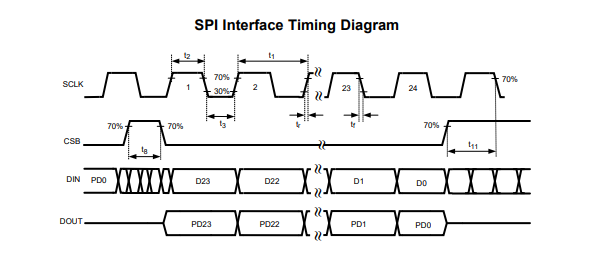
    Your SPI should be configured to comply with the recommended timing table.

    The initialization steps are as follows:

    1. Power on the device blocks via Register 0x3B, writing 0x7F00

    2. Set the ADC gain (2×VREF by default) via register 0x38

    3. Enable the desired ADC channels - Register 0x37

    4. Configure the ADC mode, and trigger the ADC to start conversion - Register 0x36, write value 0x3000 for example.

    5. Enable the temperature sensor by writing the Temp Config register 0x0A, value 0x0008

    6. Set the DAC and read the ADC as desired.

    Thanks,

    Paul

  • Hi Paul,

    Thank you for your feedback . Currently, I am trying to establish a SPI Communication Channel with External Micro-controller but would like to prefer to use SPUSI2 as it is quite convenient and this is the reason why we purchased SPUSI2 from TI. Hope you can provide some support  .

    Thank you .

    Best Regards

    SudhaL

    ----------------------