This thread has been locked.

If you have a related question, please click the "Ask a related question" button in the top right corner. The newly created question will be automatically linked to this question.

How to force CCS4 to always build a file?


Hello All,

In CCS3, there is an option to force a source file to always build regardless of the object file and source file's timestamps.

This added lines in the *.pjt file that states:

["filename.c" Settings: "Config"]
Run=Always

Is there something similar in CCS4?

Thanks!

-Quark

  • Anybody have any clues or hints on how to do this in CCS4?

  • How about adding a pre-build step like "touch myfile.c"?

  • I'm not sure how to do that.  Do you mean go into the [Build Properties]->[Build steps]->[Pre-build step] and enter "touch file.c"?  I tried that but it does not recognize "touch".

    But even if I had a batch file make a small change to the file at every build, I wouldn't want that either.  That would make my version control software think there was a change and record a change every time I perform a "commit".

    Idealy, I would like CCS4 to have the feature CCS3 had where you can always build a file without changing the file and regardless if the file changed.

    Thanks.

  • I figured it out.  It is so simple once you know the answer.  ;-)

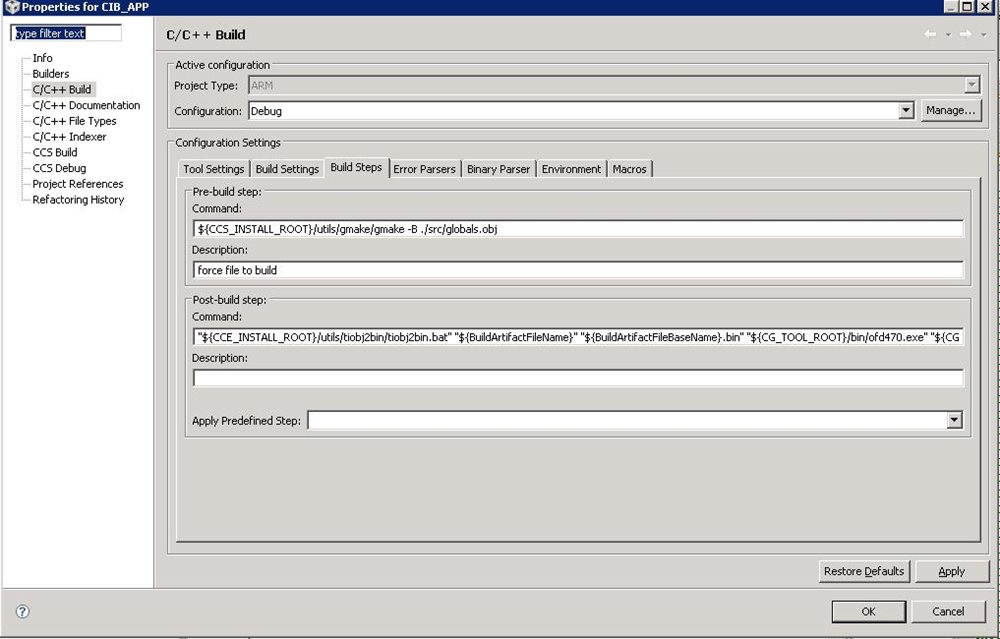
    Under "Build Properties..." select the "Build Steps" tab.  In the Pre-build step Command, type

    ${CCS_INSTALL_ROOT}/utils/gmake/gmake -B ./filename.obj

    with the "filename" being the name of the C file that needs to be always rebuilt .

    I normally have my object files placed in an "Obj" directory, so in my case, I actually have what is shown below.

  • Where can I find more infomation on the syntax of this?  For example, the above Command uses ./ but waht is the starting directory when using ./?  Also, I don't know if I can get the path from a MACRO such as PROJECT_BUILD_DIR or PROJECT_ROOT etc.  I am looking for a way to force a file to compile each time by deleting the obj file.

    Thanks,

    Doug

  • The "." refers to the Debug/Release directory (i.e. the directory corresponding to your current build configuration).  Why don't you do it the way quark did?

  • I did try what quark did and when it didn't work, I wanted to know what syntax is and what it means so I can get it working.

    The file I want to delete is in the path C:\svngcb_proj\Stellaris\CIB_APP\Debug\src and the file is globals.c

    I have tried:${CCS_INSTALL_ROOT}/utils/gmake/gmake -B ./Debug/src/globals.obj

    and ${CCS_INSTALL_ROOT}/utils/gmake/gmake -B ./src/globals.obj

    and ${CCS_INSTALL_ROOT}/utils/gmake/gmake -B ./globals.obj

    With no success yet.

    Doug


  • If you can see a file called Debug/src/globals.obj then the correct syntax is:

    ${CCS_INSTALL_ROOT}/utils/gmake/gmake -B ./src/globals.obj

    Please copy/paste the contents of the build window after you try building with that option.  I just tried it with my local setup and it worked great.

  • I copied the line exactly as you had it and I do not see the file globals compile each time I compile.

    I am using a Stellaris CPU and Code Composer Studio 4.2.1.00004.

    When I manually delete the file globals.c and compile, I see the file compile in the console window.  If I do not delete the file globals.obj I would expect if the pre build step worked correctly, I should see the file globals compile in the console window but I don't.  It appears the target is up to date and it does not compile anything.

    Could it have something to do with the target (Stellaris) and the gmake command?

    Doug

  • Brad Griffis said:
    Please copy/paste the contents of the build window after you try building with that option. 

  • **** Build of configuration Debug for project CIB_APP **** C:\Program Files\Texas Instruments\ccsv4\utils\gmake\gmake -k -q main-build Nothing to build for CIB_APP

  • It's not running the pre-build step.  For example, here's my setup in CCS 5.1:


    And here's the corresponding output:

    **** Build of configuration Debug for project 55x_relocatable_code ****

    C:\ccsv5.1.0m5\ccsv5\utils\gmake\gmake -k pre-build main-build

    echo hi

    hi

    ' '

    gmake: Nothing to be done for `main-build'.

    **** Build Finished ****

    Can you show a screenshot of your pre-build step?  Or try my "echo hi" prebuild step for something a little simpler.

  • Weird...  Well, clearly right now the issue is with getting the pre-build step to even get executed.  Can you try doing my simpler "echo" or use the drop-down "apply predefined step" to see if any of those will do SOMETHING.  I may need to split this into a separate thread.  Since it's already "verified" everyone not subscribed to this thread thinks that it's already resolved.

  • I changed the Command to echo hello and did not see it.  When I click the dropdown in the pre defined step. I see the following only:

    1) Clear All

    2) Clear Flash Image TI - TXT

    3)  Clear Flash Image Intel-Hex

    I do not see "apply predefined step" in the dropdown.  Perhaps thats the problem?

    Doug

  • There appears to be an IDE bug.

    When I tried the same thing but with a Stellaris project, it does not run pre-build steps if object files are current.

    Only when I build a C2000 project does it always run pre-build steps.


  • I just noticed that Brad mentioned he used CCS5 (instead of 4).  Is that bug fixed in version 5?

    Brad, when you did your experiment, did you do it on a Stellaris project or a C2000 project?

  • Quark,

    Thank you for taking time to try a couple things out.  That was a great discovery that the issue seems to be ARM specific.

    My original experiment actually used a c5000 target!  I just tried it with a few ARM targets (Cortex A8 and Cortex M3) but did not see any such issue.

    Doug,

    Perhaps you should install CCS 5.1.0M5 and give it a try:

    http://processors.wiki.ti.com/index.php/Category:Code_Composer_Studio_v5#Downloads

    You should make a copy of your project before importing it to CCS 5.1 since the project will be upgraded to use the latest version of the project manager.

    Personally I like CCS 5.1 way better than CCS 4.2.  It has improved in pretty much every aspect: smarter editor, faster debug, simpler project wizard, better plugin compatibility, etc.

    You can install the 2 side by side and switch back and forth.  That's what I did -- but I haven't gone back to CCS 4 now that I've gotten a taste of CCS 5.1!!!  I don't work on Stellaris processors so I don't know if there are any major issues there.  I imagine it's in pretty good shape by now.

    Brad

  • I could not get the pre-build step to work with CCSv4 etiher but as mentioned by Brad, it works with CCSv5.1.

    Brad and quark,
    It would be great if you could give CCSv5 a try when you get a chance and confirm that this works as expected.

    quark,
    You mentioned being able to get the pre-build step to work with C2000 project but not Stellaris, but I couldn't make it work with either. Which version of CCS are you using? I tested with 4.2.3. I'll go ahead and submit this as an issue against CCS4 to see if it can be fixed in that version.

  • I searched around and found some additional information on this topic. Basically it seems that the version of CDT included with CCSv4 only runs the pre-build step if the main-build step requires to be re-run.  During incremental build, CCS first checks if the main-build should be run, and if yes, only then it invokes the pre-build step followed by the main-build step.  This is the reason it is not running the pre-build step for the scenario discussed here.

    Please see details in SDSCM00038539 which you can get to by going to the SDOWP link in my signature and then trying in this number in the "Find Record ID" field.

    As noted in that report, there is a way to force the pre-build step to run. Create a new file named "makefile.targets" in the root of your project, and add the following line into this new file:
      main-build: pre-build

    This related post also describes this workaround. Hope this helps.

  • I did give 5.1 a try and I see the echo hello and also I can now make it build the file each time.  I have to decide if I really want to upgrade to 5.1 for this one feature. 

  • Doug Baker said:

    I did give 5.1 a try and I see the echo hello and also I can now make it build the file each time.  I have to decide if I really want to upgrade to 5.1 for this one feature. 

    I'm glad to hear you at least have a potential workaround.  Is there a down-side to using CCS 5.1, except perhaps getting used to the few differences like the "Target" menu becoming the "Run" menu?  In any case, that's where CCS is headed...  Switch now or switch later!  Personally I've opted for "now".

  • There are 2 downsided to the switch.

    1) As you say, I have to learn a nw interface.  It took a while to learn the V4 and yes the main things you do from day to day can be figured out quickly, it's the less used features like how to create a new project from nothing and add the lwip stack, USB drivers Safe RTOS etc for a Stellaris platform.  Those menues look much different and I still haven't found some thing I know where they are in V4.  If in the future if need to create a new project, who know what I'll run into.

    2) The other drawback is the Stellaris stuff seems to have been more buggy in the past and I just don't know what may have broke  in 5.0.

    I have projects set up and all working inb version control for version 4.  If I create a new workspace for those projects using version 5, can I have version 4 and 5 co-exist while I gain confidence or will version 5 actually alter the project files?

    Doug

  • Doug Baker said:
    I have projects set up and all working inb version control for version 4.  If I create a new workspace for those projects using version 5, can I have version 4 and 5 co-exist while I gain confidence or will version 5 actually alter the project files?

    When you import a project into CCS 5.x it will upgrade the project for the latest version of the project manager.  The project will no longer be usable by CCS 4.x once you've updated the project in CCS 5.x.  However, since you're under source control it would be easy to revert the project files back to the original version should you choose to go back to CCS 4.x.

    Doug Baker said:
    2) The other drawback is the Stellaris stuff seems to have been more buggy in the past and I just don't know what may have broke  in 5.0.

    If possible it would be great to report specific issues you are encountering on the CCS forum or the Stellaris forum.  I had a couple "false starts" on CCS 5.1 myself where I ran into a show stopper bug, reported on the CCS forum, and then went back to CCS 4 until it was fixed in the next release.  The CCS team has been very responsive in fixing problems.  I know you have other things to do besides beta testing our software, though if you could report the one or two most painful issues that would make a significant difference for everyone (including yourself once it's fixed!).  

    By the way, I thought of a potential workaround for your original issue, i.e. making a file always build in CCS 4.x.  How about doing a post-build step to delete the object file?  That way, every time you do a subsequent build that particular object file will be missing which will force the compile and link.