This thread has been locked.

If you have a related question, please click the "Ask a related question" button in the top right corner. The newly created question will be automatically linked to this question.

CCS v5 How To Use C++

Other Parts Discussed in Thread: MSP430G2211

Hello. I am a Blue Stamp Engineering student in New York City and I am programming using Code Composer Studio v5. I need to make a C++ project but can not find out how to do that. Can you please send me help.

     Thanks,

                    Justin

                                   (BSE is at http://www.bluestampengineering.com/)

  • Hi Justin,

    You can create a standard CCS project and add your C++ source file to it. All the CCS examples/templates are in 'C' so you will have add your own C++ source.

    When using C++ with CCS and TI compiler, I recommend you take a look at:

    http://processors.wiki.ti.com/index.php/Overview_of_C%2B%2B_Support_in_TI_Compilers

    http://processors.wiki.ti.com/index.php/Category:Cplusplus

    Thanks

    ki

  • Thanks for the quick reply!

    I tried that and it did not work. I am getting two syntax errors about the line "interrupt" on lines 304 and 382 in the code I downloaded from a member at DangerousPrototyes.com (http://dangerousprototypes.com/forum/viewtopic.php?f=56&t=2126).   We are using a MSP430G2211 as required by the project.

    This is the source code I was given. 6114.main.cpp

    We added the source code to a CCS template and when we tried to Debug the program we received the following error: "Load Program Error. Encountered a problem  loading file: C:\Users/User\workspace_v5_2\clock\Debug\clock.out      Could not open file at GEL_Load("C:\Users\User\workspace_v5_2\clock\Debug\clock.out")"

    This is a ZIP of the CCS project for your reference. 7457.clock.zip

    Thanks!

    Justin

  • Justin Thompson said:
    I am getting two syntax errors about the line "interrupt" on lines 304 and 382 in the code I downloaded from a member at DangerousPrototyes.com

    The editor parser seems to not recognize the interrupt keyword, hence it is showing an error. But it is not a build error. You can ignore it.

    Justin Thompson said:
    "Load Program Error. Encountered a problem  loading file: C:\Users/User\workspace_v5_2\clock\Debug\clock.out      Could not open file at GEL_Load("C:\Users\User\workspace_v5_2\clock\Debug\clock.out")"

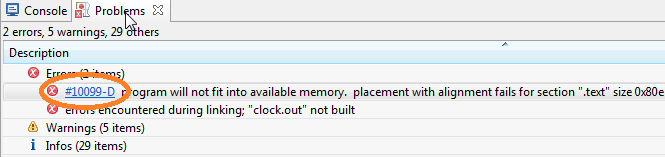
    This is the bigger issue. The debug failed because the build fails. Hence no executable is generated. I get a linker error and I'm sure you get it too:

    program will not fit into available memory.  placement with alignment fails for section ".text" size 0x80e .  Available memory ranges: FLASH        size: 0x7e0        unused: 0x78a        max hole: 0x78a    lnk_msp430g2211.cmd    /clock    line 61    C/C++ Problem

    This has nothing to do with C or C++. It is complaining that your code (.text section) is too big (size 0x80e) to fit in the memory range (FLASH) of which is a max size of 0x7e0, as specified in the linker command file

    You will need to either shrink the size of your code or put it somewhere else.

    Click on the error code link in the problems view to bring up more advice on the error.

    Thanks

    ki