This thread has been locked.

If you have a related question, please click the "Ask a related question" button in the top right corner. The newly created question will be automatically linked to this question.

CCS Debug session entered but useless...

Other Parts Discussed in Thread: UNIFLASH

Hi all,

I face an effect where I have no idea to deal with.

I want to debug my project (with a TMDXDOCKH52C1 connected) and start by pressing the debug icon. Project is loaded in the target without any visible errors. But the process leaves the studio in an all debugging knobs disabled state:
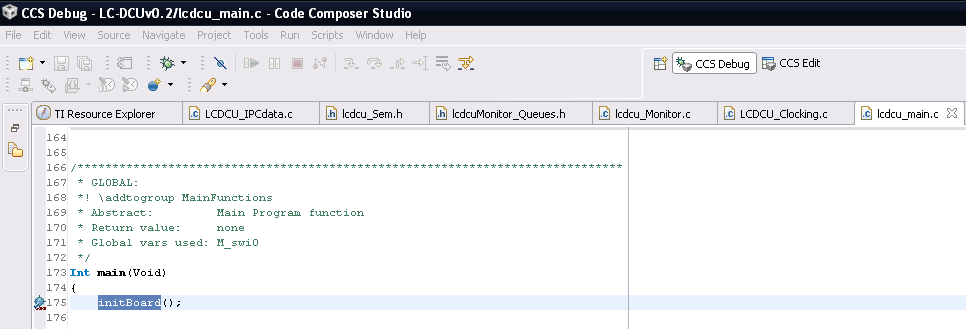
What is wrong?

Kind regards

Tom


  • Hi,

    In short you're not able to debug or as soon as you press the debug button, the code is loaded but you're unable to debug ???

    Regards,

    Gautam

  • Hi,

    code was fully loaded into the target. No errors visible, so the second applies.

    I tried to set the DEBUG option "Halt the target ..." as adviced in another posting. It did not help. But now I have another error too:

    Cortex_M3_0: GEL Output: Memory Map Initialization Complete

    Cortex_M3_0: GEL Output: Watchdog Timers Enabled

    Cortex_M3_0: GEL Output: UARTs Enabled

    Cortex_M3_0: Error writing the PLL values (Flash algorithm timed out). Operation cancelled.

    Cortex_M3_0: Unable to terminate memory download: (Error -1003 @ 0x2BC5) Internal error: Invalid parameter passed to function. Restart the application. If error persists, please report the error. (Emulation package 5.1.73.0)

    Cortex_M3_0: GEL: File: D:\01_Projekte\05_LC-DCU\Workspace_v5_4\LC-DCUv0.2\Debug\LC-DCUv0.2.out: Load failed.

    I set it back to nothing, tried some resets but this error is now permanent - a new issue. I will shut down my PC and see if it remains. Then I've to organize a new hardware?

    Regards Tom.

  • Hi Thomas,

    do you get any console output or connection errors?  It is odd.  What happens exactly when you press the green bug (debug)?

    It seems you are in the debug perspective but not in a debug session. Any further context information might help.

    Best Regards,
    Lisa 

  • Thomas Becker said:

    I want to debug my project (with a TMDXDOCKH52C1 connected) and start by pressing the debug icon. Project is loaded in the target without any visible errors. But the process leaves the studio in an all debugging knobs disabled state:

    This specific issue is likely because you inadvertently closed the Debug view. You can bring it back by going to CCS main menu View->Debug.
    http://processors.wiki.ti.com/index.php/FAQ_-_CCSv4#Q:_My_.27Debug.27_view_is_gone.21_Where_did_it_go.3F

  • Hi all,

    I still did not got any solution.

    I will try the "Debug view" reviving if the other error is solved but there is in 5.4 already a knob "CCS DEBUG". Isn't it the same?

    Currently I have on 2 boards (one of them was totally new) the already posted error messages. To remember:

    Cortex_M3_0: Error writing the PLL values (Flash algorithm timed out). Operation cancelled.

    Cortex_M3_0: Unable to terminate memory download: (Error -1003 @ 0x2BC5) Internal error: Invalid parameter passed to function. Restart the application. If error persists, please report the error. (Emulation package 5.1.73.0)

    Cortex_M3_0: GEL: File: D:\01_Projekte\05_LC-DCU\Workspace_v5_4\LC-DCUv0.2\Debug\LC-DCUv0.2.out: Load failed.

    The error survived a complete reinstall of CCS.

    I've in between found the UNIFLASH hint and will give it a try. Currently I am downloading...

    Regards Tom.

  • Hi Thomas,

    perhaps Aarti can expand once again but I can certainly tell you that selecting "CCS Debug" simply changes the view you have on screen.  It does not  launch a debug session, connect to your board etc etc.  To do that you need the debug button (looks like a green bug) ... basically you need ccs to load code and acutally launch a debug session.

    Best Regards,
    Lisa 

  • Hi Lisa,

    thank you for your message. I started with the green button...

    I did some further investigations with UNIFLASH and CCS. Find attatched the UNIFLASH log. The error still remains.

    I suppose now that it is a workspace based problem. I will try to set up a new workspace and try again.

    Best regards

    Tom


  • Hi all,

    obviously the attatched file of the previous post disappeared. Here is the content:

    After installing UNIFLASH and System Restart:

    [08:39:28] Begin Launching session operation...

    [08:39:37] Cortex_M3_0: GEL Output: Memory Map Initialization Complete

    [08:39:38] Operation Launching session returned.

    [08:39:38] Loaded target configuration from: D:\01_Projekte\05_LC-DCU\Workspace_v5_4\LC-DCUv0.2\targetConfigs\F28M35H52C1.ccxml

    [08:39:39] Settings purged.

    [08:40:13] Cortex_M3_0: GEL Output: Watchdog Timers Enabled

    [08:40:13] Cortex_M3_0: GEL Output: UARTs Enabled

    [08:40:14] Cortex_M3_0: Executing Blank Check...

    [08:40:17] Cortex_M3_0: Operation completed successfully.

    [08:40:47] Cortex_M3_0: GEL Output: Watchdog Timers Enabled

    [08:40:47] Cortex_M3_0: GEL Output: UARTs Enabled

    [08:40:48] Cortex_M3_0: Erasing Flash memory...

    [08:40:58] Cortex_M3_0: Operation completed successfully.

    Erasing After installing UNIFLASH and System Restart is ok.

    [08:43:16] Cortex_M3_0: GEL Output: Watchdog Timers Enabled

    [08:43:16] Cortex_M3_0: GEL Output: UARTs Enabled

    [08:43:17] Start operations on multiple programs on the target core...

    [08:43:17] Loading program: D:\01_Projekte\05_LC-DCU\Workspace_v5_4\LC-DCUv0.2\Debug\LC-DCUv0.2.out

    [08:44:28] Programs operation finished.

    Programming successfully finished.

     [08:44:51] Cortex_M3_0: GEL Output: Watchdog Timers Enabled

    [08:44:51] Cortex_M3_0: GEL Output: UARTs Enabled

    [08:44:51] Start operations on multiple programs on the target core...

    [08:44:51] Verifying program: D:\01_Projekte\05_LC-DCU\Workspace_v5_4\LC-DCUv0.2\Debug\LC-DCUv0.2.out

    [08:45:56] Cortex_M3_0: Program verification successful for D:\01_Projekte\05_LC-DCU\Workspace_v5_4\LC-DCUv0.2\Debug\LC-DCUv0.2.out

    [08:45:56] Programs operation finished.

    Verification successfully finished.

     Try to do Debug with CCS failed as known.

     After this try the UNIFLASH got problems too:

     [08:54:04] FATAL >> IcePick_C_0: Error connecting to the target: (Error -151 @ 0x0) One of the FTDI driver functions used during the connect returned bad status or an error. The cause may one or more of: invalid emulator serial number, blank emulator EEPROM, missing FTDI drivers, faulty USB cable. Use the xds100serial command-line utility in the 'common/uscif' folder to verify the emulator can be located. (Emulation package 5.1.73.0)

    [11:10:25] MultiLoad operation failed: Connect to target failed.


    And later on a successful FLASH erasing:

    [11:10:25] MultiLoad operation failed: Connect to target failed.

    [11:44:14] Cortex_M3_0: GEL Output: Watchdog Timers Enabled

    [11:44:14] Cortex_M3_0: GEL Output: UARTs Enabled

    [11:44:15] Cortex_M3_0: Erasing Flash memory...

    But programming fails again:

    [11:44:26] Cortex_M3_0: Operation completed successfully.

    [11:44:56] Cortex_M3_0: GEL Output: Watchdog Timers Enabled

    [11:44:56] Cortex_M3_0: GEL Output: UARTs Enabled

    [11:44:58] Start operations on multiple programs on the target core...

    [11:44:58] Loading program: D:\01_Projekte\05_LC-DCU\Workspace_v5_4\LC-DCUv0.2\Debug\LC-DCUv0.2.out

    [11:53:17] FATAL >> Cortex_M3_0: Trouble Writing Memory Block at 0x20004b7c on Page 0 of Length 0x4: (Error -382 @ 0x0) An error occurred when deleting a sub-path from the sub-path select list. The sub-path may already be off the list. Thus it cannot be deleted from that list. (Emulation package 5.1.73.0)

    [11:57:23] FATAL >> Cortex_M3_0: Trouble Writing Memory Block at 0x20004928 on Page 0 of Length 0x4: (Error -215 @ 0x0) The semaphore for the test bus controller is in a time-out state. Unified-SCIF was unable to acquire the semaphore used to express ownership of a controller by a utility or debugger. You may have to exit other clients because the timeout occurred. (Emulation package 5.1.73.0)

    [12:05:27] FATAL >> Cortex_M3_0: Trouble Writing Memory Block at 0x20004000 on Page 0 of Length 0x14: (Error -215 @ 0x0) The semaphore for the test bus controller is in a time-out state. Unified-SCIF was unable to acquire the semaphore used to express ownership of a controller by a utility or debugger. You may have to exit other clients because the timeout occurred. (Emulation package 5.1.73.0)

    [12:09:28] FATAL >> Cortex_M3_0: Trouble Writing Memory Block at 0x20004b7c on Page 0 of Length 0x4: (Error -215 @ 0x0) The semaphore for the test bus controller is in a time-out state. Unified-SCIF was unable to acquire the semaphore used to express ownership of a controller by a utility or debugger. You may have to exit other clients because the timeout occurred. (Emulation package 5.1.73.0)

    [12:13:33] FATAL >> Cortex_M3_0: Trouble Writing Memory Block at 0x20004928 on Page 0 of Length 0x4: (Error -215 @ 0x0) The semaphore for the test bus controller is in a time-out state. Unified-SCIF was unable to acquire the semaphore used to express ownership of a controller by a utility or debugger. You may have to exit other clients because the timeout occurred. (Emulation package 5.1.73.0)

    [12:17:38] FATAL >> Cortex_M3_0: Trouble Writing Memory Block at 0x20004b7c on Page 0 of Length 0x4: (Error -215 @ 0x0) The semaphore for the test bus controller is in a time-out state. Unified-SCIF was unable to acquire the semaphore used to express ownership of a controller by a utility or debugger. You may have to exit other clients because the timeout occurred. (Emulation package 5.1.73.0)

    [12:21:44] FATAL >> Cortex_M3_0: Trouble Writing Memory Block at 0x20004928 on Page 0 of Length 0x4: (Error -215 @ 0x0) The semaphore for the test bus controller is in a time-out state. Unified-SCIF was unable to acquire the semaphore used to express ownership of a controller by a utility or debugger. You may have to exit other clients because the timeout occurred. (Emulation package 5.1.73.0)

    [12:25:48] FATAL >> Cortex_M3_0: Trouble Writing Memory Block at 0x20004b7c on Page 0 of Length 0x4: (Error -215 @ 0x0) The semaphore for the test bus controller is in a time-out state. Unified-SCIF was unable to acquire the semaphore used to express ownership of a controller by a utility or debugger. You may have to exit other clients because the timeout occurred. (Emulation package 5.1.73.0)

    [12:29:53] FATAL >> Cortex_M3_0: Trouble Writing Memory Block at 0x20004928 on Page 0 of Length 0x4: (Error -215 @ 0x0) The semaphore for the test bus controller is in a time-out state. Unified-SCIF was unable to acquire the semaphore used to express ownership of a controller by a utility or debugger. You may have to exit other clients because the timeout occurred. (Emulation package 5.1.73.0)

    [12:33:57] FATAL >> Cortex_M3_0: Trouble Writing Memory Block at 0x20004b7c on Page 0 of Length 0x4: (Error -215 @ 0x0) The semaphore for the test bus controller is in a time-out state. Unified-SCIF was unable to acquire the semaphore used to express ownership of a controller by a utility or debugger. You may have to exit other clients because the timeout occurred. (Emulation package 5.1.73.0)

    [12:38:03] FATAL >> Cortex_M3_0: Trouble Writing Memory Block at 0x20004928 on Page 0 of Length 0x4: (Error -215 @ 0x0) The semaphore for the test bus controller is in a time-out state. Unified-SCIF was unable to acquire the semaphore used to express ownership of a controller by a utility or debugger. You may have to exit other clients because the timeout occurred. (Emulation package 5.1.73.0)

     [12:38:12] MultiLoad operation failed: null

     How to proceed?

    If I succeed in loading the program in uniflash: How to convince CCS to start Debugging without loading in the target?

    Best Regards

    Tom

  • Hi all,

    the problem was solved by deleting the projects .launch file.

    Best regards

    Tom

  • Hi Tom,

    great to hear you are past the issue and thanks for the update.  It seems like a file got corrupted.

    All the best with development

    Best regards,
    Lisa 

  • Hi Tom,

    I just wanted to thank you for your post. Deleting .launch files after ControlCard change solved my same problem. It seems it is related the new Eclipse based worskpace, I had same issues (with Eclipse- NXP based products) earlier...

    Great job, Grats and Regards, this should be part of the Troubleshooting too!

    Alex

  • Alex, Thomas,

    I just added this tip to our Troubleshooting guide. Check item 4 of section 4 of the page below:

    processors.wiki.ti.com/.../Troubleshooting_CCSv6

    Regards,
    Rafael